Buildroot Package Users and Permissions: Install Services Without Running as Root
Define the service’s resources before its account
A dedicated account is useful only when it matches the service’s actual access needs. List the files it reads, directories it writes, sockets it creates and devices it opens. Separate immutable configuration from runtime state and persistent data. This makes it possible to grant narrow access instead of running the entire daemon as root because one directory was inconvenient to create.
This guide uses Buildroot 2025.02 package users and permission tables. The example service, edge-log, is fictional and its identifiers are illustrative. The goal is a consistent identity across the image, the startup mechanism and writable storage. It is not a complete sandbox design, and no generated image or target service was executed for this article.
Declare the target identity in the package
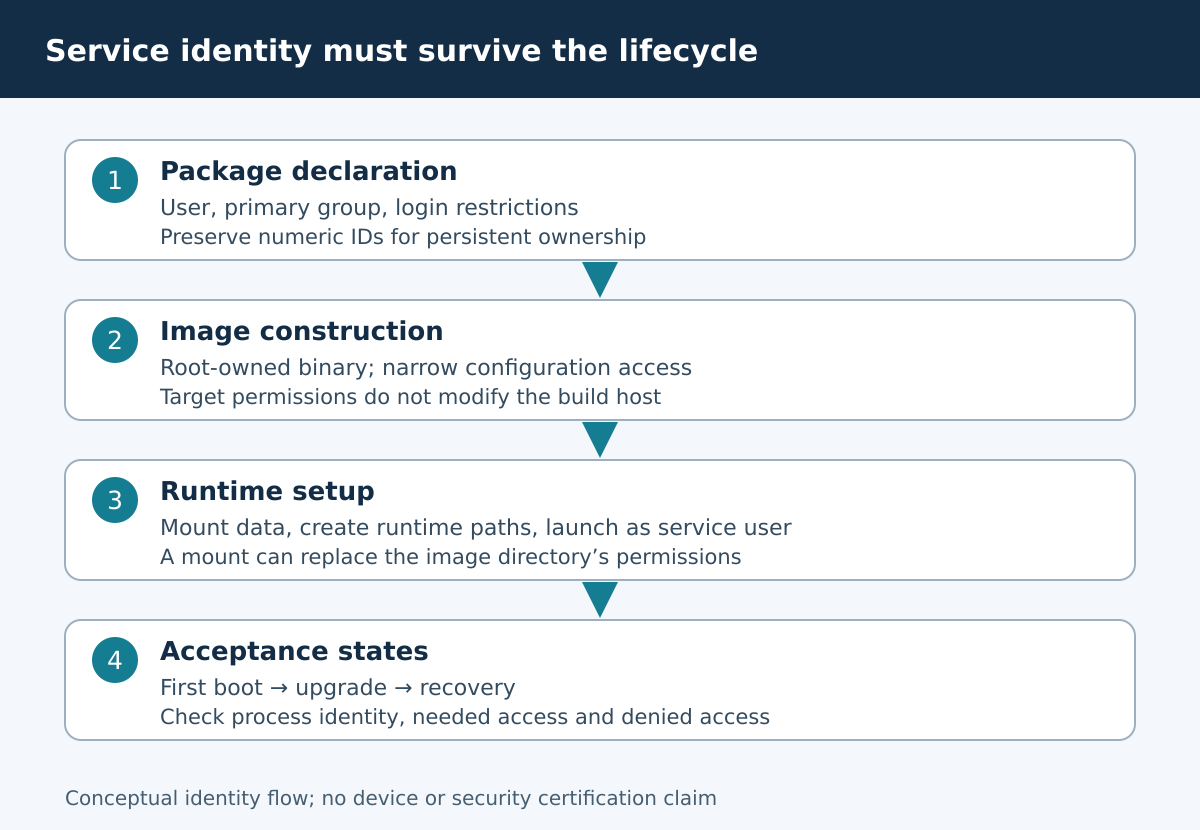
Buildroot provides package USERS definitions for accounts and PERMISSIONS definitions for filesystem ownership and modes. The 2025.02 generic-package reference describes these package hooks. Use them to describe target state; do not run useradd or change the build host’s account database from a package installation command.
define EDGE_LOG_USERS
	edgelog -1 edgelog -1 * - - - Edge log service
endef

define EDGE_LOG_PERMISSIONS
	/usr/bin/edge-log f 755 root root - - - - -
	/etc/edge-log.conf f 640 root edgelog - - - - -
endef
The executable and configuration must already be installed for the regular-file entries. Keeping the binary root-owned prevents the service from replacing its own executable. A group-readable configuration is appropriate only if its contents are intended for that service; separate unrelated secrets rather than adding broad group access.
Understand every users-table field
The fields are username, UID, primary group, GID, password, home, shell, supplementary groups and comment. In this example, -1 asks Buildroot to allocate system identifiers, * disallows password login, and the dash shell field yields /bin/false. These meanings are specific to the Buildroot 2025.02 users-table syntax; copying an /etc/passwd line is not equivalent.
Automatic identifiers simplify initial integration but can change when packages or configurations change. If the daemon owns persistent files, allocate and preserve a product-level numeric UID/GID in a controlled table. Verify uniqueness across all packages. Do not select an arbitrary number from an example and assume it is free. Names are helpful for people; persistent filesystem ownership is ultimately numeric.
Keep image permissions distinct from runtime mounts
A permission entry for a directory in the root image does not set the ownership of a different filesystem mounted over that path. If /data is mounted later, the daemon sees the mounted filesystem’s permissions. Likewise, an empty runtime directory disappears across boot when its filesystem is volatile. Arrange directory creation and ownership after the relevant mount is ready and before the service starts.
The 2025.02 permission-table syntax distinguishes existing regular files, directories and device nodes. Use the narrow entry type required by the design. Avoid recursive ownership changes to broad trees such as /var or /data: another service may own part of the tree, and a later storage layout can make a formerly safe recursion harmful.
The account does not change the process identity automatically
Creating edgelog in the image does not make edge-log run as that user. Inspect the actual service unit or init script and the daemon’s own privilege-drop behavior. A systemd-based product can express its chosen account in the service unit; a BusyBox-based product needs an equivalent supported startup path. Validate the mechanism actually installed in the image instead of assuming both init systems behave identically.
Check the running process’s UID, GID and supplementary groups, then exercise its real I/O path. A daemon may start successfully and fail only when rotating a file or reconnecting to a device. A one-time privileged setup step should finish before steady-state service work, with a clear reason for every retained privilege. Do not solve an ownership problem by enabling setuid on the daemon.
Review device and socket access separately
A static device node declaration only applies to the relevant static device-table flow. On a product using dynamic /dev management, device permissions may be determined by a different rule path. Check the effective node after the driver has created the device, including after reconnect or replacement. Membership in a broad device-access group may expose more hardware than the service needs.
Apply the same reasoning to UNIX-domain sockets and runtime directories. The parent directory can prevent connection even when the socket mode looks permissive. Conversely, making the whole runtime directory world-writable can permit unwanted replacement or interference. Test both the authorized service operation and an unauthorized access attempt using the product’s intended accounts, without printing secret file contents in logs.
Test first boot, upgrade and recovery as distinct states
On first boot, verify that required writable directories exist before launch and that a read-only root filesystem remains compatible with startup. On upgrade, compare the new account’s numeric identifiers with existing data ownership. On recovery, check whether restored files retain old numeric ownership and whether the recovery image uses the same identity contract.
Use a dedicated lab data volume for these tests. Record modes, numeric owners and operation results rather than private contents. An ownership mismatch should produce a specific diagnostic and safe service failure, not an automatic broad chmod. If a migration is necessary, review its exact paths and rollback implications before modifying stored customer data.
Acceptance and limitations
Accept the package when the account exists with the intended login restrictions, immutable files remain protected, startup uses the intended identity, and the service can access only its required resources. Include negative tests for unrelated files and devices, plus lifecycle tests for first boot, upgrade and recovery. Save the identifier allocation policy with the package, not only in a developer’s notes.
These checks reduce accidental root execution and ownership mistakes. They do not establish complete confinement: capabilities, namespaces, service hardening and mandatory access control may add separate requirements. The maintainable handover is an explicit mapping from service operations to identities and resources, with stable ownership where persistent data crosses software releases.