FreeRTOS Run-Time Statistics: Timer Resolution, Overflow and Measurement Overhead
Decide what the percentage is supposed to mean
A task shown at 70 percent CPU is not necessarily executing application instructions for 70 percent of wall time. FreeRTOS run-time statistics accumulate time associated with scheduled tasks using an application-supplied counter. Before interpreting a report, define the observation window, counter frequency, single-core or multicore scope, and whether interrupt time is separately measured. This guide reviews upstream FreeRTOS Kernel V11.1.0 on a single core; it does not prescribe a timer peripheral for every processor.
Keep three quantities separate: elapsed wall time, counter ticks, and per-task accumulated ticks. A counter that stops in deep sleep cannot directly represent wall time across that sleep. A cycle counter whose frequency changes with the CPU clock is not a constant-rate clock unless software compensates. The V11.1.0 configuration definitions expose configGENERATE_RUN_TIME_STATS and configRUN_TIME_COUNTER_TYPE, but correct hardware sampling remains the port or application’s responsibility.
Choose a counter from the required resolution
A fine-grained counter distinguishes short task runs, but reading or maintaining it also has a cost. Prefer a suitable free-running hardware counter over an interrupt that increments software state at an unnecessarily high frequency. Determine whether the counter keeps running during clock changes, debugging halts, and low-power modes. Those properties belong in the measurement record because they change the meaning of the denominator.
For a hypothetical 32-bit counter at 1 MHz, wrap occurs after about 4294.97 seconds, or 71.58 minutes. At 100 MHz it occurs after about 42.95 seconds. These values are arithmetic from 2^32 divided by the counter frequency, not device measurements. Increasing frequency without reconsidering width can turn a reliable short demonstration into an invalid long-running dashboard. A 64-bit software extension must read its high and low portions coherently; simply changing a typedef does not extend a 32-bit peripheral.
Inspect overflow behavior instead of assuming modular subtraction
The V11.1.0 single-core switch-out path compares the current counter against the switch-in value before accumulating their difference. Its source explicitly warns that the statistics do not provide timer-overflow protection. Consequently, do not assume that unsigned wraparound is automatically handled throughout the collection and formatting pipeline. Review the pinned task implementation when selecting a timer width or extending a hardware counter.
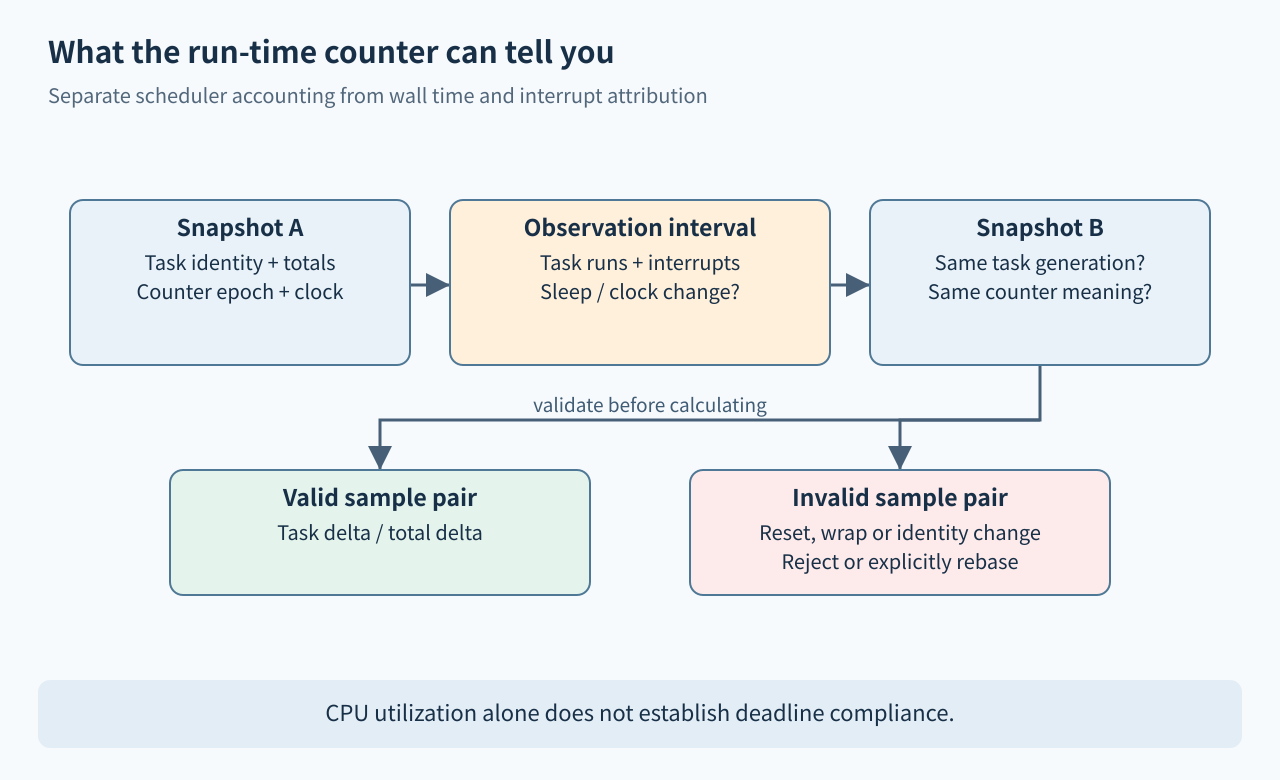
A wider configRUN_TIME_COUNTER_TYPE prevents early overflow of the software accumulation only if the values delivered by the counter hook also have a meaningful wide range. Validate the complete path: hardware read, extension state, hook return type, per-task storage, snapshot output, and presentation arithmetic. Avoid resetting the underlying timer while live task counters retain the previous epoch. An epoch change should invalidate the old sample pair, rather than manufacture a negative or enormous utilization result.
Capture numbers first and format later
uxTaskGetSystemState() provides task-status records and a total counter value. Prepare adequate storage, check the number of records returned, and record the task identities alongside the numeric snapshot. The task API declarations distinguish raw collection from the formatting helpers. A diagnostic printout is not a zero-cost observation: snapshot work, formatting, allocation, and transport can alter the schedule being observed.
Take two snapshots and compute a windowed fraction from the difference in a task’s accumulated counter divided by the difference in total time, with the appropriate arithmetic width. Reject an invalid denominator and samples spanning a known counter reset. Handle tasks created or deleted between snapshots explicitly; matching only by a reused address can join unrelated instances. Keep UART transmission or network upload outside the snapshot’s critical observation path, and report when a task list changed during the interval.
There is also a snapshot-boundary limitation in V11.1.0: the total counter is read live, while a task record copies its stored accumulated value without adding the currently running task’s unfinished interval. Short windows can therefore undercount the collector at a boundary, and task percentages need not sum to exactly 100 percent. Test this with a controlled collector workload, choose a window suitable for the required accuracy, and report the residual discrepancy instead of silently normalizing it away.
Explain interrupt and idle attribution
Basic task run-time accounting measures intervals associated with task scheduling. An interrupt occurring while a task is current can therefore appear within that task’s accounted interval unless the port or an additional tracing mechanism accounts for it separately. A CPU-intensive interrupt storm may make the interrupted task look expensive. Do not diagnose that task’s algorithm from the percentage alone.
Likewise, a low idle percentage can be useful evidence of load, but it does not by itself identify missed deadlines. A high idle percentage can coexist with a short, badly timed burst that violates a control-loop deadline. Pair utilization with the actual requirement: response-time traces, deadline misses, or queue age. For SMP, define whether the denominator represents one core or aggregate core capacity before comparing percentages; this single-core method is not a universal multicore formula.
Calibrate with controlled workloads
Propose a test containing an idle baseline, one task performing a bounded busy phase, and a phase that blocks on a timer or event. Confirm that blocking time does not appear as continuous execution of that task. Add a separate controlled interrupt source and compare task accounting with an independent timing reference. Then repeat with statistics disabled to estimate the observation overhead under the same conditions.
Force a counter boundary in a test build or use a narrow simulated counter to make wrap visible quickly. Exercise clock changes and sleep transitions that the product actually uses. Save raw snapshot pairs with build ID, clock settings, counter frequency, sample interval, and enabled tracing options. A rounded percentage alone cannot establish whether the collector or the workload caused a suspicious result. These exercises are proposed; no board timing measurements were performed here.
Acceptance checklist
- Counter units, frequency, width, sleep behavior and clock-change behavior are documented.
- The entire counter path has a defined overflow and epoch policy.
- Window calculations reject invalid samples and distinguish task instances.
- Collection, formatting and output overhead are measured separately on the target.
- Interrupt attribution and multicore normalization are stated alongside percentages.
- Deadline conclusions use deadline evidence rather than CPU utilization alone.