Reading an RCU Stall Warning: Separate a Stuck CPU, Starved Kernel Thread and Slow Console
An RCU stall warning means required RCU progress is overdue; it does not identify the root cause by itself. Start by separating the CPU that printed the warning from the CPUs or tasks reported as stalled. Then compare repeated observations from the same grace period, inspect scheduler availability, and test whether logging itself contributes to the delay. Increasing the timeout before doing this discards a useful diagnostic boundary.
This guide uses the ordinary RCU CPU-stall fields documented for Linux 6.12. Message details vary with kernel revision, RCU flavor, preemption configuration, and vendor changes. Expedited and task-specific warnings have different layouts. Confirm the exact build and warning family before applying a field interpretation. The investigation below is a proposed procedure; no kernel stall or target benchmark was generated for this article.
1. Make a structured record from the first warning
Preserve one complete warning sequence, its surrounding workload activity, and any subsequent warnings before summarizing it. Record the kernel build, boot parameters, preemption configuration, CPU affinity changes, and diagnostic options. Add the test phase: boot, resume, device removal, traffic burst, or shutdown. A cropped stack ending at the last visible function is an unreliable basis for assigning ownership.
The Linux 6.12 stall-detector guide identifies detected by as the reporting CPU, t as jiffies elapsed since the start of the grace period, g as the grace-period sequence, and q as an estimated total of queued RCU callbacks across all CPUs. Listed CPUs or task IDs identify the reported blockers. A frozen second softirq value across warnings suggests missing RCU-softirq progress. 0 ticks this GP indicates no scheduling-clock ticks for that CPU during the grace period.
Use a record with separate columns for reporter, reported blocker, grace-period identifier, elapsed value, selected counter changes, and recurring stack frames. Preserve raw units. Only convert jiffies to seconds after verifying the relevant kernel tick configuration; do not silently assume a conversion from another board.
2. Compare repetitions before choosing a subsystem
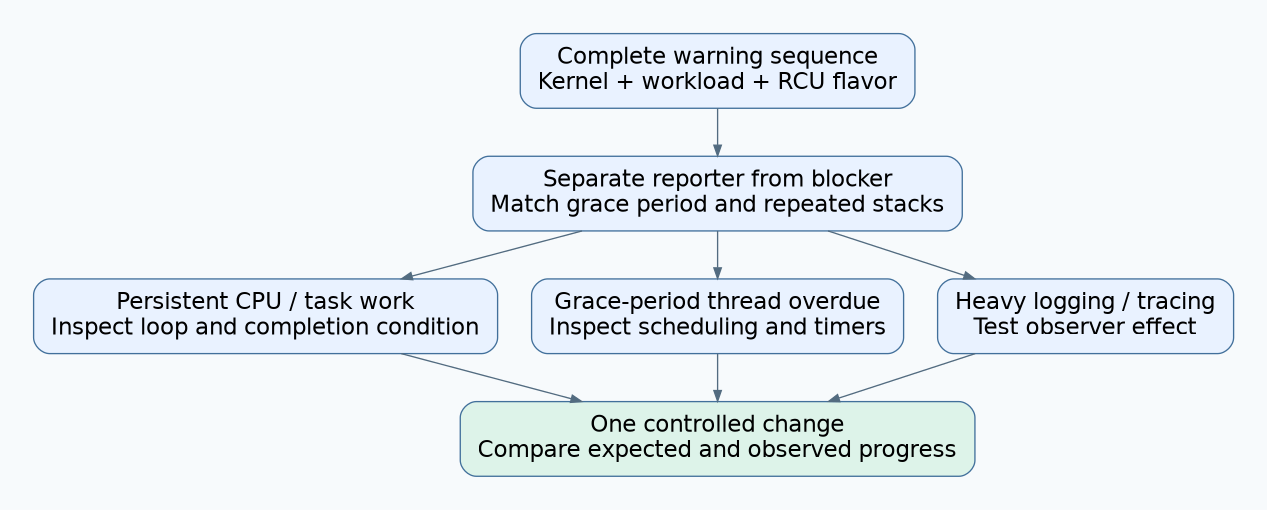
Group observations by warning family and grace-period identity. Align the reported CPU or task across repetitions. Mark stack frames that recur, those that change, and any missing trace. Do not treat a changing top frame as automatic proof of useful forward progress; it may represent repeated work inside the same unproductive path.
The stall-detector guide recommends comparing repeated stacks to identify a persistent region. It also distinguishes All QSes seen with an overdue grace-period thread from a CPU that has not supplied its required progress. Timer-wakeup warnings justify a separate timer hypothesis. Slow consoles, excessive interrupt work, and intrusive tracing are documented potential contributors.
Turn the recurring region into a reviewable question: “Can this polling loop complete under the observed device state?” is more useful than “CPU 1 is broken.” Assign an owner only after locating the work that must finish or yield. If the stacks are incomplete, state that limitation and collect a better bounded reproduction rather than filling gaps from familiarity.
3. Choose one of three investigation branches
| Evidence pattern | Next investigation | What would weaken the hypothesis? |
|---|---|---|
| The same blocker and stack region recur while relevant progress counters remain unchanged | Review the loop, lock ownership, interrupt state, and expected completion condition | A complete trace showing that the suspected path exits while the stall continues elsewhere |
| The warning reports that the grace-period thread has not run | Inspect scheduling opportunities, affinity, runnable competitors, and interrupt activity | Evidence that the thread ran as expected but a separate dependency remained blocked |
| Warnings appear after verbose diagnostics or only with a slow console path | Repeat the workload with bounded logging while retaining a reliable evidence channel | The same stalled work and timing pattern with console pressure removed |
These patterns prioritize experiments; they are not mutually exclusive diagnoses. An interrupt-heavy driver can delay both application work and diagnostic output. A starved thread can coexist with an unusually slow console. Record the expected observation before each change so the next run can disprove the proposal.
4. Investigate scheduling without creating another failure
For a starvation hypothesis, inspect which CPUs the relevant thread may use, what runs there, and whether the scheduling policy leaves it a realistic opportunity to execute. Compare those observations with the workload start and the first loss of progress. Avoid immediately raising a kernel thread’s priority, since that changes competition and may move the product failure elsewhere.
The kernel’s real-time group scheduling documentation explicitly warns that inappropriate real-time period or runtime settings can destabilize a system. It describes budget controls whose meaning depends on configuration. Read the documentation matching the deployed scheduler before interpreting or changing those controls. This article does not prescribe a universal priority, bandwidth value, or CPU-isolation layout.
On a recoverable test device, change one workload property at a time: the suspect task’s affinity, its admitted work, or its burst duration. Preserve the production image for comparison. If the stall disappears, verify that the relevant work still executes and meets its requirement. Accidentally disabling the failing path is not a scheduling fix.
5. Control the observer effect
Build a two-run comparison around the same trigger. In one run, retain the existing logging. In the other, reduce the specific high-volume diagnostic source while keeping the minimal failure record. Compare workload completion, not just visible warning count. If the output mechanism loses messages, a quieter log cannot establish recovery.
For more detail, prefer a narrowly defined trace question to enabling every event. The Linux 6.12 event-tracing documentation describes per-event controls and filtering. Verify that the selected events exist on the actual build and choose a bounded capture window. Record trace loss and buffer limits so a missing event is not confused with an event that never occurred.
For example, ask whether the suspect work item starts and ends, or whether the relevant thread is scheduled during the critical interval. Add only the events required to answer that question. Repeat without tracing afterward to determine whether the original symptom still occurs under the corrected conditions.
6. A hypothetical driver investigation
Suppose a gateway reports a stall during a peripheral disconnect test. Several warnings identify the same CPU and retain the same polling function in their stacks. A developer recently added a diagnostic line on every polling iteration. Two explanations now deserve separate tests: the device-completion condition might never become true, and logging might lengthen each unsuccessful iteration.
First, review the exit condition and the device state expected during disconnect. Then rerun with the verbose line bounded, preserving start, completion, and timeout observations. If the loop remains stuck, console reduction has only reduced an aggravating factor. If the loop completes but still exceeds the product deadline, qualification remains open. Neither result justifies hiding the warning with a larger timeout.
7. Close with progress evidence
The final record should name the delayed activity, the evidence tying it to the symptom, the corrective change, and the workload that now completes. Include repeated trigger cycles, a run with production-like logging, and a test with the original problematic input. Keep a distinct status for unexplained timer behavior or missing stacks.
Adjust a detector threshold only when the product’s expected execution behavior and an explicit diagnostic policy justify it. Document that policy separately from the fix. A resolved stall has an explanation for restored progress; an absent warning alone does not provide one.