Verifying Wi-Fi Transmit Power: Distinguish Requested, Reported and Applied Settings
A stored transmit-power value does not prove that the radio changed output. Trace the setting to an implemented control path, record whether the request was accepted, obtain supported readback and reserve physical-output claims for a suitable measurement. These are separate evidence levels, with different owners and failure modes.
This guide pins NetworkManager 1.50.0 and Linux 6.12 cfg80211/nl80211. It does not prescribe an operating power or provide regulatory approval. The actual deployment jurisdiction, approved antenna configuration, hardware limits and vendor integration conditions determine permitted operation. Keep those constraints fixed; never change country identity, bypass DFS or increase power to evade a restriction.
Reject an inert configuration path first
NetworkManager 1.50.0 documents 802-11-wireless.tx-power as unimplemented and without effect. It was deprecated in 1.44. A profile can therefore contain a power-related property without providing a working radio-control mechanism. Reading that saved property back is configuration persistence evidence, not applied-power evidence. NetworkManager 1.50.0 wireless tx-power property
The tagged source declares the same limitation. Before changing a product UI or writing a retry loop, identify which component is actually expected to control power: a supported driver API, vendor firmware interface or another documented product owner. Do not make several components compete to restore different settings after reconnect. NetworkManager 1.50.0 nm-setting-wireless.c
A useful diagnostic table records the UI value, stored profile value, actual control operation and its response separately. If no implemented operation exists, stop the application-level claim there and escalate the capability gap. An apparently successful save cannot repair a missing implementation.
Preserve mode, units and scope
Linux 6.12 distinguishes automatic selection, a requested limit and a fixed-power request. The numeric parameter uses mBm, while the cfg80211 driver’s get_tx_power callback returns dBm. The nl80211 readback path converts that driver result back to mBm. Mixing request and callback units can create a hundredfold numeric discrepancy without any physical change. Linux 6.12 TX power modes Linux 6.12 set_tx_power/get_tx_power contracts Linux 6.12 request and readback conversion
The official iw guide expresses the conversion as mBm equal to 100 times dBm. As a unit-only example, 7 dBm corresponds to 700 mBm; this is not a recommended or universally permitted operating point. Preserve the requested mode alongside the number. A limit is a ceiling request, not a promise that every transmitted frame uses that value. Linux Wireless iw TX-power interface
Scope matters too. The cfg80211 contract allows a PHY-wide request with a null wireless-device argument. Per-interface control depends on the advertised capability; the pinned nl80211 path passes a null device when that capability is absent. Two interfaces sharing a radio must not be assumed to have independent power controls.
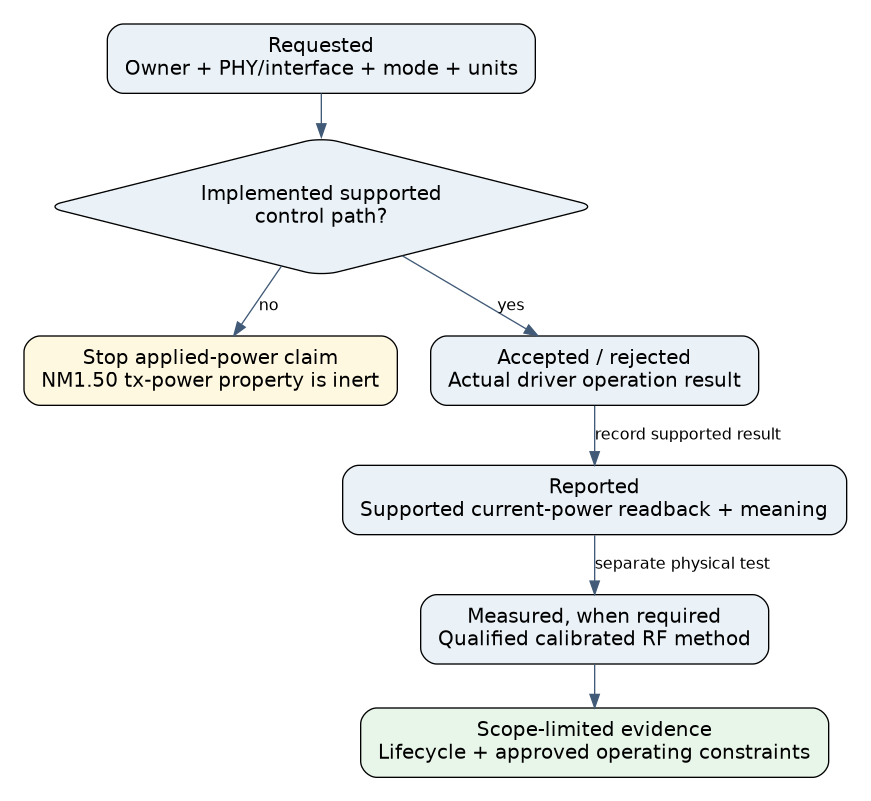
Use an evidence ladder
| Evidence level | What to record | Claim it supports |
|---|---|---|
| Requested | Owner, target PHY/interface, mode, value, units and time | The intended change was specified |
| Accepted or rejected | Actual operation result, including unsupported/error status | The control path accepted or refused the request |
| Reported | Supported driver/firmware readback and its documented meaning | The stack reports this power state at that time |
| Measured | Qualified instrument, fixture, calibration and waveform conditions | Physical output under those stated conditions |
The pinned nl80211 implementation rejects setting power when the driver’s setter is absent. Readback is added only when a getter exists and succeeds. An absent value is not a measured zero, and a request acknowledgement is not a conducted-power measurement. Preserve an unsupported result instead of silently falling back to a saved profile field.
Qualify a supported change safely
- Identify the real hardware and owner. Record board, antenna path, driver, firmware, kernel and manager versions. Resolve interface-to-PHY mapping and any sharing with other active interfaces.
- Establish permitted test conditions. Use the actual deployment jurisdiction and the supplier’s approved configuration. For RF verification, have the qualified lab define the permitted conducted or shielded setup, instrument limits, loading and calibration. Do not connect an RF output directly to an unsuitable instrument.
- Read the baseline without changing it. Capture supported power readback, channel/width, radio state and relevant firmware constraints. Record missing or ambiguous fields explicitly.
- Apply one authorized supported request. Use a preapproved operating point, such as a qualified lower-power comparison within the supported range. Record the exact mode, units, scope and returned status. Keep a supported restoration path available.
- Read back and correlate. Check the actual driver/firmware result after the operation. If unchanged, distinguish rejection, clamping, an inert path and a later policy override using owner-specific evidence.
- Measure only when the claim requires it. Compare equivalent authorized transmit conditions with a calibrated method. Record channel, bandwidth, rate/modulation, chain configuration, duty cycle and measurement type; do not substitute received RSSI from a moving peer.
- Test lifecycle behavior. Repeat readback after reconnect, resume and reboot through the product’s supported workflow. Determine whether the setting is intentionally persistent or must be reapplied by its single owner.
A conducted connector measurement is not automatically radiated EIRP. Antenna gain, losses, installation and the applicable measurement method matter. This guide supplies no jurisdiction-specific limits or compliance verdict; those require the exact product and authoritative local requirements.
Interpret a hypothetical unchanged result
Suppose a test application saves a new NetworkManager tx-power property, reloads the profile and displays the same saved number. The radio’s supported readback is unchanged. For the pinned version, the documented inert property explains why the save is not evidence of a radio command. Repeatedly saving larger values would add no useful information.
The engineering action is to identify a supported control path or state that the product cannot provide the promised control on this platform. If that path exists, qualify it through the evidence ladder without treating a fixed request as permission to exceed device or deployment constraints.
No power setting, network configuration or RF output was changed or measured for this article. Exact interfaces and source behavior were inspected. Release the feature only with truthful UI semantics, an implemented owner, verified units/scope, lifecycle evidence and measurement support appropriate to the claim being made.