Buildroot Git Worktrees: Isolate Experiments and Output Directories
A second Git worktree gives a Buildroot experiment its own source checkout. It does not automatically give that experiment its own compiled packages, configuration, external-tree selection or output images. Safe parallel investigation needs two mappings: which source revision each worktree contains, and which output directory each build invocation owns.
This distinction matters when a maintainer compares an upgrade against a release branch. Separate source paths can look reassuring while a wrapper still points both builds at the same output location. The workflow below is an engineering proposal; it does not describe a measured incident or a completed comparison.
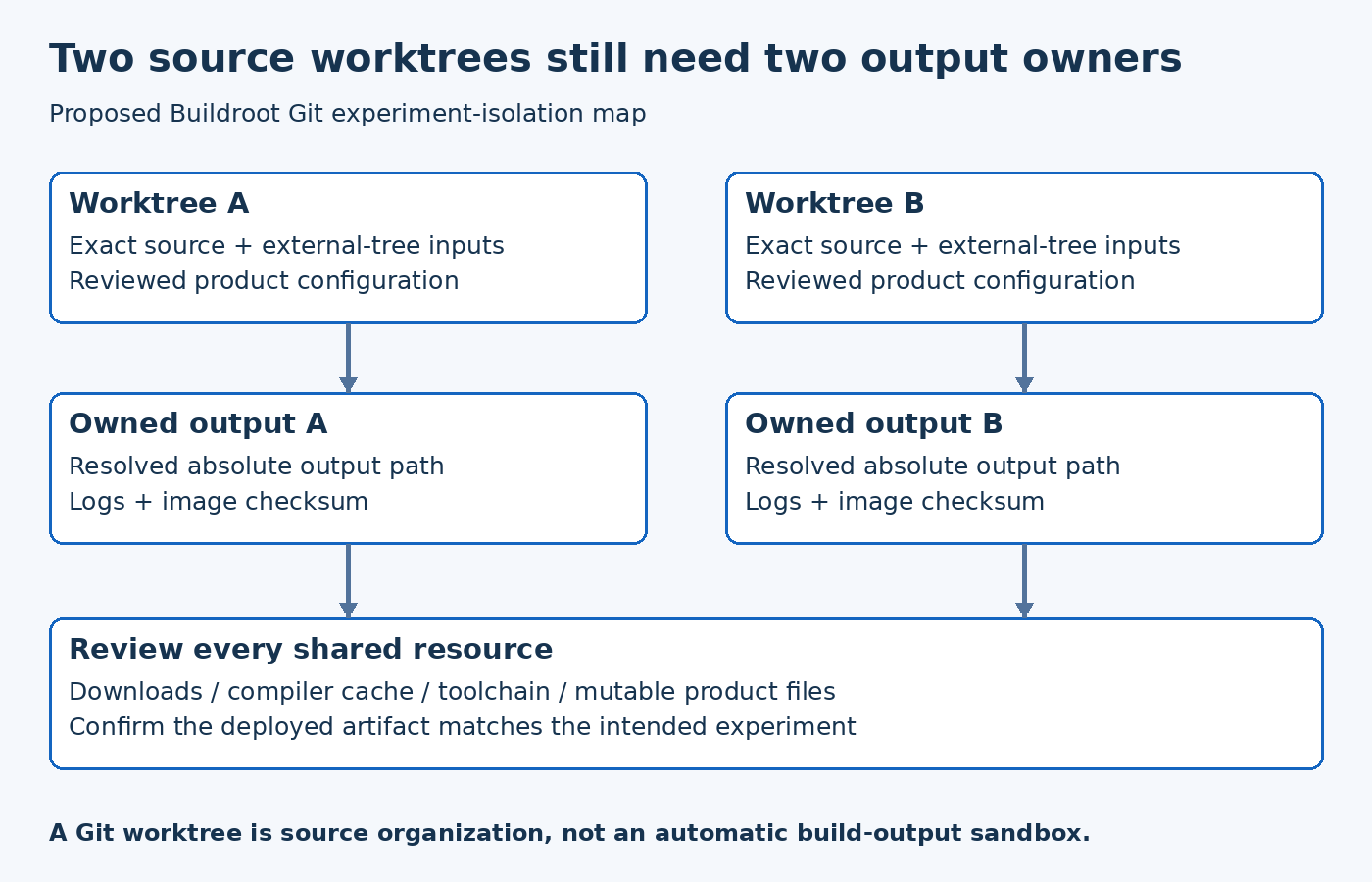
Draw the source-to-output mapping first
Write down one row for each experiment: worktree path, resolved source commit, product configuration, external-tree revision and absolute output path. Make output ownership unambiguous. If two rows resolve to the same output directory, stop and determine whether that is intentional before building.
For example, a hypothetical release comparison can have one source worktree for the accepted base and another for the proposed update. Each gets an independently initialized output directory. Their logs and image records should use distinct attempt identifiers. A source path named candidate does not protect a shared output path named production.
The Git worktree reference explains linked working trees and their relationship to the repository. Some references are shared, while each worktree has its own HEAD. Treat worktrees as a source-management facility, not a security or build sandbox.
Select the revision deliberately
Before creating an experiment, decide whether it needs a new development branch or a detached checkout of an exact revision. The choice should reflect whether changes will be committed and reviewed. Record the resolved commit after creation rather than trusting a directory name or a remembered branch selection.
Use the worktree listing to inspect which paths and revisions are present. Review existing work before cleanup. Avoid force options used merely to silence a warning: a branch or worktree constraint may be telling you that another experiment already owns the state you are trying to change.
A worktree helps keep unrelated edits out of the comparison, but it does not prevent someone from changing shared repository references. Capture the exact experiment identity in the build record so a later branch update cannot rewrite the explanation of an earlier result.
Make the output choice visible in the invocation
The Buildroot 2026.08 Makefile shows how the O setting determines the output base and its build directories. Inspect the actual invocation, including any wrapper or environment that supplies that setting. Prefer an explicit absolute path in an investigation record so reviewers do not have to reconstruct the working directory.
Do not create an experiment from Buildroot’s managed package-download Git cache. The 2026.08 Git download backend explicitly reserves that repository for its own use and warns against using it for development, as a remote or as the source of worktrees. Use a separately maintained source repository.
Do the same for product customization inputs. A separate Buildroot checkout can still consume the same mutable external-tree working directory. If one experiment edits that tree while the other builds, the comparison is no longer controlled. Either use fixed external-tree checkouts for each attempt or use a clearly documented immutable shared revision.
The point is not to duplicate every byte. It is to prevent mutable build products and mutable product inputs from being shared accidentally. Decide which resources are reusable and document the assumption for each.
Separate caches from generated build products
A source-download store and a compiled-output directory have different roles. Reusing retained source downloads can reduce unnecessary network activity. Reusing partially built packages across different configurations can introduce state that belongs to the wrong experiment. Do not use the single word cache to justify both decisions.
For a comparison, keep a small resource table: source downloads, compiler cache, toolchain installation, output tree, test logs and generated image directory. For each entry, state whether it is shared, read-only, versioned or owned by one attempt. If a shared resource is mutable, identify the controls that make that sharing acceptable.
No table proves correctness by itself. It makes the assumptions reviewable. If the comparison produces an unexpected result, the table narrows the investigation to actual shared state instead of forcing the team to guess what the two builds had in common.
Check wrappers for hidden coupling
Review scripts that derive paths from the current directory, a sibling folder or an environment variable. A wrapper copied into a second worktree may still contain an absolute output location from the first. A post-image step may also copy both results to the same convenient filename, obscuring which image was tested.
A useful preflight prints the resolved source path, output path, configuration input and external-tree locations before compilation. Retain that preflight output with the build log. This is a suggested guard, not a claim that Buildroot supplies a complete isolation audit automatically.
Also check the deployment step. Two correctly isolated builds can still be compared incorrectly if the test harness flashes the wrong file. Connect the image checksum to the board test record rather than selecting an artifact solely by its newest modification time.
Retire an experiment without erasing its evidence
Before removing a temporary worktree, preserve the commits or patches that still need review, the configuration evidence and the relevant test results. The Git status documentation provides a way to inspect tracked and untracked changes, but files outside that working tree require their own inventory.
Then use the supported worktree lifecycle under the team's retention policy. Do not assume deleting a source directory also handles every external output, and do not assume an output directory is disposable because its source experiment has ended.
The acceptance question is simple: can you point to one source revision, one controlled input set and one output identity for each comparison result? Worktrees make that organization easier, but the build and deployment mappings must still be designed explicitly.