Qt on Embedded Linux: Match EGLFS to the Application’s Window Model
A Qt HMI works on a desktop with a main OpenGL view and a second top-level diagnostic window. On an embedded Linux image using EGLFS, the first window becomes fullscreen and opening the second can terminate the application. Before changing rendering code or device permissions, check whether the application’s native-window model is supported by that platform plugin.
This discussion pins the Qt 6.8 embedded Linux documentation, including its EGLFS, LinuxFB and KMS display-output sections. It describes documented deployment constraints. No Qt build, GPU capability or running HMI was tested.
Distinguish scene elements from native windows
A status panel, modal overlay or pop-up drawn inside one scene is not automatically a second native platform window. Conversely, creating another top-level OpenGL-based window can ask the platform plugin for an additional native surface even when the new window looks visually small.
Inventory the hypothetical HMI’s top-level objects and rendering paths. Identify which objects belong to the persistent main scene, which are software-rendered widget top-levels, and which create independent OpenGL windows. Do not count every rectangular UI element as a window, or assume every dialog follows the same path.
EGLFS runs on EGL and OpenGL ES without a windowing system such as X11 or Wayland. The application controls rendering and output directly. That environment does not automatically supply the desktop behavior that the same Qt application saw through a window-system plugin.
Preserve the persistent root-window model
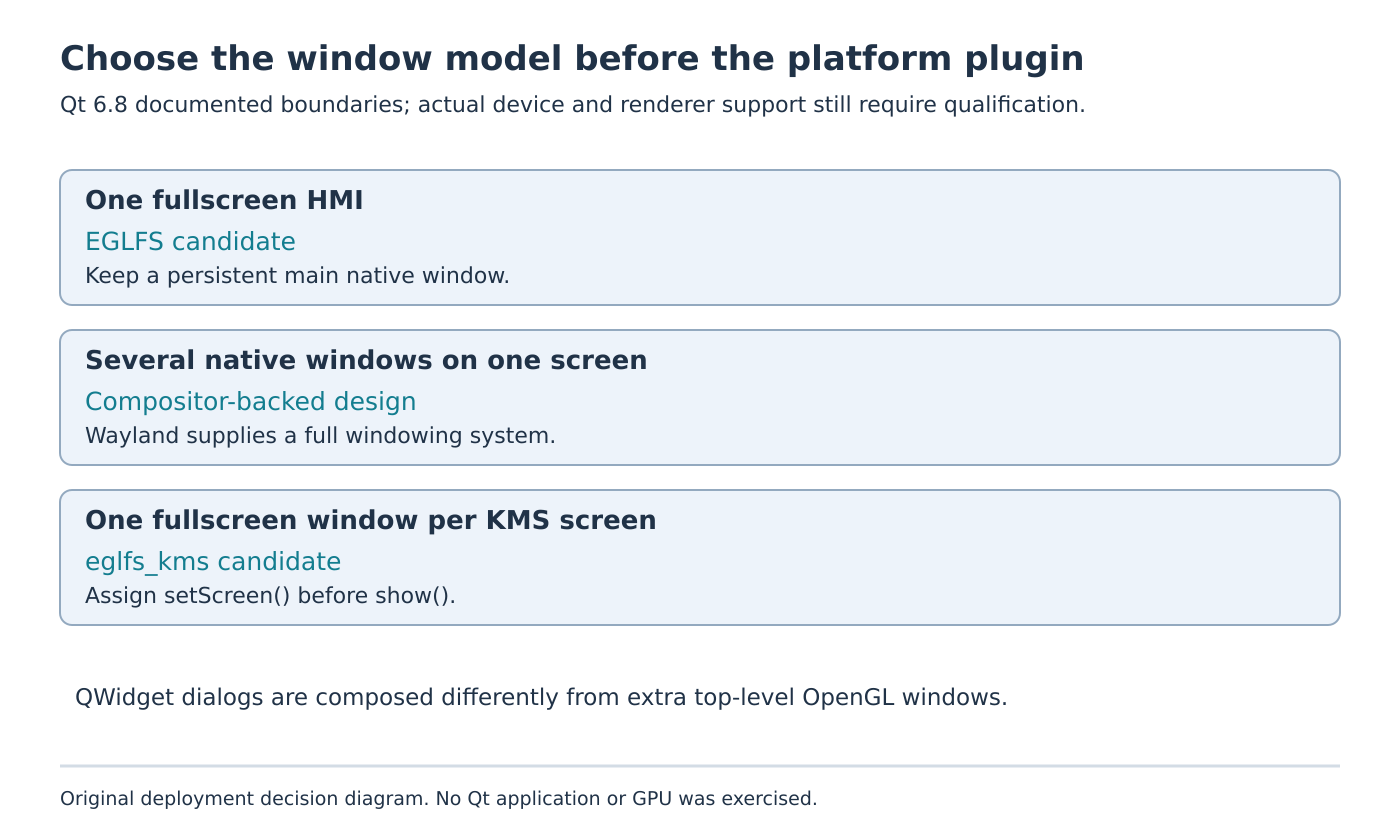
In the documented EGLFS model, the first top-level window is forced fullscreen. For widget applications, it also becomes the root into which other top-level widgets, including dialogs, menus and combo boxes, are composited.
The documentation describes a suitable lifecycle: the main window exists for the application’s lifetime, and other widgets are either not top-levels or are created afterward, once the main window is shown. A temporary startup dialog becoming the first top-level object can therefore be an important architectural detail, not just a cosmetic ordering choice.
Software-rendered QWidget content is drawn into CPU images, uploaded into textures and composited by the plugin. The existence of that support means “EGLFS forbids every dialog” is an incorrect diagnosis. Inspect the actual object and rendering type before deciding whether the design crosses the restriction.
Treat extra OpenGL windows as a different case
The same Qt 6.8 page states a stricter rule for OpenGL-based windows: EGLFS supports a single fullscreen GL window in the documented single-screen arrangement. Opening additional OpenGL windows, or the documented unsupported mixture of such windows with QWidget content, causes Qt to terminate with an error.
For the hypothetical HMI, a second independent top-level GL diagnostics view is therefore a different requirement from a panel composed inside the main scene. If one fullscreen native surface satisfies the product, redesigning that diagnostics view as part of the existing scene may fit the plugin model. Preserve the intended interaction and rendering requirements when evaluating that change.
If the product genuinely needs several independent native windows on one screen, the documented Wayland option supplies a compositor-backed window system. That is a deployment architecture decision, with a compositor and compatible Qt platform support, rather than a flag that makes EGLFS behave like a desktop window manager.
Keep multiscreen EGLFS support in scope
The generic single-window discussion must not become a claim that EGLFS can never display more than one application window across all physical screens. With the eglfs_kms backend, Qt reports the available screens through QGuiApplication::screens() and can target different screens with different windows.
The restriction remains one fullscreen window per screen. The application must call QWindow::setScreen() before QWindow::show(). Changing screens after the window is visible is not supported by the documented path.
A two-panel HMI can therefore have a different valid structure from two independent windows on one panel. Record which screen each window targets before it becomes visible. Do not assume that dragging windows between outputs, overlapping screens or desktop-style placement is part of this direct-display contract.
Do not use LinuxFB as an unexplained GL fallback
LinuxFB supports software-rendered content. The Qt 6.8 guide requires the software scenegraph backend for Qt Quick on this plugin, selected through QT_QUICK_BACKEND=software or the corresponding graphics API selection.
Consequently, changing the platform plugin alone is not proof that an OpenGL-dependent application remains compatible. Review renderer requirements alongside native-window requirements. A backend that displays a simple widget demo may still be unsuitable for the HMI’s actual rendering features.
For a proposed acceptance review, classify one fullscreen scene, a widget dialog, a second same-screen GL window and one fullscreen window per KMS screen separately. Retain object creation order, screen assignment and plugin error output. This focused inventory establishes whether the architecture matches the selected plugin before any target-specific rendering or performance qualification begins.