Rust Embedded Graphics Text Placement: Separate the Baseline Anchor from the Text Block Bounds
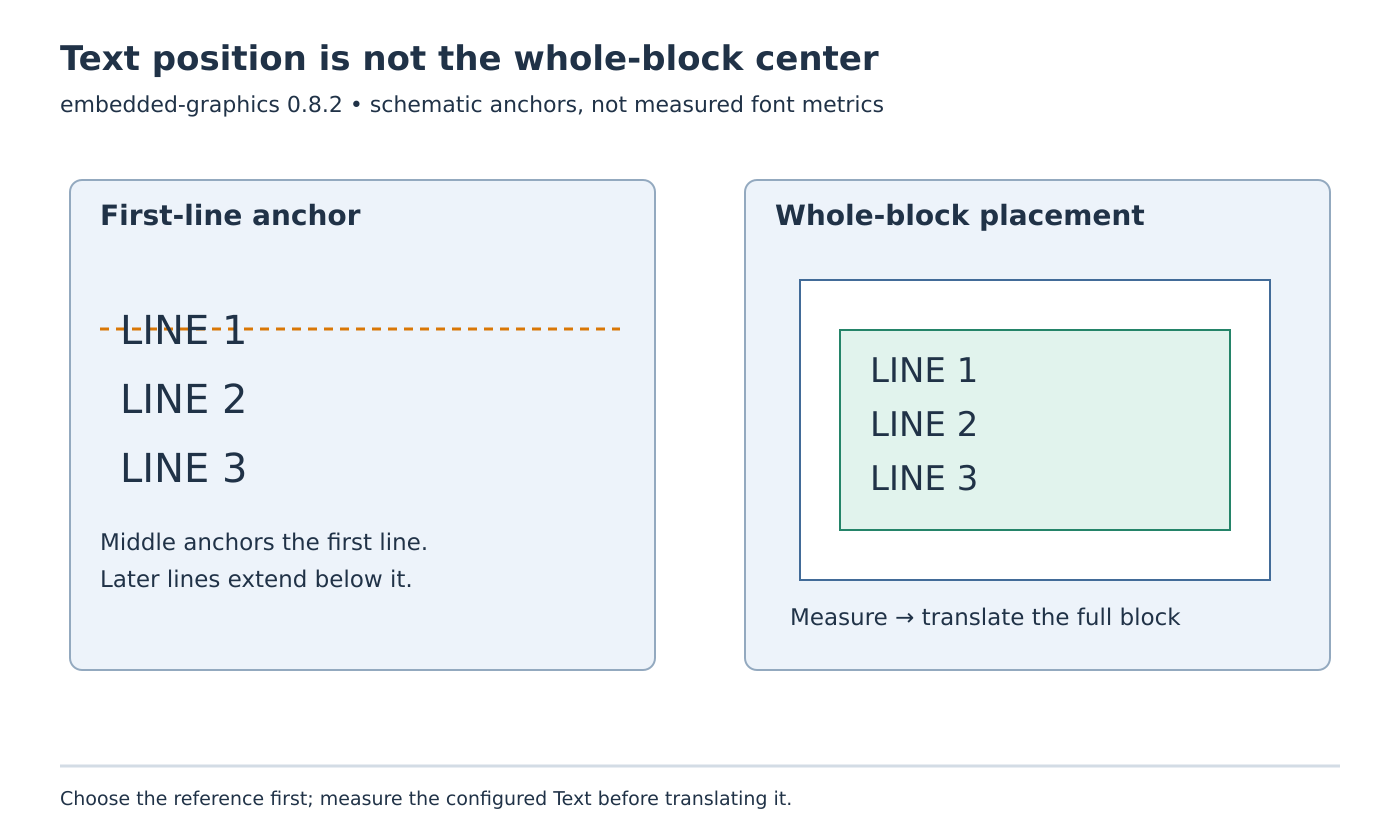
A text position is an anchor, not automatically the upper-left corner of the visible letters. In embedded-graphics 0.8.2, placing an ordinary Text at y = 0 can put most of its first line above the display. Changing that anchor to Baseline::Middle addresses a different positioning choice; it does not center a whole multiline label vertically.
Diagnose the text object’s geometry before adjusting the display driver. This article assumes that the chosen renderer already contains the required glyphs and that pixel coordinates reach the panel correctly. It concerns immediate-mode text placement, with no claim that a Rust executable or physical display was tested.
Decide which object the position should describe
The 0.8.2 text module documentation identifies Alphabetic as the default baseline. Letters without descenders sit on the supplied y coordinate, while descenders extend below it. The other baseline choices use the font’s EM box. An alphabetic baseline at the top edge therefore leaves no room above the anchor for most of the line.
For a label whose first line should begin near the top of a panel, explicitly choose a top-based anchor and leave any required margin. For text that must share a baseline with a neighboring value, keep the alphabetic anchor instead. Adding an unexplained fixed y offset can mask the wrong choice until a font change exposes it again.
Record the intended reference in the layout specification: first-line EM-box top, alphabetic baseline, or entire-block center. These are different contracts. A screenshot with a single short word can conceal the difference because only one arrangement is being exercised.
Measure the multiline block after selecting its style
The baseline setting applies to the first line. Later lines follow the chosen line height. Consequently, a first line centered at the middle of a button leaves subsequent lines extending downward. Treating Baseline::Middle as whole-block centering is the source of the apparent vertical drift.
Construct the final text with its actual string, character style, line height and alignment, then obtain bounding_box() through the Text Dimensions implementation. Use that rectangle for the block placement decision. Re-measure when any of those inputs changes; replacing a two-line message with three lines changes the thing being positioned.
For an illustrative layout calculation, a container begins at y = 12 and has height 60. Suppose the configured text reports a bounding-box top of 4 and height 28. The desired top is 12 + (60 - 28) / 2 = 28, so translate the text down by 24. These numbers are hypothetical geometry, not font metrics measured from a particular renderer.
Choose a deliberate integer rounding convention when the spare height is odd. Also define what happens when the text is taller than the container: reject that layout, use an approved shorter message, or apply an explicit overflow treatment. Centering an oversized block does not make it fit.
Keep the drawing return value out of block sizing
The documented draw result is the next-character position. It is useful when continuing a line with a different character style. It is not the lower-right corner of the entire text block and should not be subtracted from the original anchor to invent a label height.
Keep continuation layout and block layout as separate calculations. If several differently styled fragments form one composite label, determine the composite bounds from the chosen arrangement. Do not assume the last returned insertion point describes every earlier glyph’s extent.
Build a placement regression fixture
Use a small host-side drawing target and compare these proposed cases:
- The same first line at y = 0 with the default and explicit top baselines
- A one-line and three-line label with the same first-line middle anchor
- The same multiline strings translated using their measured block bounds
- A changed line height and a label exceeding the container height
Include letters with descenders, but keep glyph coverage fixed. Record the selected renderer and crate versions alongside the expected bounding rectangles. The fixture should expose which anchor moved and why, rather than merely approving a visually plausible image. Once those checks agree, a remaining panel-edge defect can be investigated at the driver boundary with the text geometry already known.