STM32CubeIDE SWV Trace: Separate Clock Mismatch from SWO Packet Overflow
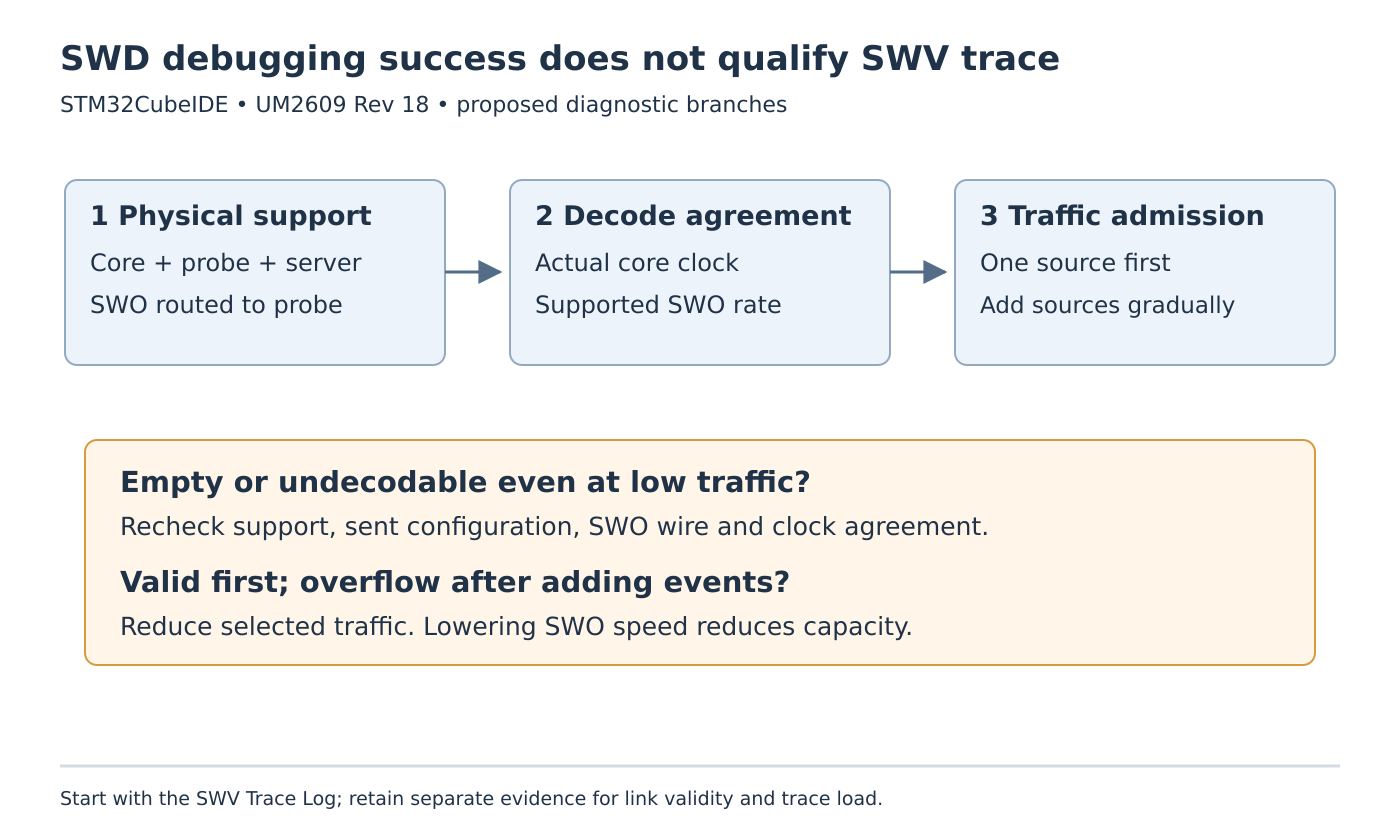
Working breakpoints prove that the debug connection can control the processor. They do not prove that the separate SWO trace path is connected, decoded at the right rate, or capable of carrying the selected events. In STM32CubeIDE, diagnose an empty SWV stream differently from a stream that becomes unreliable as more trace sources are enabled.
The workflow below uses the Eclipse-based STM32CubeIDE guide, UM2609 Rev 18, June 2026. It proposes a staged trace setup, not a measured capture or a claim of lossless, zero-intrusion observation.
Check the third wire before the trace views
UM2609 sections 3.2.1–3.2.2 distinguishes the two-wire SWD debug interface from SWV using the additional SWO signal. Verify that the chosen processor supports SWV/ITM, that the board routes SWO to the probe, and that both the probe and selected GDB server support the feature. Cortex-M0 and Cortex-M0+ devices do not provide SWV/ITM.
Make this a physical connection check. A header can expose SWD clock and data while omitting SWO, or a board jumper can leave the trace route disconnected. Successful single-stepping does not eliminate either possibility. Review the exact board and probe configuration rather than increasing a trace buffer in response to a missing wire.
Match the decoder to the application’s clock
Open the debug configuration, select SWD, enable SWV and enter the core frequency used by the application. Inspect the value after application clock initialization. SystemCoreClock is useful only if the software maintains it correctly; the variable is not an independent measurement of the silicon’s operating frequency.
The guide describes calling SystemCoreClockUpdate() when necessary, rebuilding, and checking the updated variable in a fresh debug session. Confirm the underlying oscillator assumptions as well. Updating a variable using an incorrect configured source frequency cannot validate the board clock.
Keep the core-clock setting separate from the SWO clock. CubeIDE selects an SWO rate according to the probe and core clock, with a limit available when the hardware cannot handle the selected rate. A lower SWO limit may address link-rate capability. It also leaves less serial capacity for trace traffic, so it is not a remedy for excessive event production.
Establish one readable trace source
Use the SWV Trace Log as the first observation point. Begin with one deliberately selected source, such as infrequent PC sampling, rather than enabling every event class and a verbose ITM console together. The question at this stage is whether recognizable packets arrive through the configured link.
Apply the trace configuration while the target is paused, use Start/Stop Trace to send it, and then resume execution. The guide notes that configuration must be resent if target trace registers are reset. A restarted application with stale trace setup can therefore produce silence even after an earlier session worked.
For a record of an empty session, preserve whether configuration was sent, whether the target ran, the expected source activity, and the wire/clock configuration. An idle event source and an undecodable serial stream can both look empty in a higher-level view; they call for different next checks.
Add traffic while watching the packet stream
Once the minimal stream works, add only the information required for the investigation. PC sampling, exception tracing, data comparators, timestamps and ITM text all contribute traffic. A fast sampling interval or frequent text output can exhaust the single-wire path even while ordinary debugging remains healthy.
The guide associates overflow with more selected trace data than SWO can process and recommends reducing the traced amount. Increase the cycles per PC sample, narrow data tracing, or reduce unnecessary ITM output before treating a faster transport setting as the only solution. Keep timestamps when a timeline is required; changing their prescaler is described as a later overflow-reduction measure.
Preserve the two failure diagnoses
A useful acceptance exercise has two stages. First, qualify a low-traffic stream with verified wiring and matching clocks. Second, add each required trace source individually and inspect overflow or corruption indicators under the intended workload. Neither stage was run for this article.
If packets are valid until a trace class is added, investigate its event rate and required detail. If the stream fails even with minimal traffic, return to support, configuration, wiring and decode-clock checks. Keeping those branches separate prevents an apparent debugger success from hiding a broken trace link, and prevents a clock adjustment from concealing an overloaded one.