U-Boot Bootflow Arguments: A Bare Flag, an Empty Value and a Deleted Parameter Differ
When adjusting a selected bootflow in U-Boot v2025.01, clearing a
command-line parameter does not remove it. Setting it without a value
produces a third representation: a bare flag without an equals sign. A
script that treats all three operations as equivalent can leave a
parameter present when it intended to restore the operating system’s
default.
The distinction belongs to the bootloader’s argument editor. Whether
a particular kernel parameter interprets these representations
differently is a separate, parameter-specific question.
Choose the intended
resulting token
The bootflow
command guide distinguishes clearing a value from deleting a
parameter. The command
implementation also gives a value-less set operation
its own internal marker.
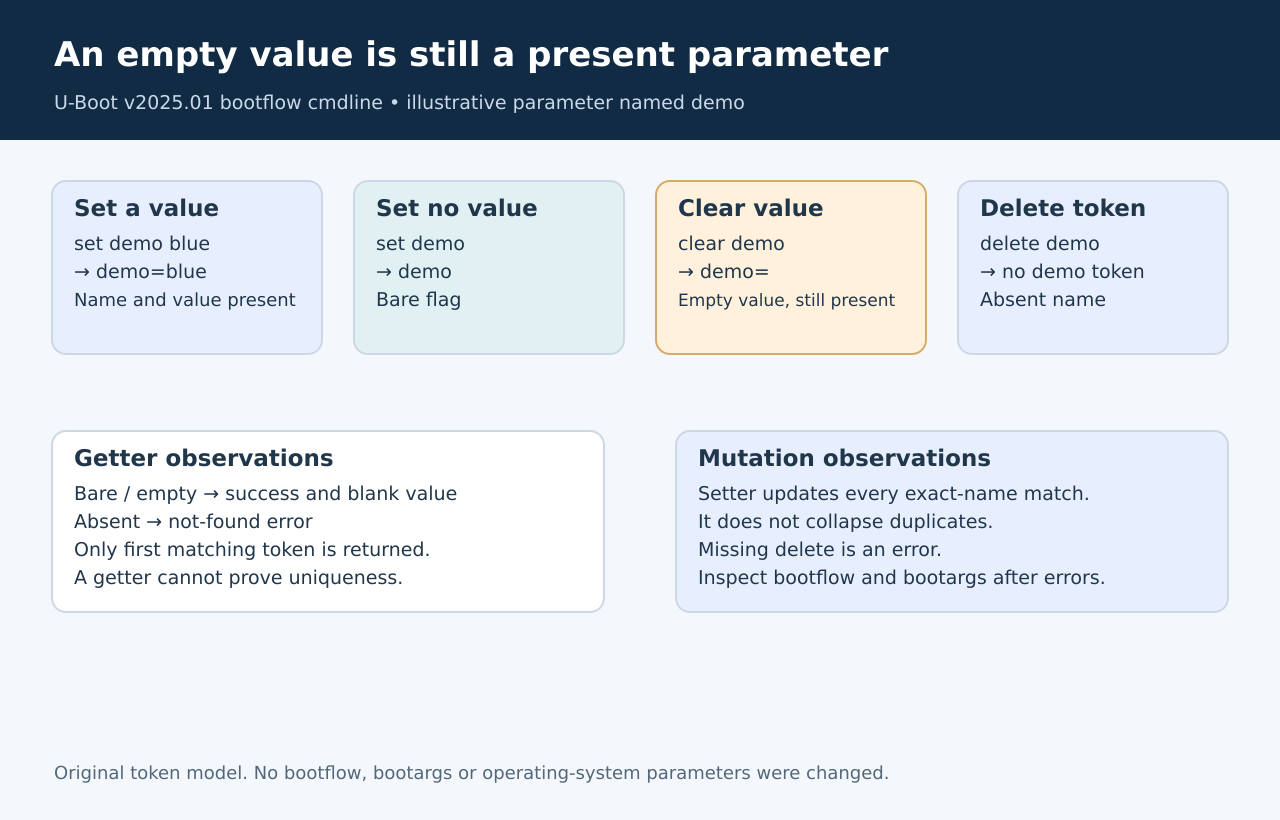
For an illustrative parameter named demo, the successful
transformations are:
- Operation
bootflow cmdline set demo blueproduces
demo=blue. - Operation
bootflow cmdline set demoproduces the bare
tokendemo. - Operation
bootflow cmdline clear demoproduces
demo=. - Operation
bootflow cmdline delete demoremoves the
demotoken entirely.
Use a selected disposable bootflow for qualification; these examples
are proposed inputs, not an executed session. The fuller command
interface must be enabled, and the relevant boot method must expose a
command line that can be edited.
A blank
get result does not identify the representation
The argument
editor matches the complete parameter name before its first equals
sign. A search for root does not match
rootwait, and an additional equals sign inside a value does
not become part of the parameter name.
For an existing bare flag or an existing empty value, the getter can
return a zero-length value successfully. The command then prints an
empty line. A missing parameter instead produces an error. Therefore,
status plus output distinguishes absence from an existing zero-length
value, but not a bare flag from a token ending in =.
Inspect the complete stored command line when that distinction
matters.
The upstream
tests exercise clearing, deletion, value-less setting, empty getter
output and exact-name matching. They provide source-level corroboration;
they were read, not run here.
Repeated parameters
need a whole-line check
The setter walks the entire existing line. Every token with the
matching name is updated or removed. Setting a value does not collapse
repeated matches into one token. The getter, by contrast, returns at the
first match.
For example, editing a hypothetical demo=old demo=older
to the value new leaves two matching tokens, both changed.
A successful getter showing new cannot establish
uniqueness. If a product requires exactly one instance, validate the
full line explicitly rather than relying on the first returned
value.
When no match exists, a set or clear operation can append a token.
Deleting a name that is already absent returns the not-found error. An
idempotent cleanup routine must decide deliberately whether that
specific outcome is acceptable; ignoring every failure would also hide
malformed input or resource errors.
Keep quoting and state
updates visible
The editor adds double quotes around a supplied value containing
spaces. It rejects a new value containing a literal double-quote
character and rejects unmatched quotes in the existing line. Shell
quoting and the resulting command-line quoting are different layers:
inspect the value actually passed to the editor.
This command path also requests synchronization to
bootargs. The bootflow string is changed before the
environment update is attempted, so a failed operation is not a promise
that both representations stayed unchanged. Inspect both after an error
before attempting a boot.
The useful acceptance check is the complete resulting token sequence.
A blank getter response, a plausible first value or a successful
mutation does not establish that the parameter is absent, unique or
represented in the intended form.