Yocto Alternatives: Resolve Competing Providers of the Same Command
Adding a full-featured command package to a Yocto image can change which implementation an existing script invokes. Both packages may be installed successfully, yet the familiar command name now resolves to a different executable. The mechanism to inspect is the alternatives registration, not just the image's package list.
Yocto Project 5.0.12 provides update-alternatives support for this situation. It separates a shared command pathname from provider-specific targets and records priorities for selecting among them.
Separate the command, link and implementation
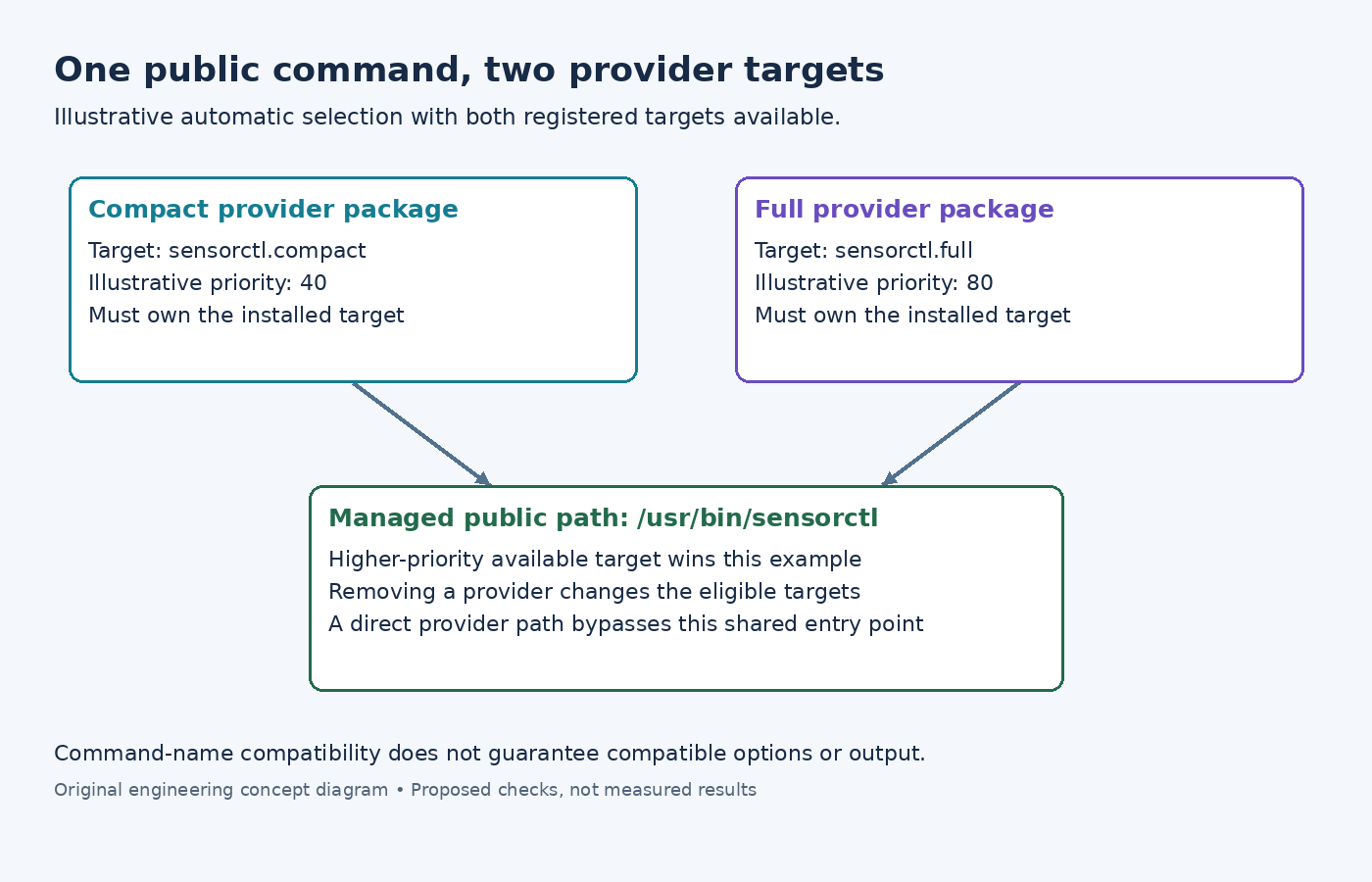
The class reference describes how conflicting executables can coexist through renamed targets and a selected symlink. In a simple automatic-selection case, the highest-priority available implementation supplies the shared command.
For an illustrative sensorctl command, imagine two independently packaged implementations: /usr/bin/sensorctl.compact and /usr/bin/sensorctl.full. The public pathname is /usr/bin/sensorctl. Those three paths are not three copies of the same package file; the public name is the managed entry point.
Before changing priority, inspect what the caller actually executes. A script using an absolute provider-specific path bypasses the public alternative. A different directory earlier in PATH can also supply another command with the same basename. Check the resolved command location and its symlink target before concluding that alternatives selection is wrong.
Declare the registration on the owning package
In each participating recipe, inherit update-alternatives. The ALTERNATIVE variables associate command names with an output package, while separate flags describe the public link, target and priority.
For a main-package example, ALTERNATIVE:${PN} = "sensorctl" declares participation. ALTERNATIVE_LINK_NAME[sensorctl] = "${bindir}/sensorctl" identifies the shared path. A provider that explicitly installs the compact executable can use ALTERNATIVE_TARGET[sensorctl] = "${bindir}/sensorctl.compact" and ALTERNATIVE_PRIORITY[sensorctl] = "40".
A second recipe can register its full implementation at the same public link with a different target and priority, such as 80. These numbers are illustrative policy choices, not performance scores. The target executable must actually be installed and packaged by the provider that registers it.
If the executable belongs to a split package, put the ALTERNATIVE declaration on that package rather than assuming ${PN} owns it. Compare the generated package contents and registration scripts. Setting a priority on a package that is absent from the image cannot make its target available there.
Account for class-driven renaming
Explicitly distinct target names make the example easy to follow, but they are not the only supported arrangement. The documented default target follows the link name; when the two coincide, the class appends the base recipe name and can rename the installed file during packaging.
The scarthgap implementation performs those renames before package splitting and adds registration and removal operations to package scripts. It also checks whether the target exists before adding an alternative.
Therefore, inspect the packaged filename, not only the earlier do_install tree. A suffix that appears during packaging may be intentional. Conversely, a warning about a missing target can explain why an apparently correct priority never participates in selection. Inspect the class from the product's exact checkout when its behavior differs from the maintenance branch examined here.
Test the selection transitions that matter
On a development image, inspect the installed alternatives implementation and its supported query commands before using backend-specific options. Compare its registration data with the public symlink and the actual executable. Avoid manually replacing the symlink as a permanent recipe fix: package installation or removal can recreate the managed state.
Exercise the package combinations the product supports: compact alone, both providers, and removal of the preferred provider. Check the resulting public path after each supported transition and run a representative command invocation. Different implementations can share a name while accepting different options or producing different output.
A priority change is complete only when the intended registration wins and the callers remain compatible with that implementation. Alternatives resolve ownership of a command entry point; they do not establish behavioral equivalence between its providers.