Yocto CONFFILES: Preserve Target Edits Without Assuming Every Upgrade Is a Merge
An updated application package installs successfully, but a device's edited configuration is replaced or an unexpected alternate file appears. Adding a pathname to CONFFILES is only the beginning of the diagnosis. The file must belong to the named output package, survive the configuration-file selection logic, and reach the package backend in the expected form.
This article follows Yocto Project 5.0.12 and the examined Scarthgap packaging code. Upgrade handling must be checked with the package manager actually deployed on the target.
Mark the file in the package that owns it
The CONFFILES reference requires a package override and states that the identified files must already be included through FILES.
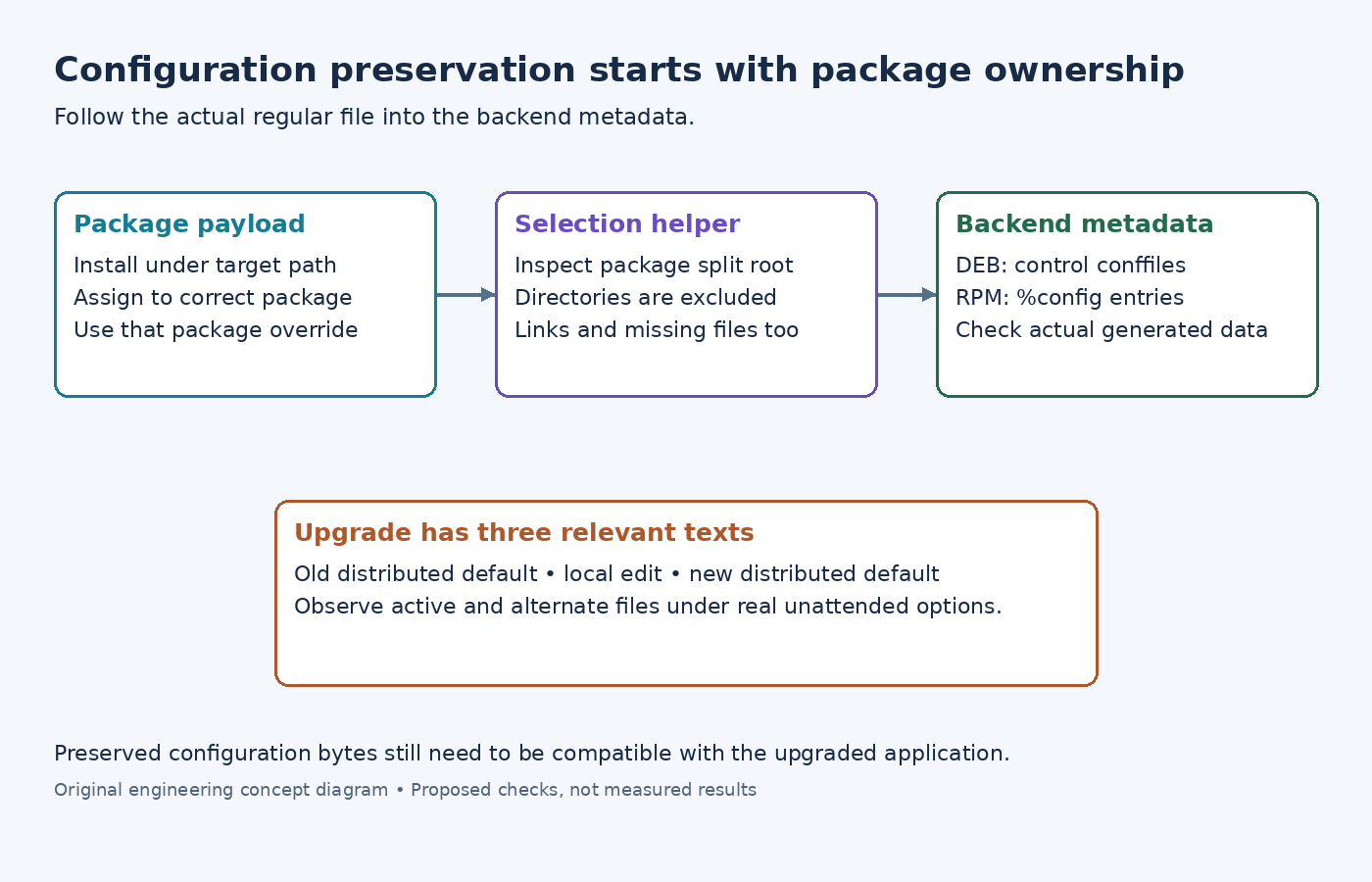
For an illustrative main package, CONFFILES:${PN} += "${sysconfdir}/sensor-agent.conf" identifies a target pathname. It does not install the file, move it between packages, or refer to the build host's staging prefix. The file must first be installed under ${D}${sysconfdir} and assigned to that output package.
If packaging rules move the configuration into ${PN}-config, the corresponding CONFFILES declaration must describe that package. An entry attached to the main package does not mark a file that now belongs to a different package's payload.
Inspect the split package directory and the final package's file list. This catches a misplaced override before any target upgrade experiment is necessary.
Check which entries reach the writer
The examined get_conffiles implementation evaluates the configured entries within the package's split root. It excludes directories, symbolic links and nonexistent paths from the returned configuration-file list.
That means a pathname appearing in metadata is not sufficient evidence that the backend marked it. If an installation change turns the configuration into a symlink, inspect the actual regular file and its owning package. Do not assume that marking the symlink protects a separately created target file.
Similarly, a configuration generated only on the running device is not automatically a shipped package conffile. Decide whether the package distributes a default file or whether application-specific management owns its creation and updates. The two designs need different upgrade handling.
Inspect the backend representation
The examined DEB writer writes selected existing paths into its control conffiles file. The examined RPM writer emits %config entries for selected paths in the generated spec.
These are concrete backend representations, not a promise that every backend performs an identical interactive merge. In particular, the examined RPM emission is %config; do not describe it as %config(noreplace) without a separate implementation change and verification.
For a DEB-based product, Debian's configuration-file policy distinguishes distributed conffiles from configuration maintained by scripts. It also warns against maintainer scripts modifying a conffile. A postinstall command that unconditionally copies a template over the target path can undermine the preservation behavior being tested.
Exercise the old default, local edit and new default
Use a restorable target with the old package genuinely installed. Prepare separate cases where the target file remains unchanged and where it contains a harmless local edit. Upgrade each to a package whose distributed default also changes.
Record three versions of the text: the old packaged default, the locally edited file and the new packaged default. Inspect the active pathname, any alternate file created by the backend, and the package manager's recorded state after the transaction. This distinguishes preserving a local edit from merely leaving the new default unapplied.
Repeat with the product's unattended upgrade options. An interactive choice made during a development test does not establish what a headless device will do under its configured policy.
Finally, start the application with the resulting configuration. Preserving bytes does not guarantee that an older configuration schema remains valid for the new executable. CONFFILES identifies package-managed configuration; schema migration and application compatibility remain explicit product responsibilities.