Yocto Host Tools: Diagnose a Command Missing from the Filtered Task PATH
A recipe fails with command not found even though the same command runs in a developer's terminal. Adding the terminal's entire PATH to the recipe can make the symptom disappear while introducing uncontrolled host tools into the build.
Yocto deliberately exposes a filtered set of host executables. Diagnose the name's admission, the generated link and the task's actual search order before deciding whether the tool belongs on the host or in a recipe dependency.
Distinguish required admission from optional admission
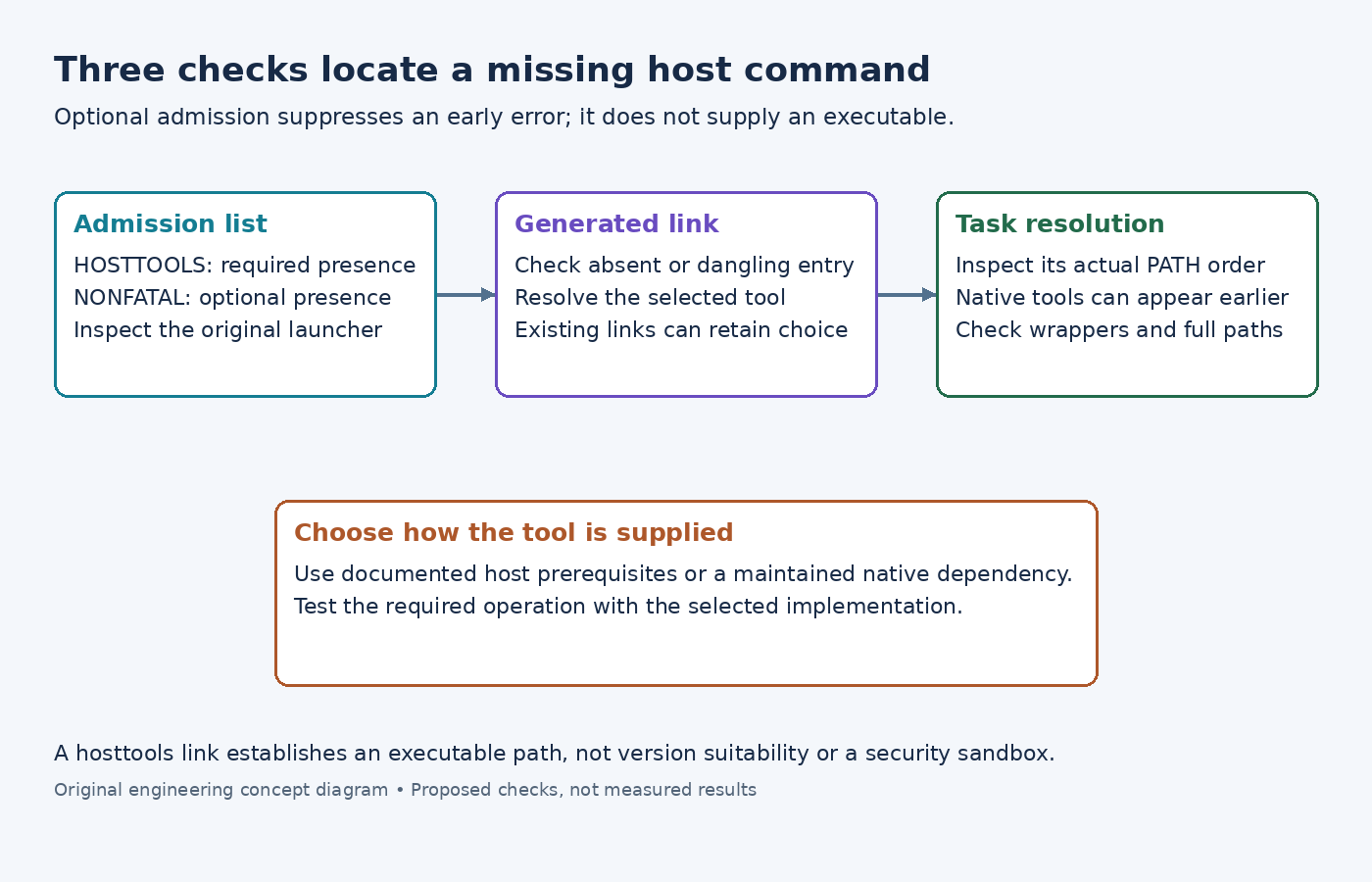
The HOSTTOOLS reference defines the allowed host-tool list. A listed tool missing from the host causes an early error. The related HOSTTOOLS_NONFATAL reference allows optional tools without that missing-tool error.
NONFATAL does not install a tool, generate an implementation or guarantee that a later task can invoke it. Moving a mandatory command into the optional list can merely postpone the failure until the first task needs it.
For an illustrative custom host utility named sensor-pack, inspect its real executable path and the effective admission lists. Check the launch environment used by CI, rather than relying on a different interactive terminal. A shell alias or function is not the executable file that host-tool setup searches for.
Inspect the hosttools link as its own artifact
The examined base class builds the hosttools directory using the original launch PATH. It searches for executable files and creates symlinks. It also avoids its own scripts directories and prefers a gnu-prefixed command where available.
Find HOSTTOOLS_DIR with bitbake -e sensor-agent, replacing the example recipe. Inspect the entry for the failing command with ls -l and readlink, using the resolved directory. Establish whether the entry is absent, dangling or pointing at an unexpected implementation.
The setup function retains an already existing valid destination. Changing the host's PATH therefore does not imply that an existing hosttools link was retargeted. This is an especially useful distinction when a developer installs a second version and expects a warm build directory to start using it immediately.
Do not repair that by editing arbitrary shared links while builds are running. Compare with a fresh, separate build directory under the intended launcher. That experiment can distinguish retained link selection from a missing or incorrectly ordered host executable.
Follow the task PATH before blaming the link
The examined core layer configuration replaces the ordinary host search path with the hosttools location while preserving access to BitBake tools. The core build configuration prepends script, toolchain and recipe-native locations.
Consequently, a valid hosttools link does not prove that the task selected it. An earlier recipe-native executable with the same name may win. Inspect the failing task's generated PATH and command invocation, then resolve the name in that environment.
If the command is called through an absolute pathname, normal PATH selection is not involved. If a wrapper supplies another PATH to its children, inspect that narrower environment. The filter controls normal command exposure; it is not a filesystem sandbox preventing every possible host reference.
Choose a maintained source for the tool
For standard host prerequisites, follow the release's build-host package requirements. Record the implementation supplied by the supported host setup. A successful link proves presence, not a suitable version or option set.
For a project-specific generator whose version affects output, consider maintaining a native recipe dependency rather than extending a machine-local allowlist. That decision is about how the tool is supplied; it should not be confused with admitting a scalar environment variable.
After the correction, verify the resolved executable in the real failing task and run a small input through its required operation. Keep the diagnostic narrow: the useful result is an explained command path and implementation, with the same selection available to CI, rather than a larger PATH that happens to work on one machine.