Yocto Package Feeds: Decide Whether Field Package Updates Fit the Product’s Recovery Model
A Yocto product already produces packages during its image build, so serving those packages to deployed devices can look like a small extension. The harder decision is what the device must do when an update stops after changing only part of its installed software. A package feed needs a recovery model, a supported version policy, and an observable device state, not just a reachable repository.
This article uses Yocto Project 5.0.12 documentation. It proposes a decision and test framework for runtime package management. It does not claim that a particular package manager provides whole-device atomic rollback, or that the tests described here have been executed.
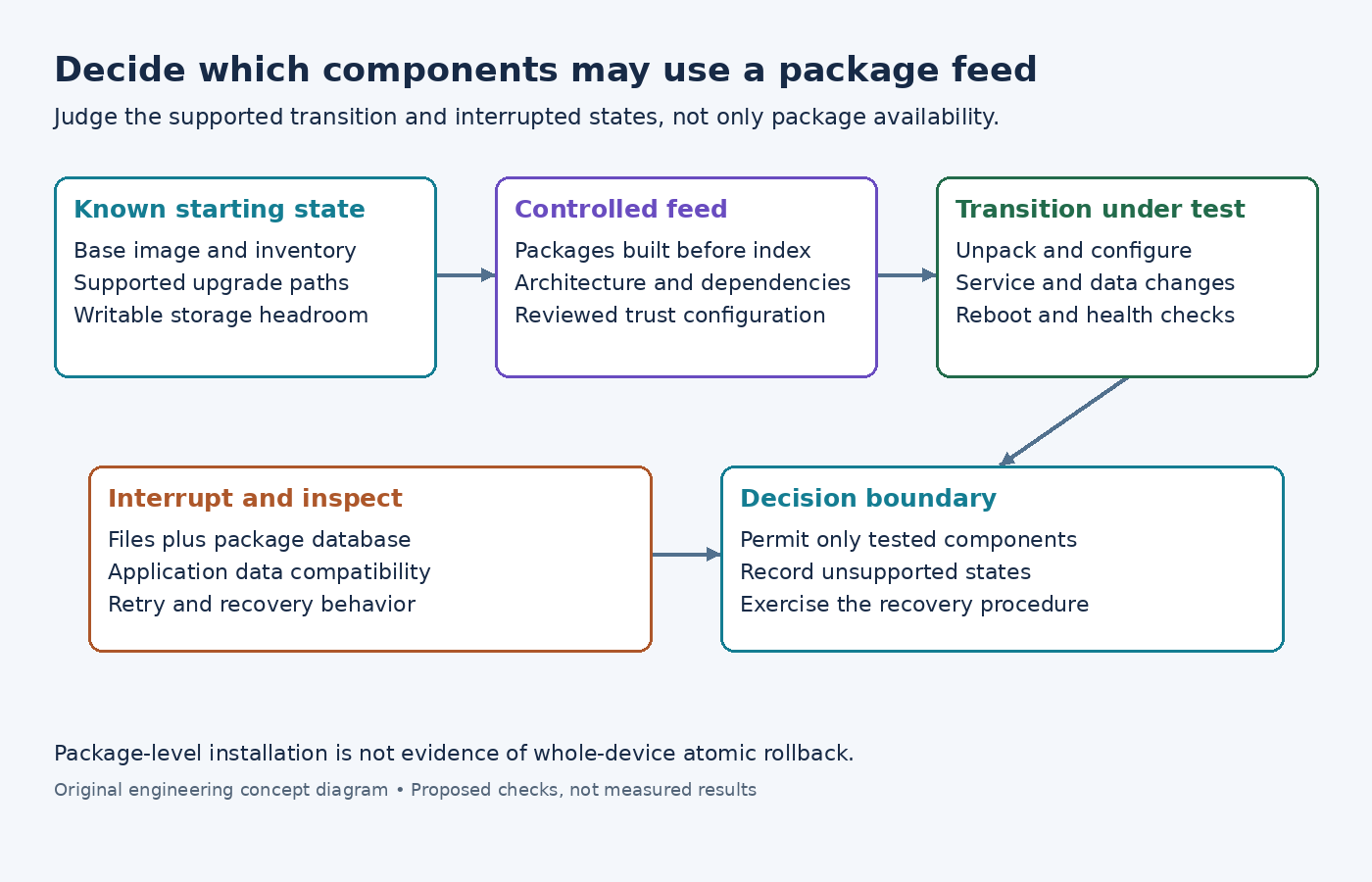
Start with the allowed field-change boundary
List the components that may be updated independently. An optional diagnostic utility has a different compatibility surface from a service sharing a database schema with several applications. Include libraries, configuration files, service units, and persistent data migrations in that surface, rather than considering only the package that starts the change.
Define the state the device must reach after an interrupted operation. Must it boot the previous complete software set automatically? Is a maintenance shell acceptable? Can a technician replace the image? Must customer data remain usable by both old and new applications? These requirements determine whether package-level updates are suitable for the proposed components.
Keep the decision specific. A product might permit a narrow package feed for service tools while requiring a separate whole-image update path for its core software. That is a design option to evaluate, not a universal recommendation or an automatic property of Yocto packaging.
Establish the actual package-management configuration
The Yocto runtime-package-management guide describes build, server, and target setup. Check the configured package format, the target's matching package tools, and its feed configuration. When multiple PACKAGE_CLASSES entries are present, the first controls image and SDK generation.
The image-feature reference describes package-management as including package-management tools and retaining the package database. Verify the built image rather than assuming that packages in the build output imply a ready-to-use target package manager.
Record the installed base-image identity and package inventory before the trial. Confirm that the target is using the intended architecture-specific feed and release channel. An update test against an accidentally broader development feed cannot establish the behavior of the controlled field feed.
Treat the feed snapshot as a release artifact
Build the intended packages first, then run bitbake package-index separately. The Yocto guide explicitly warns that putting package targets and package-index in the same BitBake invocation does not establish the required ordering. Retain the completed index and the corresponding package files together.
For release use, stage the reviewed feed outside the mutable build output directory. Record hashes, package versions, architectures, dependencies, and the base images permitted to consume it. Test from that staged copy so the exercised artifact is the one under review.
Define how the client establishes that a feed and its packages are authorized for the device. Verify the chosen package manager's signature and repository-trust behavior in the actual configuration. A successful download or a package filename containing the expected version is not sufficient authenticity evidence. Keep signing and release credentials out of the article's example commands and ordinary build logs.
Investigate partial progress, not just a successful upgrade
Use disposable test devices or restorable test storage. Identify observable stages such as downloading packages, unpacking files, configuring packages, restarting services, and rebooting. The exact stages and guarantees depend on the package manager and package scripts; inspect those implementations before choosing interruption points.
At each selected point, interrupt the operation in the controlled test environment and record what remains. Check the package database, relevant file hashes, service status, persistent data, and whether the next boot reaches the required operating state. A package database that reports a version is one observation, not proof that every application contract still holds.
Include failures that do not resemble power loss. Test insufficient storage, an unavailable feed, a failed configuration script, a rejected package, and an application that fails its health check after installation. Decide in advance which failures should allow retry and which require the recovery path.
Do not call reinstalling an old package a proven rollback until the data and configuration effects have been examined. A newer application may have changed persistent state that an older executable cannot read. The relevant acceptance test includes those state transitions, not only the replacement of executable files.
Keep version paths and storage requirements explicit
Test the oldest supported installed base against the proposed feed, including devices that skipped intermediate releases. Identify dependencies or migration steps that require a bridge version. A feed containing the newest package does not by itself explain how every supported starting state reaches it.
Check version ordering with the selected package manager and preserve a policy for recipe revisions. Rebuilding changed contents under an indistinguishable package version can make the intended update difficult to observe or select. Record what the target considers installed and available before interpreting an upgrade command's result.
Measure storage demand during the test, including downloaded packages, temporary files, and application migrations. Free space sufficient for the final installed set may be insufficient during the transition. Keep the measured headroom requirement with the tested package set rather than generalizing it to all future updates.
Make the acceptance decision actionable
Accept package-feed updates for a component only when the supported starting versions, trust configuration, interruption outcomes, and recovery procedure meet the product requirements. If a critical failure leaves the device unable to reach its required recovery state, narrow the permitted update set or revise the update architecture before deployment.
The review record should identify the staged feed, base-image identities, test cases, observed states, and unresolved gaps. Keep a recovery exercise in the release checklist when package scripts, dependency boundaries, or persistent-data formats change. The useful result is a supported transition with known failure behavior, not merely a package installation command that returned success once.