Kernel Modules After a Buildroot LTS Update: vermagic, Symbols and Signing
Separate loading, binding and device operation
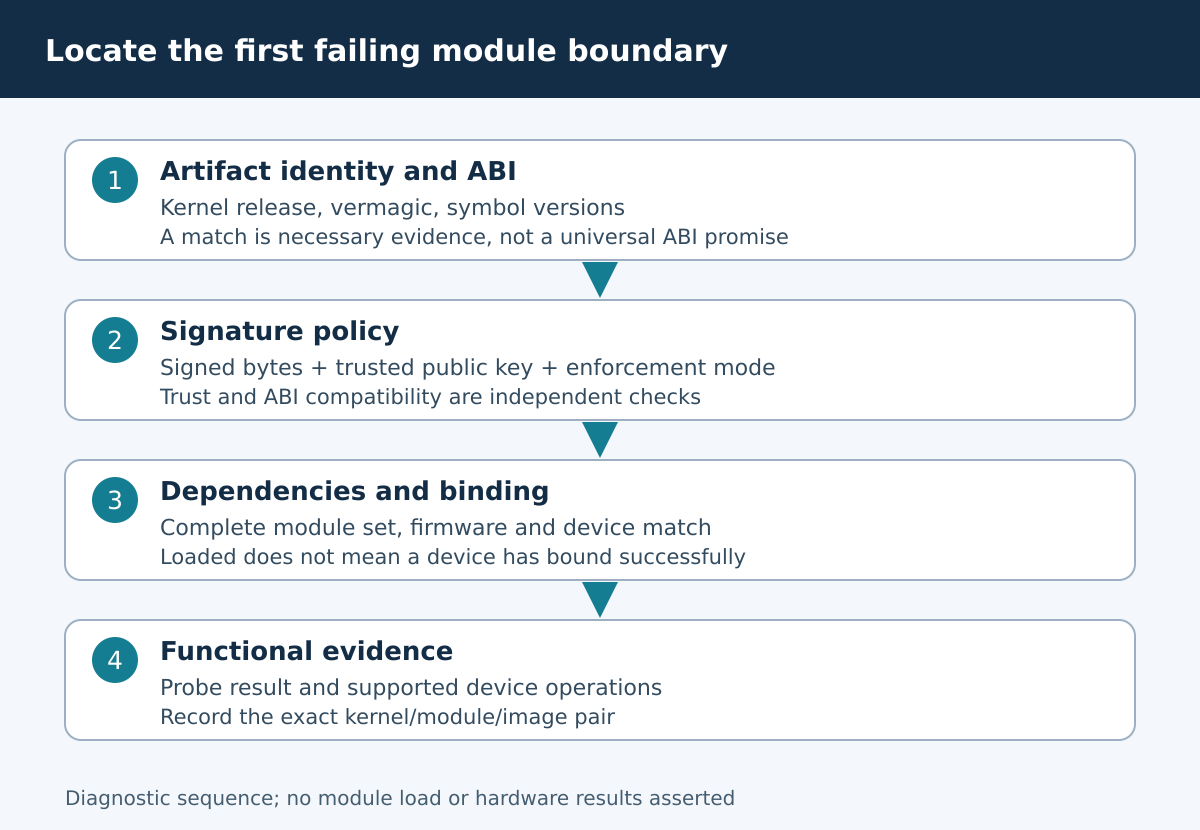
After a kernel update, “the driver stopped working” can mean three different failures: the module loader rejected the file, the module loaded but did not bind to the device, or the bound driver failed during operation. Start by placing the failure at the correct boundary. A rejected module is not evidence that the hardware is damaged, and a successful insertion is not evidence that the peripheral works.
This guide considers a Buildroot 2025.02 product workflow and verifies kernel behavior against Linux 6.12. The Buildroot release does not force every product to use that kernel. Record the exact deployed kernel, module and configuration before applying the checks. No driver was loaded, signed or tested on hardware for this article.
Capture the first rejection with its kernel context
Preserve the userspace error and the nearby kernel messages from the same attempt. A generic “invalid module format” message gives less information than the kernel’s detailed explanation. Note the booted image identity and the module path actually resolved by the loading tool. Two files with the same module name can exist in different image or update locations.
# Read-only examples; set MODULE to the file under review.
uname -r
modinfo -F vermagic "$MODULE"
modinfo -F depends "$MODULE"
modinfo -F signer "$MODULE"
These commands assume a modinfo implementation supporting the requested fields; minimal target installations may not include it. Inspect the artifact on an appropriate analysis host when necessary. Do not make a production insertion attempt solely to collect a log. Reuse available failure evidence or reproduce on an authorized lab system with a recovery path.
Check release and vermagic without treating them as a full ABI proof
Compare the running kernel release with the build release associated with the module. The version-magic string also reflects selected kernel build properties. Its exact composition is visible in Linux v6.12 vermagic.h. Differences can reveal that the module came from another configuration even when a human-readable source version looks similar.
A matching string is only one check, not a universal compatibility certificate. Downstream patches, exported interfaces and configuration still matter. If it differs, rebuild from the correct kernel artifacts rather than editing the string or using force options to bypass the rejection. A forced load removes a diagnostic boundary while leaving the underlying incompatibility unresolved.
Distinguish symbol versions from missing symbols
With CONFIG_MODVERSIONS, the kernel and module compare version information associated with exported symbols. A disagreement can mean that the module was built using different interface definitions. An unknown symbol can instead point to an unavailable export, a missing dependency or an inappropriate kernel configuration. Read the actual diagnostic and inspect the producer of the symbol before deciding which explanation applies.
The Linux 6.12 external-module guide explains the role of Module.symvers and warns that modules_prepare does not generate it for symbol-versioned builds. Keep the complete matching kernel artifacts. Headers exported for userspace compilation are not a substitute. If another external module provides the symbol, preserve its paired version and the symbol information used during the consumer build.
Treat signature trust as a different gate
A module can be ABI-compatible and still be rejected because its signature is absent, invalid or not trusted under the target’s policy. Conversely, a trusted signature does not prove ABI compatibility. Review CONFIG_MODULE_SIG-related settings and the boot-time enforcement policy, then identify the public key that the target trusts. The Linux 6.12 signing documentation describes permissive and restrictive behavior.
The signer field is a clue about the artifact, not proof that the running kernel trusts it. Keep signing private keys out of ordinary build handovers and diagnostic bundles. Check transformation order as well: the signature covers the signed module content, so stripping or changing a signed artifact afterward can invalidate it. Record the final distributed artifact digest rather than only a pre-signing build hash.
Only then move to dependencies, firmware and binding
Once loader checks pass, inspect module dependencies, aliases and the final image’s dependency metadata. A direct insertion and a dependency-resolving load can behave differently. Confirm that the expected companion modules and firmware are present in the installed image and correspond to the driver version. Do not infer firmware availability from its presence in the original source tree.
If the module loads but no device binds, inspect the device identity and relevant description or enumeration path. If it binds and then fails, capture the probe or runtime failure separately. Keeping these stages distinct prevents a module-signing change from being blamed for a later missing-firmware problem, or a hardware substitution from hiding an old kernel-module pairing error.
Use a paired-artifact comparison
Prepare a manifest for the known-good image and the candidate image containing kernel release, kernel configuration digest, module source revision, module digest, symbol-version settings and signing-policy identity. Compare complete pairs first. Mixing the old module with the new kernel is useful only as an explicitly unsupported diagnostic experiment, not a release acceptance path.
When a rebuild resolves the failure, preserve the reason: corrected kernel tree, regenerated symbol information, restored dependency or correct signing stage. Otherwise the same manual repair will be rediscovered at the next update. Keep a negative test that rejects an intentionally mismatched artifact on a lab target, with the failure category recorded and no production override mechanism added.
Acceptance and limits
Accept the module-image pair when the source and kernel artifacts are traceable, loader compatibility and signature policy both pass, dependencies resolve, the device binds and the agreed functional tests succeed. Archive public verification information and final hashes with the release manifest. Keep private signing material in its approved secure system.
This is a diagnostic and acceptance sequence, not a guarantee of stable internal kernel ABI or future driver support. A matching vermagic, a valid signature and a successful load each answer a narrower question. Treat the sequence as a way to preserve those distinctions so the next failure can be located without guessing or bypassing safeguards.