LVGL Flex and Grid Layouts: Fix Content Sizing, Overflow and Responsive Screens
Give the layout a finite problem to solve
A settings page fits one language but gains a horizontal scrollbar when labels become longer. Moving the final button left can hide the symptom while leaving the sizing dependency unresolved. Start by identifying which object supplies the available width, which objects size themselves from content, and which dimension may scroll. This guide uses LVGL 9.2 documentation and checks API names against the official v9.2.2 source; it is not a claim about the newest release.
The LVGL project supplies the UI framework, while application code still decides the layout policy. Write that policy in ordinary language before adjusting coordinates: the header remains visible, the body may scroll vertically, labels may wrap, and the action button must remain reachable. Such rules survive a resolution or translation change better than a collection of unrelated pixel offsets.
Calculate from the content area
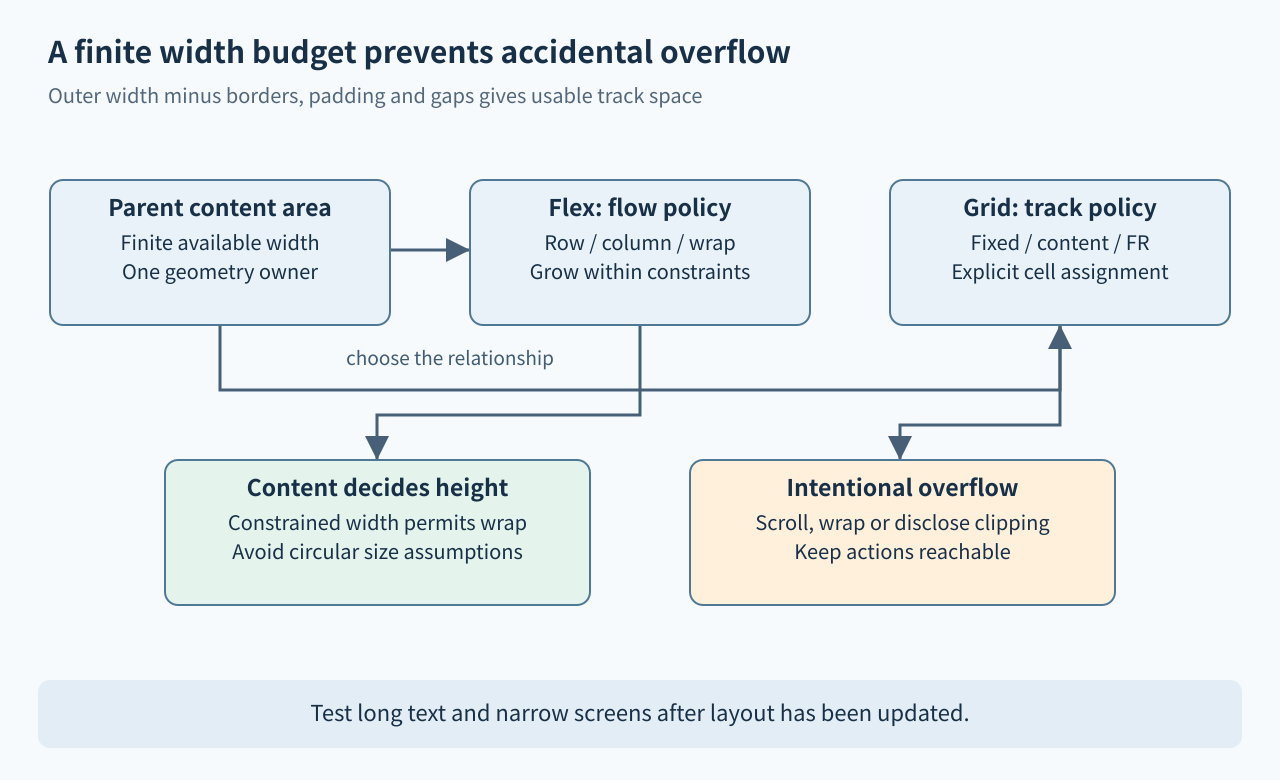
An object’s width includes its border and padding. Its usable content area is smaller. Percentage sizes for a child are based on the parent’s content area, so two children at fifty percent width plus an inter-item gap may require more space than is available. The 9.2 coordinate documentation explains the box model and deferred coordinate calculation. Measure the content width when diagnosing overflow, not only the outer rectangle.
Make a small worksheet for the problematic row: outer width, left and right border, padding, item gaps, fixed control widths, and flexible remainder. Decide which term is allowed to shrink or wrap. An illustrative 320-pixel container with padding and two fixed controls is not evidence that every 320-pixel screen will fit; fonts, theme borders, and actual labels can change the required space. Keep the worksheet’s assumptions with the component definition.
Choose Flex for flow and Grid for relationships
Flex is a useful starting point for a toolbar, a vertical form, or a set of cards that should wrap as space changes. Select the main direction, whether wrapping is allowed, and how remaining track space is distributed. In LVGL 9.2, lv_obj_set_flex_flow() and lv_obj_set_flex_grow() express those choices; the Flex reference also documents row and column gaps and alignment. A grow factor distributes available space; it is not permission to violate every minimum size.
Grid is more suitable when labels and values must maintain shared columns or when a component spans several tracks. Define row and column descriptor arrays ending with LV_GRID_TEMPLATE_LAST, then assign each child to a cell. The Grid reference distinguishes fixed tracks, LV_GRID_CONTENT and LV_GRID_FR(). Keep descriptors valid while the container uses them. Do not switch from Flex to Grid merely because one component overflows; first identify the relationship that the selected layout must preserve.
Break ambiguous content-size dependencies
LV_SIZE_CONTENT asks an object to derive its size from children. A child whose size is a percentage of that same unconstrained parent creates an unhelpful dependency for the application designer. Give at least one level a clear size budget in that direction. For example, constrain the form’s width to the display’s usable width, let rows occupy that width, and allow text to determine height through wrapping.
Separate decorative overlays from content that should participate in measurement. Hidden or floating objects do not contribute to LV_SIZE_CONTENT in the documented way, so an overlay is not a reliable spacer. Also avoid adjusting the position of a layout-managed child after layout and expecting that position to remain authoritative. Use layout properties or a clearly separate overlay layer, and document which mechanism owns each object’s geometry.
Make overflow an intentional interaction
There are several valid responses to insufficient space: wrap text, move controls onto another row, clip a nonessential decoration, or allow scrolling in a chosen direction. Decide before the screen becomes crowded. A hidden scrollbar is not proof that the content fits, and a smaller font can harm usability while concealing an incorrect width dependency. Minimum touch-target and readability requirements should remain part of the component’s acceptance criteria.
For a settings form, a useful policy is a bounded-width, vertically scrolling body with persistent actions outside it. For a compact status strip, a single row with a defined abbreviation or overflow indicator may be better. Preserve the meaning of labels when truncating them. A long device identifier may need a details view rather than silent clipping, especially when several devices differ only at the end of their names.
Reproduce with geometry, not screenshots alone
Build a proposed test matrix containing narrow and wide resolutions, portrait and landscape variants when supported, long translations, empty strings, large numeric values, and enabled or hidden optional rows. After changing text or size, use lv_obj_update_layout() when immediate coordinate inspection is necessary; ordinary updates are deferred. Record actual bounds and content bounds so an assertion can identify which object escaped the available area.
Check focus visibility and reachability after scrolling, not just the initial render. Repeatedly hide and reveal optional children and switch text between short and long forms. Inspect theme and pressed-state changes that alter borders or dimensions. A screenshot catches visual overlap, while coordinate assertions catch cases outside the captured viewport. These are proposed simulator and target checks; no interactive LVGL application was run for this article.
Acceptance checklist
- Each layout direction has a finite size source and a documented overflow policy.
- Borders, padding and gaps are included in the width or height budget.
- Flex and Grid encode relationships rather than compensating pixel offsets.
- Content-sized parents do not depend ambiguously on percentage-sized children.
- Translations, optional fields and state changes preserve reachable controls.
- Immediate geometry reads occur after layout has been updated when required.
The goal is a component whose sizing rules can be explained and tested, not a single screenshot that happens to fit.