Multiple Displays in LVGL: Assign Screens, Inputs and Resources Explicitly
Inventory the display domains before building widgets
A dual-screen device creates a dialog on the customer display when it was meant for the operator. Later, a touch on one panel changes a control on the other. These failures usually come from implicit defaults and incomplete ownership maps. This guide targets LVGL 9.2 with APIs and default-display behavior checked against v9.2.2. It concerns assigning resources to displays, not selecting a Linux backend or implementing a general thread-safety layer.
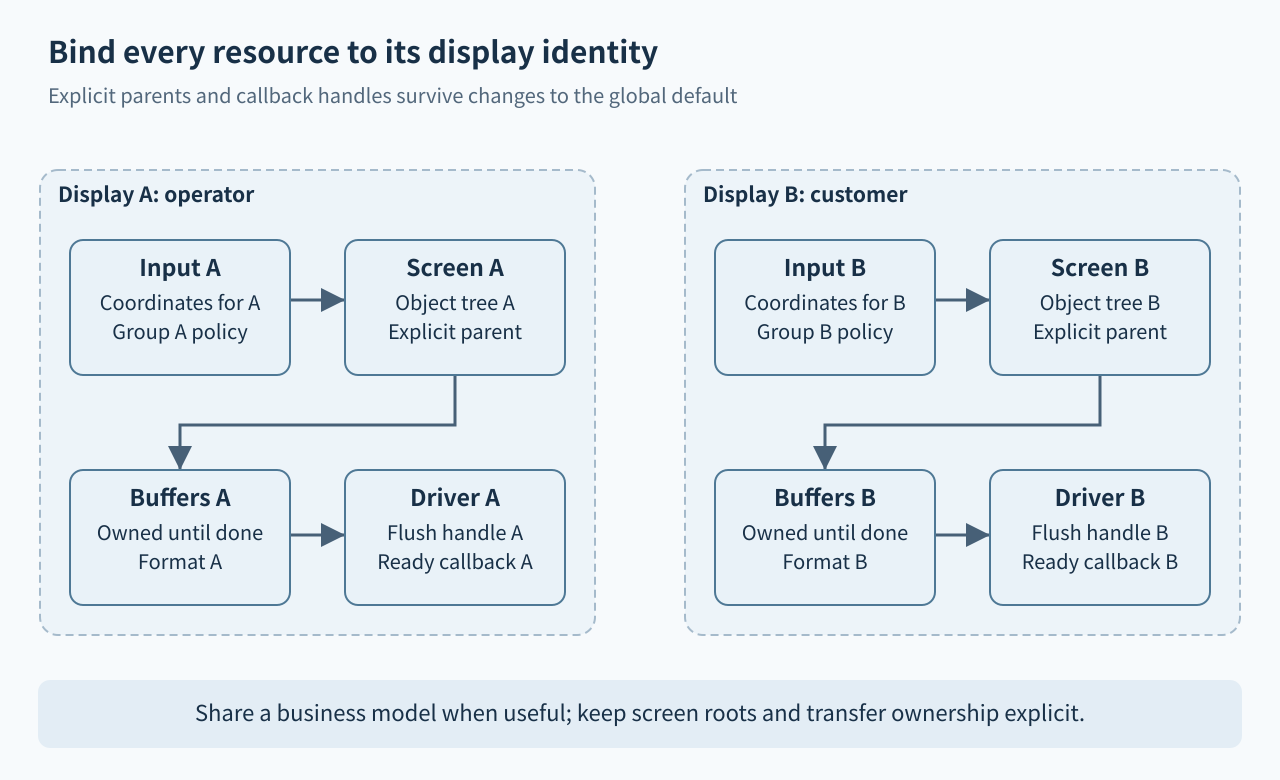
Create an inventory for display A and display B: lv_display_t handle, resolution, color format, physical transport, drawing buffers, active screen, input devices, focus groups and power state. Give the displays stable application names instead of referring to them as “the first” and “the second.” Initialization order can change during maintenance, and that should not silently change the destination of a dialog or touch event.
Treat the default display as mutable context
The 9.2 display overview describes per-display screens and the default-display concept. In the v9.2.2 implementation, creating another display temporarily selects it while constructing its internal screens, then restores the previous default; the first display becomes default when none exists. Do not assume that “most recently created” is a dependable application routing policy.
Use lv_display_set_default() deliberately when creating a new root screen with lv_obj_create(NULL), then restore or document the chosen default. Better still, create ordinary widgets with an explicit parent already belonging to the intended screen. Shared component builders should accept that parent as an argument rather than reaching for lv_screen_active() internally. When reading the active root of a known display, use lv_display_get_screen_active(disp) from the pinned display API.
Keep screen ownership distinct from screen loading
A screen is a root object associated with one display; it is not a portable page object that can simply be loaded onto any other panel. In v9.2.2, lv_screen_load() follows the supplied screen’s associated display through the implementation’s screen-loading path. Verify the screen was created for the intended display instead of trying to repair an incorrect association by changing the default immediately before loading it.
If the same application view must appear on both panels, share the underlying model and build two separate object trees with their own parents. This allows different resolutions, text sizes and interaction rules. A pixel mirror is another design: one render output is copied to multiple transports. Do not combine the assumptions of independent displays and a simple mirror without documenting who owns rendering and when each transport has finished reading the pixels.
Bind input and focus intentionally
Associate each pointing device with its target display using lv_indev_set_display(). The v9.2.2 input API also provides an accessor to inspect that association. Keep touch calibration, rotation and coordinate transformation consistent with the target panel’s resolution and orientation. A correct I2C read can still produce an incorrect UI event if its coordinates are interpreted in the other display’s space.
Keypads and encoders also need an intentional focus-group policy. Assign the intended group and populate it with the controls that device should operate. Display association and group membership solve related but different routing problems. A shared keyboard may switch targets, but the switch should update the application’s focus ownership explicitly and clear any stale interaction state. Test a held key or pointer press during switching so its release cannot unexpectedly activate another screen.
Keep buffers and completion callbacks tied to the handle
Each display needs a reviewed buffer and flush configuration. The 9.2 display interface passes the display handle to the flush callback; carry that identity through an asynchronous transfer and call lv_display_flush_ready() for the same display when appropriate. A global “current display” variable is unsafe if another display begins work before the first transfer completes.
Independent buffers are the simplest ownership model. Sharing a buffer or transport requires explicit serialization across both displays and must preserve the buffer until every intended consumer is finished. Different resolutions or color formats can imply different size and alignment requirements. Account for each display’s buffers and temporary rendering resources rather than multiplying one guessed framebuffer size. Powering down one panel must not accidentally stop completion handling or input processing for the other.
Review inactivity and deletion as per-display operations
Inactivity is tracked per display. The documentation notes a special case: lv_display_get_inactive_time(NULL) returns the lowest inactivity time among displays, rather than simply querying the default. A sleep policy for one screen should therefore pass that screen’s display handle explicitly. Similar-looking NULL conventions are not necessarily identical across APIs; read the specific contract instead of assuming one global rule.
Before deleting or replacing a display, stop its external producers, settle pending transfers and retire input associations and callbacks that reference it. Manage its screen objects under the documented lifecycle, including the restriction against simply deleting a currently loaded screen. Deletion is not a generic physical hot-unplug protocol. The application’s driver and input lifetime must make it impossible for a late completion to use a removed handle.
Test asymmetric configurations
Proposed tests should use intentionally different resolutions and visible A/B labels, because two identical panels can conceal a mapping error. Open dialogs through shared component builders, change the default display, and confirm that explicit-parent components remain on their intended screen. Rotate one panel, sleep only one, and keep data updating on the other.
Inject touch and encoder input on both sides, then exercise target switching with a gesture in progress. Delay one flush completion while the other display refreshes. Assert screen ownership, input association, callback identity and buffer lifetime throughout. No dual-display simulator or board test was executed for this article. Acceptance is a complete ownership map whose invariants survive initialization changes, independent power states and asynchronous completion, not merely two screens that happen to light up.