LVGL Arc Controls: Test Angular Wrap and Forbidden Sectors Before Using Them as Setpoints
Test an arc as three separate things: a numeric mapping, a rendered angle and a history-dependent pointer interaction. Unwrap the permitted sector across zero degrees before calculating its value range. Then test the invisible sector explicitly; a gap in the drawing is not automatically an exact, zero-tolerance prohibition on setpoint changes.
Applicability: this guide pins LVGL v9.3.0, normal arc mode, a nonzero ascending integer range and an untransformed object. Display calibration is assumed correct. Reverse and symmetrical modes, transformed widgets and application-specific physical safety limits need separate qualification. The worksheet and replay tests are hypothetical; no LVGL target was exercised.
1. Record the angular coordinate system
The 9.3 arc reference defines zero degrees at the right-hand side and increasing angles clockwise. Record background start, background end, rotation, numeric minimum/maximum, mode, geometry and input settings in one worksheet. Background angles define the available arc; indicator angles depict the current value.
Keep arc rotation separate from display rotation. Rotating this widget’s angular presentation does not authorize another transform of the touch controller’s entire coordinate stream. First verify that a crosshair follows input correctly, then examine the widget’s own mapping.
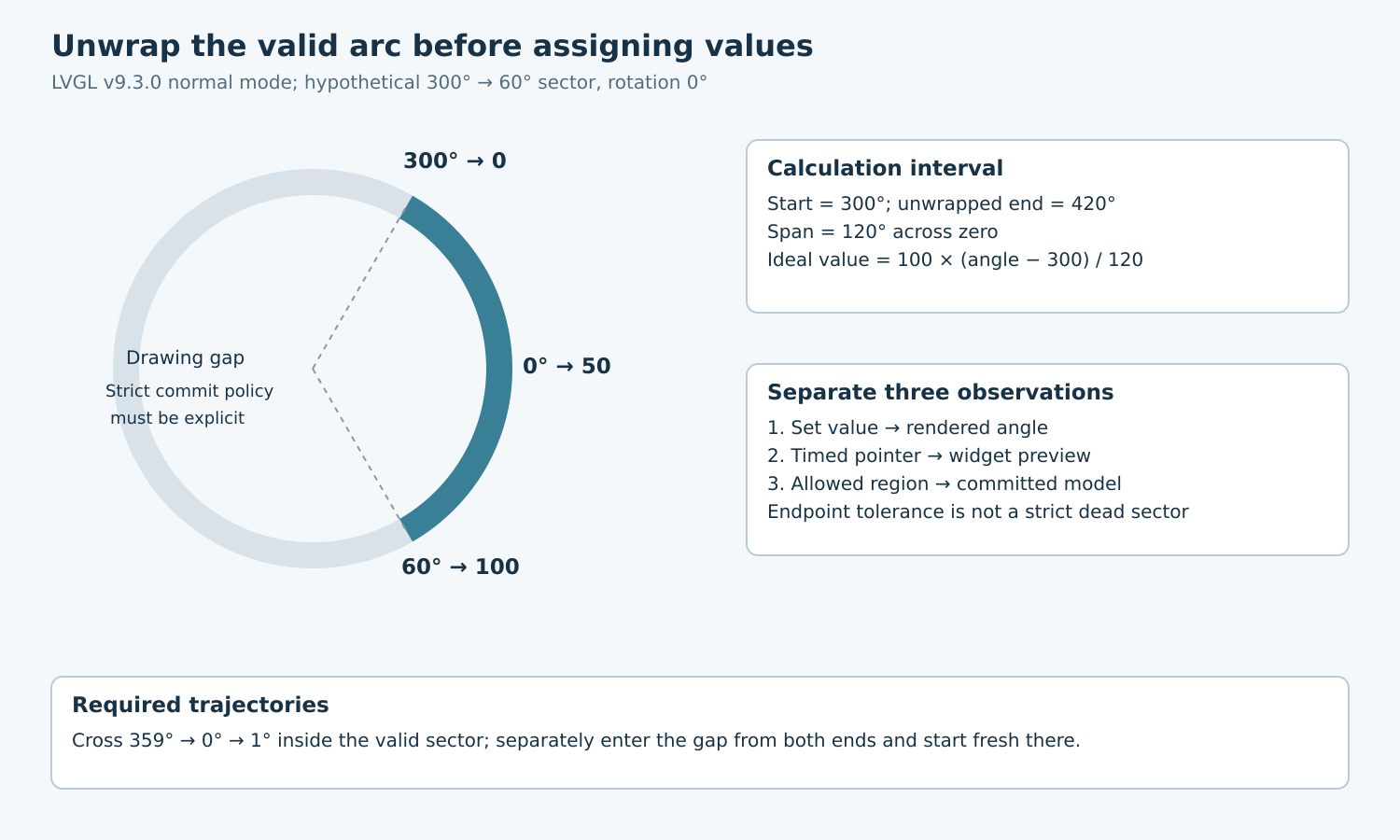
For a hypothetical control, choose background start 300 degrees, end 60 degrees, rotation zero and value range 0 through 100. The valid path travels clockwise through zero. Its span is 120 degrees, not negative 240 degrees and not the long path around the opposite side.
2. Build an unwrapped mapping worksheet
Represent the end as 420 degrees for calculation. For a geometric angle in the valid sector, unwrap it into the interval 300 through 420. The ideal continuous value is 100 multiplied by (unwrapped angle − 300), divided by 120. The displayed integer requires the implementation’s quantization policy.
| Geometric angle | Unwrapped angle | Ideal value |
|---|---|---|
| 300° | 300° | 0 |
| 330° | 330° | 25 |
| 0° | 360° | 50 |
| 30° | 390° | 75 |
| 60° | 420° | 100 |
These conveniently spaced values avoid fractional examples, but they are mathematical reference points, not promised outcomes from one immediate pointer sample. In the tagged implementation, value-to-angle mapping extends an end below the start by 360 degrees. Pointer handling additionally includes angle quantization, endpoint logic and elapsed-time rate limiting.
With a rotation of 45 degrees, the same endpoint and midpoint values appear at geometric angles 345, 45 and 105 degrees. The numeric range remains unchanged. Add that rotated case only after the zero-rotation worksheet passes; changing several coordinate assumptions together makes a failure difficult to localize.
3. Test value-driven rendering before pointer behavior
Set the five reference values through the arc value API and record the value getter plus indicator endpoint after layout and rendering. In normal mode, the indicator advances from the background start toward its end. Check the expected endpoint geometry using the worksheet rather than judging whether the knob looks roughly centered.
A programmatic value assignment tests a different path from pressing the ring. Keep the numeric setter authoritative for the baseline fixture and avoid also writing arbitrary indicator angles as a competing representation of the same setpoint. If a decorative gauge intentionally uses direct angles, document that separate ownership model.
Reject a zero-width numeric range and ambiguous angular configuration in application validation before running interaction tests. The example intentionally uses minimum less than maximum and a nonzero sector. Do not extrapolate its formula to degenerate cases by allowing division by zero or silently treating equal endpoints as a full circle.
4. Distinguish a drawing gap from a strict forbidden sector
The v9.3.0 arc pointer logic has endpoint tolerance derived from geometry and display scaling, plus history-aware behavior near the gap. It can admit points just outside the drawn background sector. Advanced hit testing improves geometric selection but does not, by itself, define your product’s exact forbidden-angle policy.
Specify two separate expectations. The widget-compatibility test records the pinned implementation’s behavior near each endpoint. The application-policy test decides whether any candidate change is allowed to reach the model while the pointer lies in a forbidden sector. A strict product rule must be enforced at that model boundary and tested; it cannot be inferred from an invisible background segment.
For the worked policy, angles strictly between 60 and 300 degrees are forbidden for new setpoint commits. Endpoints are allowed. If the widget produces a preview change inside a tolerated edge region, reject its commit and reconcile the preview under an explicit policy. Also test a drag entering the gap after starting on the valid arc. An initial hit-test filter alone does not prove the continuing interaction remains eligible.
5. Replay trajectories with controlled time
Record the configured change rate, tick source and time between samples. The public rate setter uses degrees per second. A quick jump from one reference angle to another can be limited differently from a slow trajectory through the same coordinates. Treat that as an input-history variable rather than immediately changing the angular formula.
- Start fresh at each reference point and hold with deliberate time advancement. Compare settled value, indicator angle and committed model.
- Move through 350, 359, 0, 1 and 10 degrees. Verify a continuous progression through the valid wrap, allowing documented integer quantization.
- Approach both endpoints from inside, then just outside. Repeat with a fresh press outside and a continuing drag outside; save both histories.
- Traverse the middle of the forbidden sector, release there and re-enter with a fresh press. Verify that the application does not commit a gap-induced endpoint jump.
- Repeat with different object sizes and the production display scaling. Requalify boundary tolerance rather than assuming the same angular margin.
Add exact-center and near-center points, because an angle becomes unstable or undefined there. Also test keyboard adjustment at minimum and maximum independently of pointer geometry. A usable pointer path does not validate every input method.
6. Accept the model behavior, not just the arc
Retain the configuration worksheet, angle/value reference table, timed input records and separate preview/commit trace. A wrap defect changes value discontinuously around zero; a rate-limit effect depends on elapsed time; an endpoint-policy mismatch appears in the gap. Those observations suggest different fixes.
Release the control only when its numeric mapping and commit policy agree across wrap, endpoints, gap traversal and fresh interactions. Visual continuity is useful evidence, but the decisive result is that the application receives only permitted, correctly scaled values.