RAUC HTTP Streaming Updates: Test Range Requests, Proxies and Interrupted Transfers
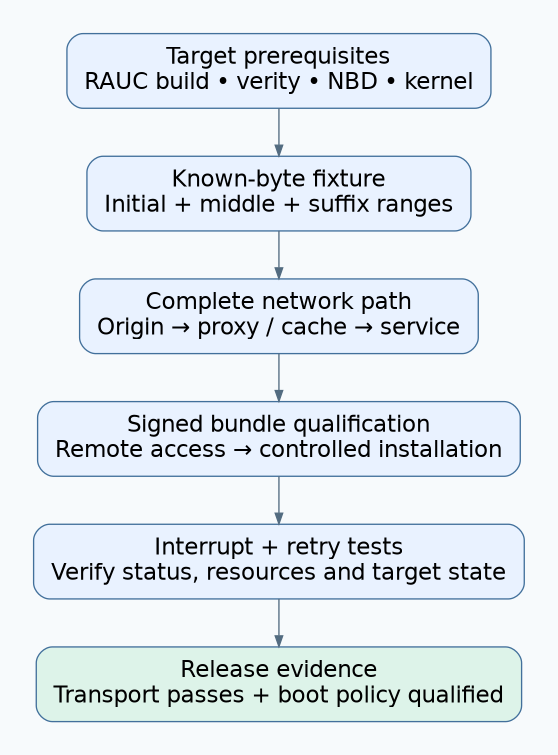
RAUC HTTP streaming requires a compatible bundle, the necessary target kernel support, and working byte-range access through the complete network path. Prove those prerequisites before comparing installation time or removing local staging capacity. A browser downloading the whole bundle successfully does not exercise the access pattern that streaming installation needs.
This guide is pinned to RAUC 1.13 documentation and uses an unencrypted verity bundle as the qualification baseline. It is not a universal recipe for older RAUC releases, encrypted-bundle key handling, or a bootloader integration. The proposed requests and interruption tests were not executed against a server or target for this article.
1. Establish the target-side prerequisites
The RAUC 1.13 streaming guide requires streaming support in the RAUC build, a suitable bundle format, a range-capable HTTP server, and kernel NBD support. The implementation uses an NBD device and a helper that translates block reads into HTTP range requests. Streaming avoids storing a complete downloaded bundle first; it does not eliminate destination-slot space, runtime memory, or all temporary storage.
The 1.13 integration guide lists the normal bundle requirements, including loop devices, SquashFS, device mapper, dm-verity, and SHA-256, with CONFIG_BLK_DEV_NBD added for streaming. It identifies the NBD netlink interface as requiring Linux 4.12 or later. Verify the deployed configuration and availability of required modules rather than relying only on the kernel version string.
Save the RAUC version and build options, kernel configuration, bundle format, system configuration, and destination layout in the qualification record. First establish that the same trusted bundle is valid for the target through the existing local installation workflow. This isolates format and trust problems from network access problems.
2. Prove range behavior with a controlled object
Host a non-sensitive test object with known length and contents through the same origin, reverse proxy, cache, and authorization route planned for bundles. Use a client with bounded response size and timeout so a server ignoring a range does not unexpectedly transfer a large production artifact.
Request a small initial range, a middle range, and a suffix range near the object’s end. For example, the illustrative request header Range: bytes=0-1023 asks for the first 1,024 bytes. Inspect the response status, Content-Range, and returned bytes against the fixture. Repeat after the cache is populated.
RFC 9110’s range semantics allow a server to ignore a Range request. A 200 response containing the entire representation is therefore different from the expected partial response. Accept-Ranges is useful information but does not replace an actual successful request. For a satisfiable single byte range, verify a 206 response and the matching Content-Range.
Do not accept a status code alone. Check that the returned offset, length, total size, and content belong to the same known representation. Include an intentionally unsatisfiable range to observe the error path, but keep that test separate from ordinary successful range retrieval.
3. Test the path the service will really use
A direct origin test and a proxied deployment test are separate cases. Repeat the fixture checks through each supported network path, including the environment used by the RAUC service. An interactive shell may have proxy variables or trust settings that a managed service does not inherit.
RAUC’s streaming guide documents proxy handling through curl and the http_proxy/https_proxy environment variables. Confirm the service’s actual configuration and credentials delivery mechanism using non-production test credentials. Do not place production passwords or bearer tokens in shared shell history, diagnostic screenshots, or logs.
Keep certificate verification enabled. Test the legitimate server name, certificate chain, client clock conditions, and any authorized client-certificate setup. A TLS failure should remain a diagnosed configuration failure, not become a successful test by removing server authentication.
Inspect redirects and caches as well. Require a documented policy for the destinations that may receive authentication material. Keep release objects immutable at their published identity, and verify repeated range reads remain consistent. An intermediary that transforms, replaces, or serves inconsistent content deserves investigation even if whole-file downloads appear normal.
4. Move from the fixture to a signed bundle
Use a development bundle with a known digest, approved signer, compatible target identity, and controlled destination slots. Verify remote inspection and mounting through the documented RAUC workflow before scheduling an installation on a recoverable test device. Mounting is an active operation; arrange cleanup and do not confuse it with a passive metadata read.
The RAUC basics separates bundle verification, installation, and the later boot process. Preserve that separation in the evidence. A working NBD path proves that blocks can be obtained; it does not prove that the selected bundle is authorized or that the installed system is healthy.
Observe the actual range requests made during remote inspection and installation. Compare them with the fixture’s tested patterns. Record server status classes and timing without retaining credentials or private bundle contents. If the service fails where the fixture succeeds, investigate bundle access, helper permissions, kernel interfaces, and the specific requested offsets.
5. Inject transport failures at useful boundaries
| Controlled fault | Required evidence | Release hold |
|---|---|---|
| Connection closes during a range response | RAUC error or retry behavior, remaining target state, operator-visible result | An incomplete operation is reported as successful |
| Proxy returns a whole object instead of a range | Clear transport incompatibility and bounded resource use | Unexpected full transfers or uncontrolled memory/storage growth |
| Authorization expires mid-operation | Accurate authorization failure and a documented recovery attempt | Repeated unauthenticated retries hide the actual cause |
| Network becomes slow or unavailable | Timeout behavior and continued product responsiveness | The approved installation or availability budget is exceeded |
| The target resets during installation | Known bootable state and accurate incomplete-installation status | A partially written candidate is treated as ready |
Do not promise byte-offset resume merely because ranges are supported. Record what this RAUC build does when the operation is retried, including bytes transferred and destination work repeated. Adaptive updates can reuse verified local data in supported configurations, but that is a separate configured feature, not an automatic conclusion about every interrupted stream.
6. A hypothetical factory proxy failure
Suppose an engineering bench installs a bundle directly from the origin, but a factory network fails during remote mounting. The fixture works for the first range while a suffix request through the factory proxy returns the whole file. This hypothetical result narrows the investigation to path behavior before any bootloader setting is changed.
Correct the proxy or distribution arrangement, repeat all fixture ranges through that path, then rerun remote bundle access and installation. Preserve the failing response evidence and the corrected result. Do not replace the test with a successful browser download, since that bypasses the demonstrated failure condition.
7. Decide with a transport acceptance record
Release streaming only when the target prerequisites, byte-range contract, authentication path, interruption behavior, and measured resource budget all pass. Record the tested origin/proxy configuration and bundle identity. Measure complete installation time and product responsiveness under representative latency and bandwidth; no generic streaming speedup is assumed.
Keep the already-qualified boot confirmation and recovery policy as a prerequisite. Streaming changes how installation obtains data, while the product still needs a correct decision about whether the newly installed system may become the active, trusted operating state.