Wi-Fi Multi-Link Operation: Keep Link-Level Events Separate from Device Connectivity
A multi-link client can stop using one radio link without losing its Wi-Fi association or application session. Treat advertised links, associated links, traffic mappings and useful connectivity as separate observations. Otherwise a dashboard can announce a disconnect that never happened, or display healthy Wi-Fi while the service has already stalled.
This guide pins its application-facing definitions to Android 15, API level 35, using the android-15.0.0_r1 Wi-Fi module. A Linux 6.12 driver contract provides a separate example of link removal. Neither implies that every Android 15 device, Wi-Fi 7 product or vendor driver implements every MLO feature. Ordinary BSSID roaming and switching between Wi-Fi and cellular are outside scope.
Build a link ledger before interpreting events
Record the exact client chipset, driver and firmware, AP model and software, negotiated Wi-Fi mode, and available diagnostic permissions. Identify the AP multi-link device separately from each affiliated AP’s BSSID. A link ID has meaning within its MLD and connection context; it is not a globally unique network identity.
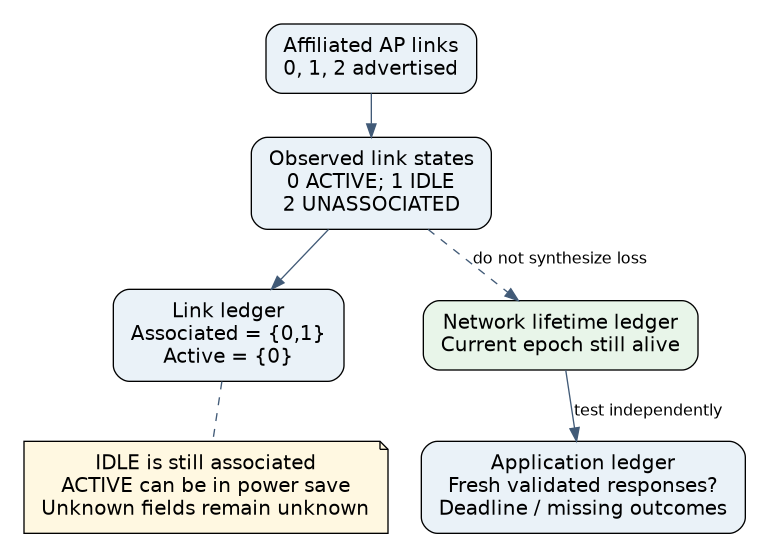
The pinned WifiInfo implementation exposes two different lists. getAffiliatedMloLinks() describes AP-supported links learned from scan information. getAssociatedMloLinks() selects links whose state is IDLE or ACTIVE. An advertised third link therefore need not belong to the client’s established association. Android 15 WifiInfo source
| Observation | What it supports | What it does not establish |
|---|---|---|
| Affiliated link advertised | AP MLD offers that link | Client has associated on it |
| IDLE link | Associated, no traffic stream mapped | Association loss |
| ACTIVE link | Associated, at least one traffic stream mapped | Continuous transmission or successful service delivery |
| Fresh validated application response | The tested service operation completed | Every affiliated link was usable |
Android’s MloLink explicitly allows an ACTIVE link to be in power-save mode. INVALID is an initialization/error state, not another spelling of disconnected. Preserve unknown or unavailable values instead of converting them into zero links or a failed connection. MAC addresses can also be redacted when the caller lacks permission; do not use a missing identifier as evidence that the AP disappeared. Android 15 MloLink state and address contracts
Keep event causes and observation limits explicit
Android’s Wi-Fi 7 integration guide describes temporary TID-to-link disablement while the station continues using remaining established links without another association. It also distinguishes firmware-managed switching and power behavior from framework notifications. Consequently, an application should not expect every radio scheduling decision to arrive as a connectivity event. A capabilities update is a new observation, not a complete over-the-air timeline. AOSP Wi-Fi 7: multi-link handling and TID-to-link mapping
Use the WifiInfo associated with the relevant Network callback and preserve that network’s lifetime in the diagnostic record. On replacement, retire the old ledger and reject late observations from it. Do not merge snapshots solely because the SSID or a link ID matches. Sampling time, source and missing fields should travel with each snapshot.
Linux 6.12 offers a useful contrasting boundary: cfg80211_links_removed() reports setup-link removal caused by AP-MLD reconfiguration. Its contract forbids removing all links through that notification; disconnection is required instead. This is a specific driver notification, not a general API for interpreting every brief RF fade or idle interval. Keep temporary mapping changes, configured-link removal and complete association loss as separate categories. Linux 6.12 cfg80211_links_removed contract
Qualify a one-link disruption without resetting the product
- Prove the initial topology. Establish which links are actually associated and which are ACTIVE in the available snapshots. Record the current MLD and network lifetime. A Wi-Fi 7 scan label alone is insufficient evidence of a multi-link connection.
- Define the application boundary. Run numbered, authenticated test operations through the intended Wi-Fi network. Record release, validation, timeout and duplicate handling. Ensure a cellular or wired fallback cannot silently carry this particular test.
- Change one supported link condition. In an authorized isolated setup, use an AP-supported link-disable or reconfiguration control, or approved laboratory attenuation. Distinguish a temporary traffic-mapping change from removal of an affiliated AP. Keep the remaining link available and the legal operating configuration unchanged.
- Correlate three outcomes. Capture link-state snapshots, association/network lifetime events, and the application operation trace. Record whether the network stayed alive, whether a different link carried traffic where observable, and whether the application met its declared interruption budget.
- Restore and repeat. Verify that restoring the link does not create duplicate application sessions or revive obsolete observations. Repeat with the other supported link and with representative bidirectional traffic.
- Run a complete-loss control. Separately remove the whole test association using an approved method. Confirm that the product handles real network loss and later recovery. A test suite that only exercises surviving-link cases cannot validate disconnect handling.
Record actual concurrent-link capabilities rather than assuming multiple associated links transmit simultaneously. Link combinations, scheduling and radio sharing depend on the device implementation. Do not infer a throughput sum or a universal failover delay from the number of rows in the ledger. The regional permission to operate each band remains an independent deployment constraint.
Interpret a hypothetical disagreement
Suppose a synthetic diagnostic record initially contains two ACTIVE links and one UNASSOCIATED affiliated link. After an AP mapping change, one associated link becomes IDLE, the other remains ACTIVE, the same network lifetime continues, and application responses still satisfy the project limit. Report a link-use change with continuing service. Do not report “one of three connections failed”: there were only two associated links, and IDLE did not end either association.
If the same link-state update accompanies repeated application timeouts, report degraded service while association remains established. That result calls for traffic-path and firmware evidence. It does not justify pretending the link callback itself proved an association loss.
Evidence and release checklist
A Python 3.12.14 host model tested filtering of associated versus active links, unknown-state preservation, stale-generation rejection and independent network/service outcomes. It is an application admission model, not executed Android framework code or an RF simulation. No multi-link hardware, AP reconfiguration or recovery timing was tested.
Release evidence should include the supported hardware/software combination, observed link categories, network-lifetime handling, application interruption results and unobservable fields. The useful claim is that the product interprets and tolerates specified link changes under a measured workload, not that MLO universally makes Wi-Fi loss invisible.