Yocto PREFERRED_VERSION: Prove Which Recipe Provider the Build Selected
A configuration requests a preferred version, but the image contains software from another recipe revision. The useful question is not whether the assignment exists in a file. It is whether the requested recipe identity and version match an available candidate, whether that preference survives configuration evaluation, and which recipe ultimately enters the target graph.
This article uses Yocto Project 5.0.12 and BitBake 2.8 behavior. The examples use an imaginary sensor library to illustrate selection mistakes. They are not claims about a tested layer or an existing upstream package.
Write the requested identity in three separate fields
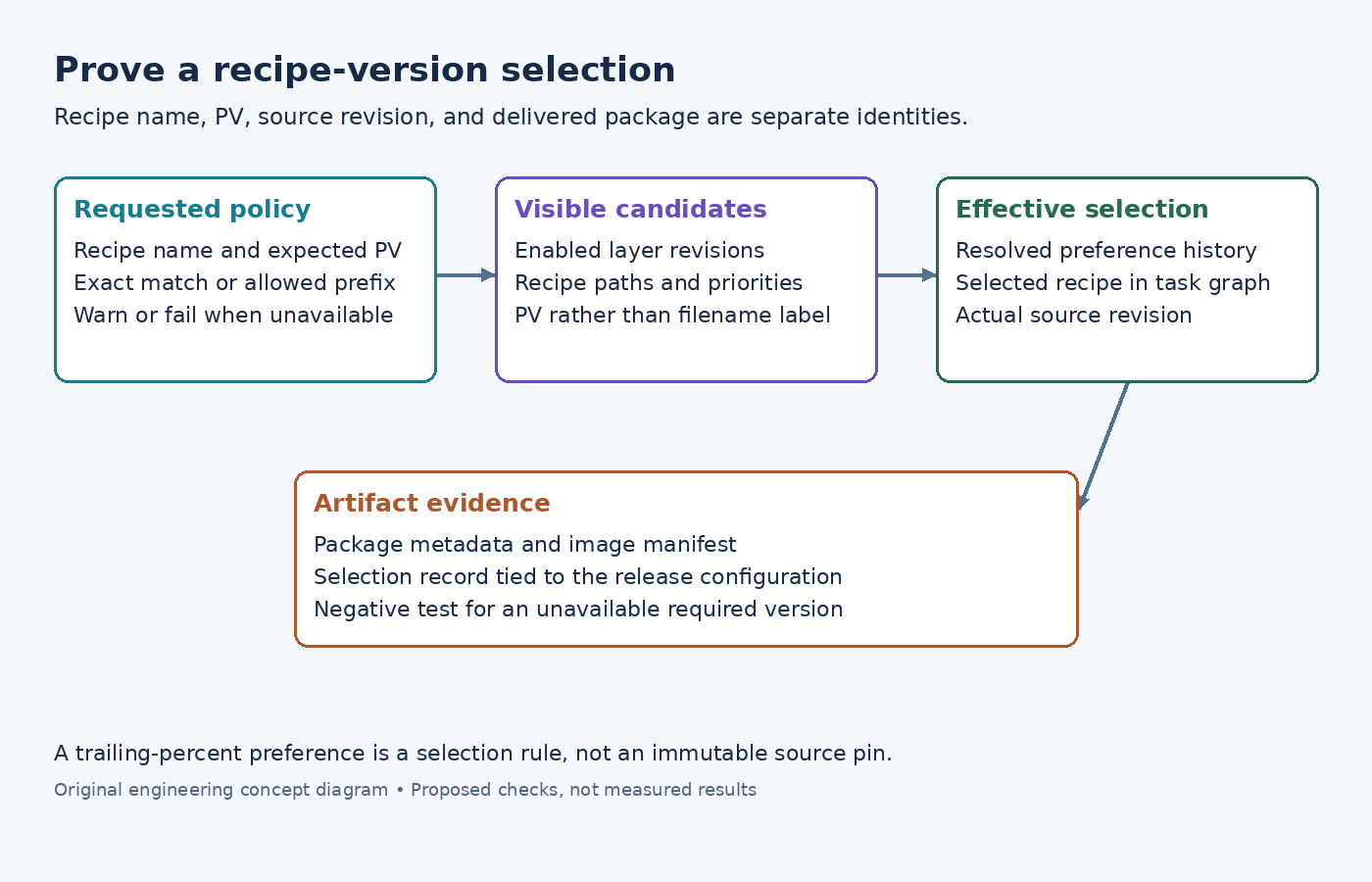
Start with the recipe name, the recipe version, and the source revision. Keep them separate in the investigation record. A recipe version such as a Git-derived development version can refer to metadata that also selects a specific source commit. Choosing the intended version string does not independently prove that the intended source commit was fetched.
If the build depends on an alias such as a virtual provider, first identify which recipe supplies that alias. PREFERRED_VERSION selects among versions of a named recipe; it is not the control for choosing between differently named implementations. Record the selected provider name before testing the version preference for that recipe.
State the acceptance requirement precisely. A development configuration may allow any supported version in a series. A release configuration may require one exact candidate and should stop if it disappears. These are different policies, even if both initially select the same recipe.
Compare the requested value with PV, not the filename label
The PREFERRED_VERSION reference states that the value matches PV. It also limits the percent wildcard to the end of the string. The filename's version portion can differ from the recipe's effective PV.
For example, imagine sensorlib_git.bb declares PV = "2.4+git". A preference for git would not express a match for that value. An illustrative PREFERRED_VERSION_sensorlib = "2.4%" expresses a prefix match, but it can admit more than one version as the available metadata changes.
Use this example as a diagnostic, not a recommended release pin. Inspect the actual candidate's PV and source-selection metadata. If the requirement is exact, record the complete selected values instead of interpreting a broad prefix as an immutable source identity.
Inventory the candidates that the build can actually see
Use bitbake-layers show-recipes to inspect the available recipe versions and providing layers. The layer-management reference also documents show-overlayed, which helps identify recipes hidden by another layer's selection priority.
If the expected candidate is missing, investigate the enabled layer list, branch, recipe path, and parse diagnostics before changing the version preference. A preference cannot select metadata that is absent from the configured build. Preserve any reported skip reason instead of flattening all failures into a generic version mismatch.
For duplicate recipe names across layers, inspect the recipe paths and configured priorities. The layer-priority documentation notes that priority can allow a lower-version recipe to take precedence. Do not assume that sorting filenames by their apparent version reveals the selected candidate.
Avoid raising a whole layer's priority as the first repair. That can affect other recipes beyond the one under investigation. First establish whether the desired candidate belongs in that layer combination and whether the selection policy is being expressed at the correct scope.
Read the effective preference and selected recipe together
Inspect bitbake -e sensorlib, substituting the actual recipe name. Save the effective PREFERRED_VERSION_sensorlib, PV, PN, recipe-file identity, and relevant source revision values. The variable-inspection guide explains the assignment history available in this output.
Trace an unexpected preference back to the configuration that set it. A machine-specific assignment may legitimately change the choice for one board while leaving another board unchanged. Keep the machine and distribution names beside the captured environment so two different contexts are not compared as if they were the same build.
Then inspect the target's dependency graph with bitbake -g product-image. The BitBake graph-generation reference describes its task graph and recipe list outputs. Use them to establish that the recipe being inspected is actually part of the requested image build.
Decide whether absence is a warning or a release failure
The version reference distinguishes PREFERRED_VERSION from REQUIRED_VERSION: an unavailable preferred version produces a warning, while an unavailable required version is an error. If both are set for the same recipe, the required value applies.
Use this distinction deliberately. Where the release contract requires an exact available version, consider REQUIRED_VERSION_sensorlib with the reviewed value in product configuration. Do not add a requirement blindly to a generic layer that must support several independent products.
Test the policy in a disposable configuration by making the requested version unavailable and confirming the expected diagnostic. This is a proposed negative test, not a result reported here. Restore the intended layer set afterward and retain both the negative and normal selection evidence.
Tie selection evidence to the delivered software
After building, connect the selected recipe and source revision to the package metadata and image manifest. A runtime version banner can be useful, but custom patches or unchanged upstream version strings may make it incomplete evidence.
The release record should show the configured requirement, selected recipe path, effective PV, source revision, and delivered package identity. If any link is missing, keep the selection claim narrow. A preference assignment is an input to selection; the recorded recipe and artifact evidence show what the build actually used.