U-Boot Bootflow Diagnostics: Keep Failed Candidates Visible During Scanning
A storage device appears in U-Boot, but the expected operating system
is missing from the boot menu. A normal scan finds another candidate and
the investigation moves toward filesystem repair. That jump can be
premature: the missing candidate may have been discarded after failing a
particular discovery step, and a different valid candidate says nothing
about where it failed.
U-Boot standard boot provides a useful diagnostic model when the
relevant command support is enabled. This article uses the v2025.01
documentation and proposes a controlled inspection sequence. It does not
claim that any board was booted or repaired. For a Buildroot-based
product, trace these mechanisms in the U-Boot revision and board
configuration selected by that product; Buildroot integration does not
replace that check.
Confirm the command surface
first
The versioned
bootflow command reference states that full functionality depends on
CONFIG_BOOTSTD_FULL. Reduced builds do not offer the same inspection
workflow. Check the actual binary’s help and build configuration before
pasting a sequence intended for a full diagnostic build.
This is especially important when the desired operation is
observation. The reduced command behavior and a scan with automatic
booting are not interchangeable with a full scan that retains failed
candidates. Decide whether the session may probe all available devices,
contact network services or attempt to transfer control to an operating
system.
On a laboratory device, preserve the original boot configuration and
choose a specific target where practical. Record the device name or
convenience label and how it relates to board aliases. Do not assume
that a numerical label identifies the same physical connector across
unrelated boards or firmware configurations.
Preserve the candidate
that disappeared
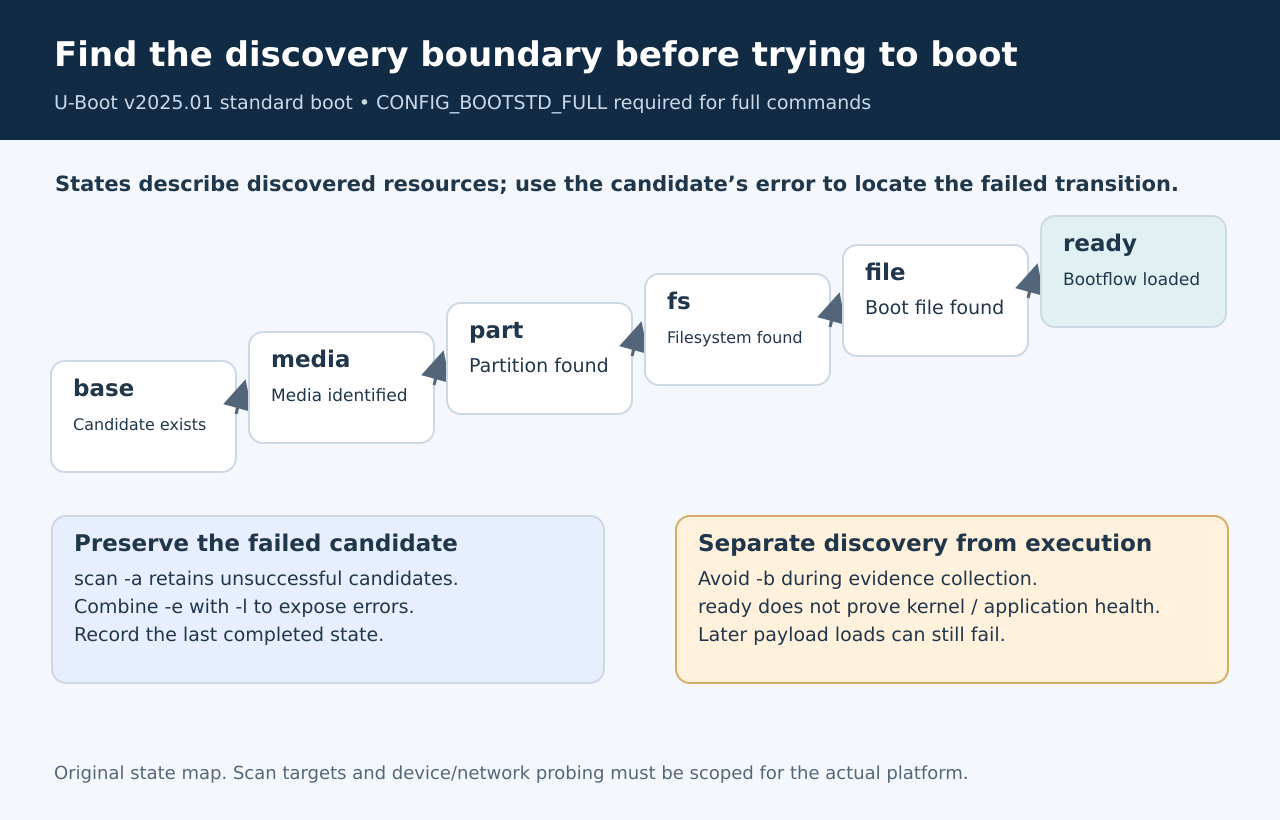
For a full-featured build, scan’s -a option retains
candidates that would normally be dropped. The list and error options
expose more context, while -b requests booting. A
diagnostic sequence should make that last choice deliberately. A
retained failure is often more useful than another successful boot
because it identifies the stage that needs investigation.
Capture the complete candidate identity: boot device, partition,
method, filename, state and error. Keep these fields together. An error
number without its method and stage can lead the next engineer to
troubleshoot a different path from the one that actually ran.
Read the state as a boundary
The Standard
Boot overview separates the discovery states base, media, part, fs,
file and ready. They distinguish finding media, locating a partition,
accessing a filesystem, finding a file and loading it. The state is a
clue about the last completed boundary, not a complete diagnosis of the
underlying cause.
Use that distinction to choose the next observation. If partition
information is unavailable, changing a kernel command line is unlikely
to illuminate that boundary. If the filesystem is accessible but the
expected configuration file is absent, investigate its name and search
location before replacing the entire image. If a file’s size can be
found but reading it fails, preserve that specific read failure rather
than reducing it to “not bootable.”
Avoid turning each state into a single-cause lookup table. A
partition-related failure could involve missing metadata or a read
problem. Your report should say what was observed, what remains
uncertain, and which additional read distinguishes the hypotheses.
Separate discovery
from payload execution
A ready bootflow is not an application-health result. The command
documentation notes that some files may be read later and that
bootflow read itself does not perform additional parsing or
load the images contained in those files. The eventual boot path can
therefore fail after the configuration was discovered successfully.
Select one retained candidate before inspecting or booting it. Record
its name again in the transcript so the transition from list to
selection is unambiguous. If a later kernel, initramfs or device-tree
retrieval fails, attach that failure to the selected candidate rather
than revising the earlier discovery result.
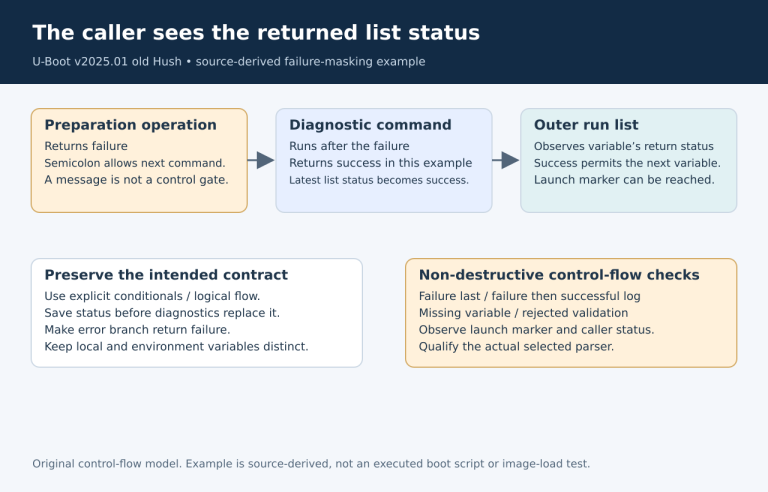
Also avoid treating a command’s shell status as a universal
bootability test. The documented return behavior differs between
booting, menu interaction and other subcommands. For automated
diagnostics, define which structured observations or explicit conditions
establish each result. A true shell condition alone is too weak to mean
that the intended operating system exists and can run.
Create fixtures with
one changed boundary
A controlled fixture set is more informative than trying unrelated
recovery commands. Start from one known, disposable boot medium and
create separate cases for missing configuration, a wrong configuration
directory, an unavailable filesystem and a later payload file that is
absent. Change only one property per fixture and keep a record of the
intended difference.
For each case, propose the expected last completed stage before
running the test. Compare that expectation with the retained bootflow
and its error details. When the state differs, inspect the actual boot
method and search order before assuming the documentation is wrong;
another method may have handled the candidate.
Repeat the relevant fixture with automatic booting disabled and then,
only in an authorized test session, with explicit boot of the selected
candidate. This separates discovery evidence from execution evidence and
prevents a fallback candidate from hiding the original failure.
Leave a compact,
reproducible diagnosis
A useful handoff contains the firmware version, required command
configuration, selected device, retained candidate identity and the
first failed boundary. Include the smallest fixture that reproduces that
boundary. “The card works elsewhere” is context, but it does not
establish how this U-Boot build interpreted the same medium.
Stop the investigation when the evidence answers the actual question.
If the configuration path is wrong, correct that path and verify it
rather than changing partitioning, boot order and filesystem settings
together. Retaining failed candidates gives the engineer a way to make
one justified change and to prove which discovery step it repaired.