Zephyr OS Overlay Selection: Prove Which Hardware Description Reached the Build
An edited overlay file has no effect unless the build actually selects and processes it. When a Zephyr hardware property refuses to change, first establish the overlay inputs and generated devicetree for that build. Repeatedly changing a file that is not active only adds uncertainty.
This workflow is based on Zephyr 4.4.0. It addresses overlay selection and precedence, rather than whether a particular electrical configuration is safe for a board. The examples are hypothetical, and no board-specific configuration has been compiled or tested here.
Separate the intended input from the selected input
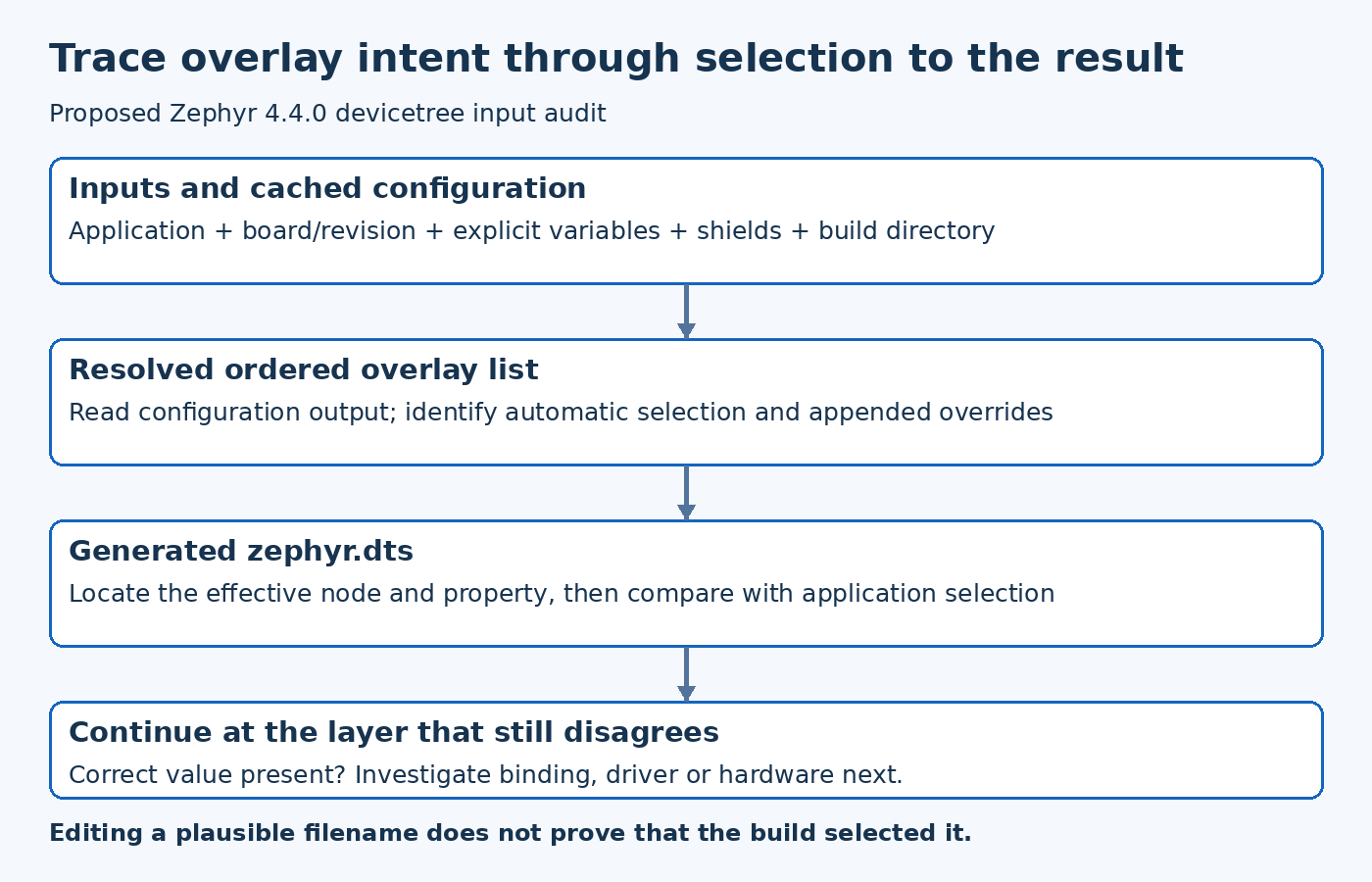
Record the application directory, board target, board revision and build directory. Then inspect the configuration-stage output that lists discovered overlays. The file visible in an editor is not authoritative evidence of what CMake used.
The version-pinned Zephyr devicetree HOWTO describes automatic overlay discovery and explicit overlay variables. Discovery can select board-specific files before reaching the generic application overlay. A project containing several plausible files therefore needs an input inventory, not a filename guess.
For example, a hypothetical application may add app.overlay while an existing board-specific overlay is the one selected by the automatic search. The unchanged peripheral property is then a build-input issue. It is not evidence that the property itself is unsupported or that the driver ignores it.
Check explicit selection and appended overrides
Determine whether the build supplies DTC_OVERLAY_FILE explicitly. If it does, inspect the actual list and order. Keep command-line arguments, project configuration and CI wrappers in view; an upstream script can select files that a developer does not notice during a local rebuild.
EXTRA_DTC_OVERLAY_FILE is an additional input mechanism, not simply another spelling of the first variable. In the documented processing sequence its overlays are appended, so later definitions can affect values established earlier. Record the resolved inputs before trying to interpret the final property.
Avoid solving an ordering problem by copying the same property into every possible overlay. That makes the immediate result difficult to explain and creates multiple sources of future disagreement. Prefer a clear ownership rule for base hardware description, product variation and deliberate test overrides.
Inspect cached configuration deliberately
Build configuration persists information between invocations. A developer can change an invocation or move files while continuing to reuse a build directory whose cached input selection differs from the intended experiment.
Before drawing conclusions, inspect the active cache and configuration output. If a fresh build directory is used to remove uncertainty, keep it separate from the original evidence and identify exactly what changed. A successful fresh build is useful, but it should not erase the explanation of why the earlier build selected another input.
This is particularly important in automated builds that reuse workspaces. Make the resolved board and overlay list visible in the build record, rather than relying on a CI job's friendly name to describe them accurately.
Read the final devicetree as the result
After configuration completes, inspect the generated zephyr.dts. Locate the intended node and the property under investigation. This is a more direct way to determine the effective description than manually following every include and overlay in a large board hierarchy.
The version-pinned Zephyr DTS CMake module provides the build-side reference for processing the devicetree inputs. When reviewing unusual behavior, compare the implementation for the release being used instead of assuming that the latest development documentation exactly matches an older product branch.
If the final DTS contains the intended value, move the investigation forward. The remaining problem may involve the binding, driver configuration or hardware behavior. Continuing to rearrange overlays after the effective value is correct can obscure the real failure.
Check node identity before blaming precedence
Two nodes can look similar while referring to different buses or peripheral instances. Verify that the overlay targets the node the application actually uses. An alias or chosen entry can direct the application elsewhere even when the edited node contains the expected property.
For a hypothetical board with two UARTs, changing the baud-rate property of one node does not prove that the console uses it. Trace the selected console node and the effective property together. The decisive comparison is between the application's selected device and the generated description for that device.
Use the same caution with board revisions and shields. They may add legitimate inputs whose purpose is separate from a local application change. Preserve those distinctions in the investigation rather than flattening every file into one ad hoc overlay.
Establish a maintainable override policy
Once the issue is understood, decide where the property belongs. A hardware fact shared by all applications should not necessarily live in a temporary local test overlay. A deliberate experiment should be clearly identified and should not silently become the product default.
Document the intended override order and test the configuration combinations that the product actually supports. If two combinations intentionally select different hardware, state that explicitly. Do not claim support for untested board or shield combinations merely because the overlay parser accepts them.
A useful regression check can inspect the resolved input list and relevant generated properties. Such a check establishes configuration intent; it does not replace electrical validation or runtime testing. Keep those acceptance layers separate in the release record.
Leave an explainable build record
Retain the release revision, resolved board target, selected overlay list and generated result needed to explain the change. Include the reason for an explicit override and remove obsolete experimental inputs through the normal review process.
The diagnostic outcome should be more specific than saying a clean build fixed it. It should explain which input was previously active, why the intended change was absent or overridden, and what now selects the correct description. That makes overlay behavior predictable for the next engineer and for the next automated build.