SquareLine Studio State Trickle: Test Parent State Propagation Without Confusing It with Events
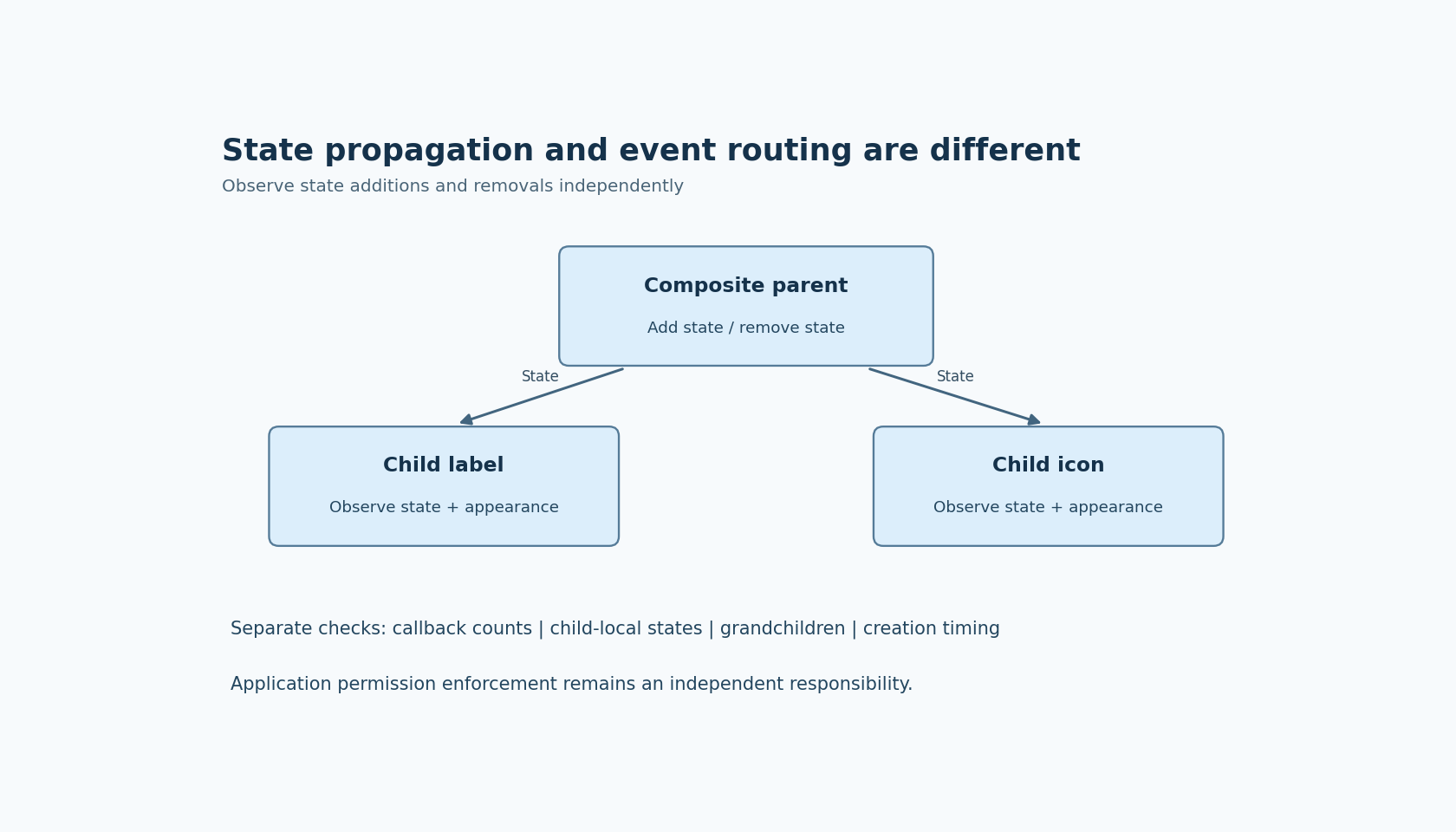
A composite control often contains a parent container, a label and an icon. Disabling the parent may need to change the whole control's appearance. SquareLine Studio's State Trickle flag offers a parent-to-child state mechanism, but it should be tested as state propagation rather than treated as a general synchronization feature.
The SquareLine inspector documentation describes propagating parent state additions and removals to children. The feature is listed in the 1.6.2 changelog. In LVGL 9.5's flag reference, STATE_TRICKLE is distinct from EVENT_TRICKLE and EVENT_BUBBLE. Those names identify different mechanisms; they are not alternative spellings for “make children behave like the parent.”
Decide who owns each state
Consider a command card with an icon and a status label. The card may be disabled because the command is unavailable, while the label may independently be checked or selected for another reason. Before enabling propagation, write down which state bits the parent is supposed to control and which belong to a child-specific interaction.
This matters on both sides of a transition. A child that acquires a state when the parent does is only half of the test. Removing the parent's state can be equally consequential, particularly if application code has also manipulated the same state on the child.
Do not assume the flag maintains an independent ownership count for every writer. The cited flag descriptions establish propagation, not a transaction system that reconciles competing application decisions. If a child-local state must survive a parent transition, test that exact combination and choose an explicit ownership policy.
Make invisible state changes visible
Build a small diagnostic version of the control. Give the parent and each child clearly distinguishable styles for the states you intend to propagate. Use restrained colors in the production design later; during diagnosis, a deliberately obvious outline or fill makes the transition easier to observe.
Exercise one state at a time. Add DISABLED to the parent, inspect the children, then remove it and inspect them again. Repeat separately for PRESSED if that state is relevant to the design. Combining multiple states in the first test makes it harder to tell whether the propagation failed or a different style selector dominated the visible result.
Record actual state values as well as appearance where your integration allows it. A child can hold the expected state while displaying an unexpected style because of its styling configuration. That is a different problem from a state that never arrived. Keeping those observations separate prevents an unnecessary change to event routing.
A callback counter answers a different question
Add a simple diagnostic counter to the callbacks you care about. Observe whether a parent state transition coincides with those callbacks, but do not make callback execution part of the State Trickle promise without evidence from the selected integration.
Event routing determines where event notifications travel. State propagation changes state membership. A UI can need both, one or neither. For example, a child icon may need the disabled visual state without becoming a second source of the command event. Enabling an event-routing flag to repair its color can introduce a separate behavior change.
Likewise, a disabled visual state is not a substitute for enforcing command availability in the application. The business rule still needs an authoritative owner. A background command source or a later code path should not become allowed merely because it did not originate from that visible control.
Test hierarchy depth and late changes deliberately
Start with direct children so the first result is easy to interpret. Then add the nesting actually used in the product. Observe grandchildren explicitly rather than inferring their behavior from one child that changed correctly. If intermediate containers have relevant flags, include their settings in the test record.
Also test a child created or modified after the parent is already in the relevant state. A description of state additions and removals does not, by itself, establish every initialization behavior. The product may create dynamic content while a page is disabled, so this timing can matter even when ordinary press/release transitions look correct.
Finally, add the intentional child-local state from the ownership analysis. Run parent add/remove transitions around it. If the outcome violates the intended policy, centralize the writes or revise the composition rather than relying on an undocumented interaction between multiple state owners.
Accept the composite control as a set of transitions
A useful acceptance record lists parent state before and after, child state before and after, visible style and relevant callback count. It should include removal, repeated transitions and the nested structure used by the product. One screenshot of a disabled card cannot establish those behaviors.
The result is a narrowly tested use of SquareLine's flag: a known parent-to-child state relationship. It does not imply model synchronization, permission enforcement or event delivery. The experiments here are proposed, not executed; their purpose is to make those boundaries observable in the selected SquareLine and LVGL build.