Yocto MACHINE and DISTRO: Explain Why the Same Application Produces Different Images
Two teams build the same application revision with the same image recipe, yet one image contains different services and the other configures an optional library feature differently. Comparing the application source alone cannot explain the difference. In a Yocto build, the selected machine, distribution, image, layers, and local configuration jointly determine the result.
The practical diagnostic question is not which file mentions the application. It is which configuration axis introduced the first relevant difference. This walkthrough uses Yocto Project 5.0.12 Scarthgap documentation and invented configuration names. Its comparison procedure is proposed; no image pair or target was built for this article.
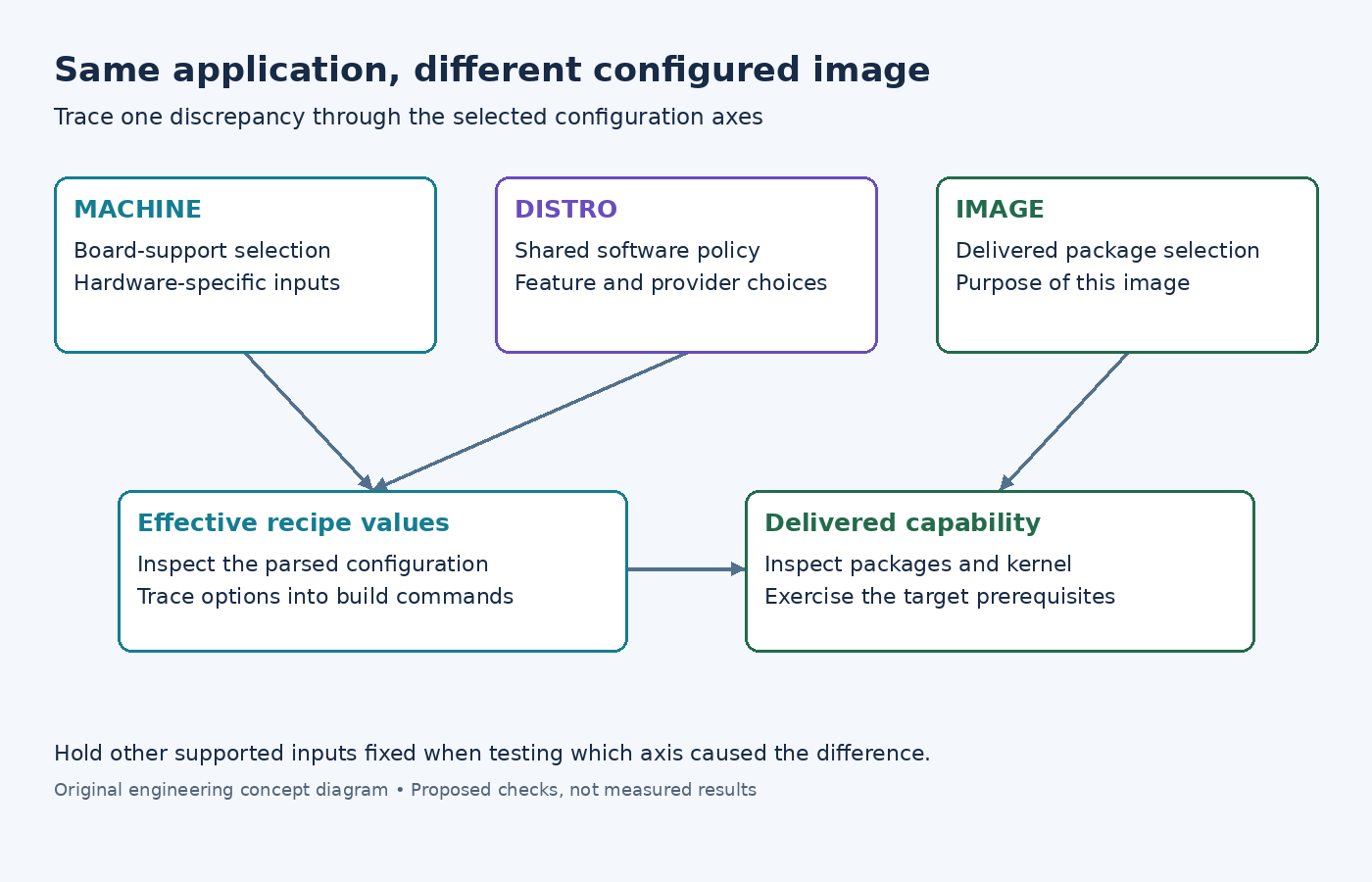
Name the three axes before comparing outputs
The MACHINE reference connects the selected machine name to its machine configuration. The DISTRO reference similarly connects the distribution name to distribution configuration. An image recipe then defines a deliverable within that configured build. Treat these as separate choices, even if a setup script usually selects them together.
For an illustrative gateway, the machine choice might identify board support while the distribution expresses product policy and the image selects a diagnostics-oriented package set. The same application commit can participate in several combinations. That is a useful capability, but it makes the phrase same build ambiguous unless all relevant selections are recorded.
Collect an evidence header for each build: layer revisions, machine, distribution, image target, configuration fragments, and application source revision. Include local changes and environment setup steps. If one team cannot supply the inputs, the comparison starts with an unknown baseline rather than with an application defect.
Compare the effect, then find its configuration source
Choose one concrete difference, such as an optional feature missing from the application or a service appearing in the filesystem. Do not begin by diffing every generated file. A focused discrepancy gives the investigation a stopping condition: explain which input produced that difference and whether it was intended.
Inspect the parsed configuration in each build using bitbake -e for the affected recipe or image. The variable-inspection guide explains how this exposes effective values after parsing. Save the relevant values and assignment history, rather than relying on the last assignment found by a text search.
If the difference is in an application's configure command, compare its effective feature selections and dependency inputs. If the difference is an installed service, inspect the image selection and the package that owns the service files. Those investigations may eventually meet, but they begin at different boundaries.
A feature name is not the complete implementation
The features reference explains that distribution and machine features can influence configuration and package inclusion, without a one-to-one package mapping. It also warns that a distribution feature does not normally configure the kernel automatically. Therefore, a feature label is a starting point for tracing behavior, not proof that all required layers of support exist.
Suppose an illustrative feature requires a userspace library, a daemon, and a kernel facility. Review all three. A library may be built with the requested option while the image omits the daemon. The daemon may be installed while the kernel lacks the necessary support. A successful application link does not establish that the complete target capability works.
Write the expected chain explicitly: selected configuration, recipe option, generated build command, delivered package, runtime prerequisite. Mark the first broken link. This is more useful than adding the same feature name to additional variables until the image happens to boot.
Change one axis at a time
When the two builds differ in both machine and distribution, a direct comparison has multiple plausible causes. Construct an intermediate configuration when the layers support it. Keep the machine fixed while changing the distribution, or keep the distribution fixed while changing the machine. Do not invent unsupported combinations merely to complete a square matrix.
For each supported comparison, predict which properties should change and which should remain stable. A machine change can legitimately change hardware-specific artifacts. A distribution change can legitimately alter software policy. An image change can legitimately alter delivered packages. Unexpected changes are investigation targets, while expected changes still need validation for their intended use.
- Save the effective input values for the original configuration.
- Change only the selected axis in a separate build configuration.
- Reinspect the affected recipe and image values before building.
- Build and compare the specific artifacts tied to the discrepancy.
- Run the target check that exercises the feature, including a failure case such as absent hardware or unavailable service.
Do not share a mutable output directory casually between experiments. Record where each artifact came from and keep comparison results associated with the correct configuration. Otherwise an old image copied from a deployment directory can make a sound metadata investigation appear contradictory.
Resolve ownership as part of the fix
Once the cause is understood, place the change where its scope belongs. A board capability should not need to be rediscovered in every application recipe. A product-wide policy should not depend on one developer's local configuration. An optional test utility should not enter production solely because a reusable layer was enabled.
Close the issue with a compact explanation linking the original symptom to the effective value, its source, and the corrected artifact. Preserve the supported configuration pair used for regression testing. The goal is not to force all images to match. It is to make their differences intentional, traceable, and testable whenever the same application is reused.