Yocto Multilib: Trace Library Paths and Package Names Through the Selected ABI
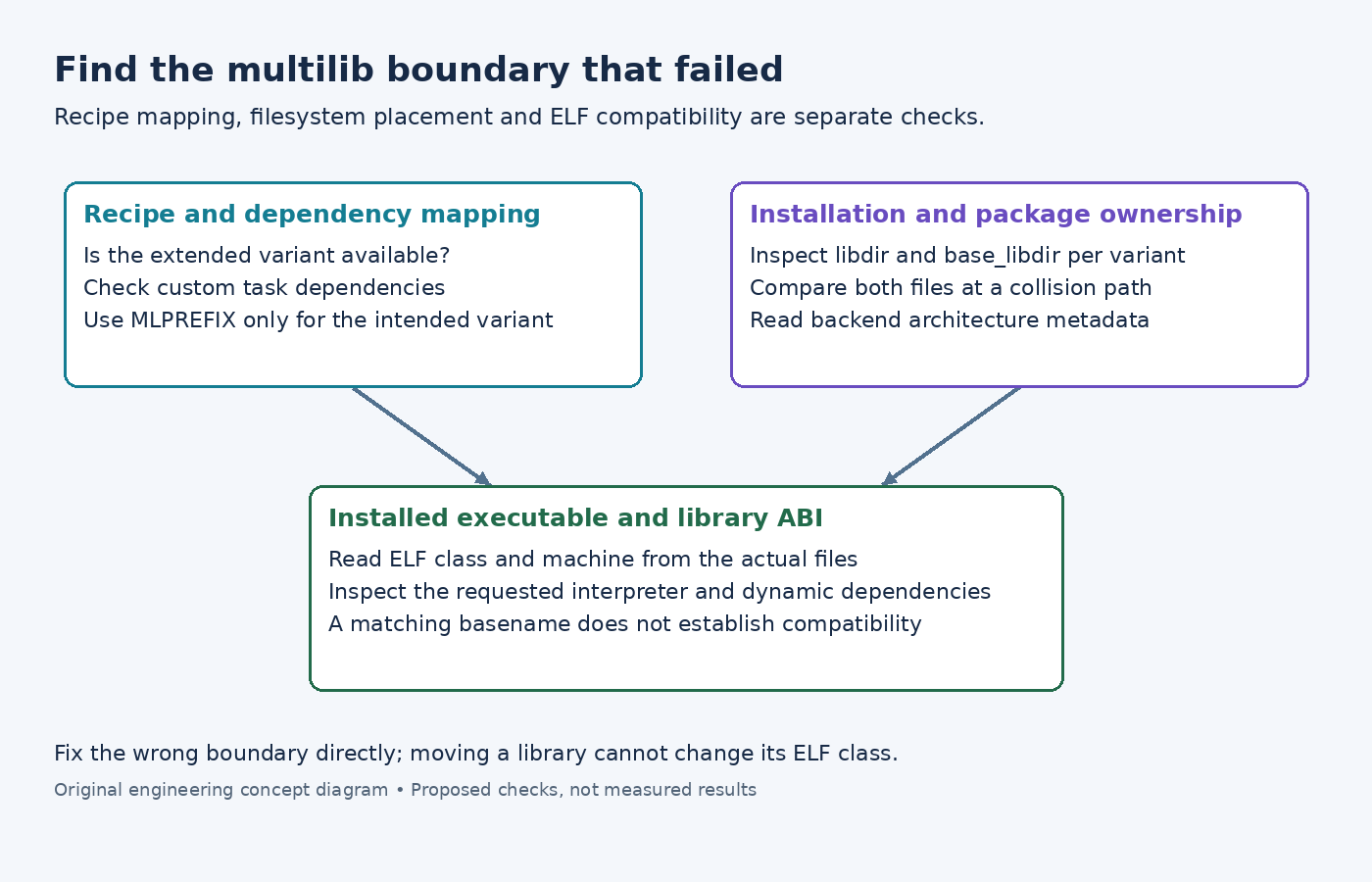
A mixed-ABI Yocto image can fail in several superficially similar ways: a multilib dependency has the wrong recipe name, two packages install different files at one pathname, or an application finds a library of the wrong ELF class. These failures occur at different boundaries and need different corrections.
Start with the intended relationship: which application ABI should use which library build? Adding a second library package to an image does not by itself establish that relationship.
Follow the multilib recipe identity
The Yocto 5.0.12 multilib guide describes class extension for multiple target formats or optimizations. A configured lib32 variant commonly gives a recipe an extended identity such as lib32-sensorlib. Standard dependency and package variables are transformed by the multilib machinery.
First verify that the recipe supports the configured extension and inspect the extended recipe's effective metadata. A missing lib32- provider should be investigated before changing installation directories. A normal recipe being available does not demonstrate that its extended variant is available under the selected configuration.
Custom task dependencies deserve separate attention. The MLPREFIX reference explains that explicitly named task dependencies do not receive the same automatic rewriting as ordinary DEPENDS. Where the dependency must follow the variant, an expression such as do_foo[depends] += "${MLPREFIX}sensorlib:do_foo" can express that requirement. Confirm the intended provider; some dependencies deliberately refer to a native tool instead.
Separate path errors from architecture errors
Inspect libdir, base_libdir, the install command and the staged files for each variant. Do not assume that /usr/lib or /usr/lib64 is correct merely because it works on another distribution. The active configuration determines the expected locations.
Yocto's package QA reference distinguishes libdir problems from arch problems. The former can expose hardcoded library locations; the latter checks ELF architecture properties such as bit width and endianness.
For a path problem, trace the build system's install-directory argument and remove an inappropriate hardcoded location. For an ELF problem, inspect the compiler and ABI flags actually used for the extended build. Moving a 64-bit library into a 32-bit directory does not transform its ABI. Suppressing both checks would hide the distinction rather than resolve it.
Investigate collisions using both package payloads
If rootfs construction reports a pathname collision, identify the two package owners and compare the actual files. Different ABI libraries accidentally installed at one common pathname point toward installation layout. A shared configuration or generated header with differing contents needs a separate co-installation design decision.
Do not classify every duplicate pathname as an error solely by counting owners. The multilib guide describes backend-specific handling of identical files. It also notes that RPM strips the multilib prefix from the package name while using architecture distinctions, whereas IPK retains the prefix. Inspect package metadata rather than inferring ABI from a basename alone.
A custom package naming scheme can also break extension assumptions. The documented convention expects names containing ${PN} to start with it. Check that convention when an auxiliary package escapes the expected variant mapping.
Inspect the executable's actual ABI requirements
The official GNU readelf reference documents -h for the ELF header, -l for program headers and -d for dynamic information. Use these views on the installed application and candidate libraries to inspect class, machine, requested interpreter where present, and dynamic dependencies.
Compare the executable's requirements with the libraries and loader actually present in the image. A matching library filename is weaker evidence than matching ABI properties and a valid loader path. Keep separate applications' requirements separate; a mixed image is not permission to mix incompatible library classes inside one process.
After fixing the failing boundary, rebuild the affected variant and image, then exercise the intended application on the supported target configuration. That final runtime check complements the metadata, path and ELF inspections; none of those inspections alone establishes application compatibility.