UBIFS Free Space and Reserved Space: Explain Why a Write Can Fail Before the Display Says Full
Use UBIFS’s reported available space as an admission signal, then qualify the real operation and handle its actual result. A display based on physical flash capacity, an old sample, or total free blocks can show headroom that the application cannot use. Reserved space, concurrent writers, metadata growth, and the shape of a replacement operation all matter.
This guide is pinned to Linux v6.12 UBIFS. It does not provide a universal reserve percentage or claim that every positive free-space report predicts a failed write. UBIFS deliberately accounts for overhead; the engineering task is to interpret the right field and test the workload that the product actually admits.
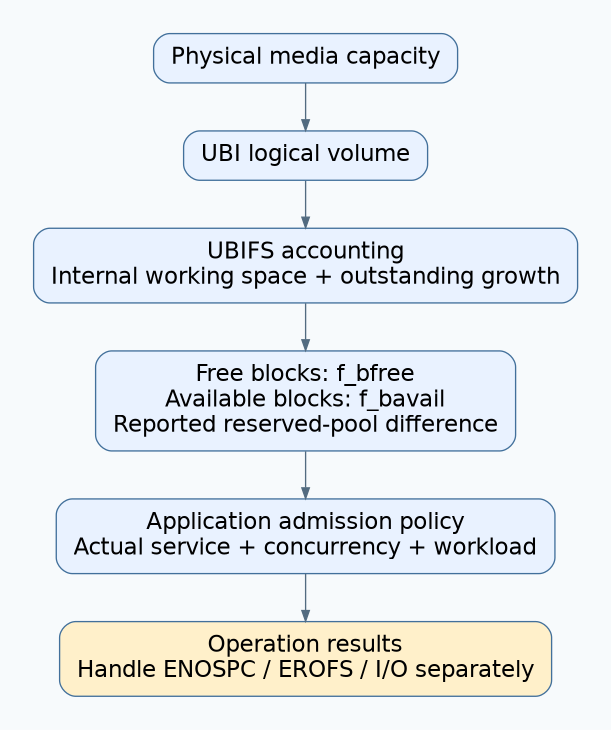
1. Separate three different reserves
First identify the filesystem’s internal working space for indexing, journal activity, and garbage collection. Next identify its privileged reserved pool. Finally identify any application policy that keeps capacity available for critical settings or recovery. Those are different mechanisms, even when a dashboard labels all of them “reserved.”
The v6.12 UBIFS budgeting implementation accounts for internal overhead and outstanding growth, and it can force write-back, garbage collection, or commit when an operation cannot initially be budgeted. It also checks eligibility for a separate reserved pool. An application quota does not replace those internal requirements.
| Capacity layer | What it represents | Wrong inference |
|---|---|---|
| Physical MTD storage. | Underlying media geometry. | Every physical byte is application file capacity. |
| UBI volume capacity. | Logical storage assigned to the volume. | All logical bytes are file payload space. |
| Filesystem free/available report. | UBIFS’s accounted estimate exposed to callers. | A snapshot reserves that space for the next writer. |
| Application admission budget. | Product policy for bounded workloads and recovery needs. | The filesystem guarantees the entire multi-step operation will succeed. |
2. Inspect the exact field behind the display
In v6.12, ubifs_statfs reports f_bfree from calculated free space and subtracts the reported reserved pool for f_bavail, flooring available space at zero. See the statfs implementation. A UI showing total free space can therefore disagree with an ordinary writer’s usable capacity.
Record the API, returned block unit, raw counts, mount identity, and observation time. If a wrapper uses a different interface, verify its unit conversion instead of assuming the field names are interchangeable. Do not mix a count of blocks with bytes, or a UBI device statistic with a filesystem statistic.
Test with the actual service identity and permissions. A maintenance process with access to the reserved pool can succeed where the ordinary application fails. That difference should trigger a policy review, not a recommendation to grant the application broad privileges or consume all recovery space.
The budgeting source describes free-space reporting as pessimistic and overhead-aware. Compression, indexing, alignment, and partly usable eraseblock tails make exact prediction difficult. Reported free bytes are therefore not raw unused media bytes. Conversely, calling the figure “just wrong” misses the protection it is intended to provide.
3. Describe the next operation, not only its payload
List every allocation the product operation can require. A settings replacement may need a new file while the old file remains retained, a new directory entry, and a backup generation. A burst of small records has a different metadata pattern from one large sequential file with the same total payload length.
Include concurrency. Two writers can both inspect the same available-space snapshot and independently decide that their work fits. If the product needs an admission guarantee between its own writers, give them a shared bounded reservation policy or serialize the relevant operations. The operating system’s later allocation result still remains authoritative.
Do not choose an arbitrary payload-to-flash multiplier and call it a UBIFS guarantee. Measure the proposed workload across its supported file sizes, naming patterns, compression settings, and churn histories. Keep an explicit margin for product growth, but tie it to the tested operation and failure policy.
4. Build a capacity observation matrix
Use a disposable UBI volume with the intended filesystem geometry and configuration, preserving all valuable data elsewhere. Do not fill a production root or settings volume to investigate admission behavior. Start each comparison from a documented image or recorded churn history.
| Workload variation | Record before and after | Question answered |
|---|---|---|
| Large sequential file versus many small files. | Payload bytes, file count, free/available fields, and operation results. | Does the product’s metadata pattern change its practical budget? |
| Compressible versus incompressible fixture data. | Same logical sizes and actual storage observations. | Is capacity being inferred from an unusually compressible sample? |
| Fresh fill versus repeated replace/delete churn. | Latency, return codes, and capacity samples. | Does steady-state behavior differ from a newly created filesystem? |
| Ordinary service versus authorized maintenance identity. | Effective identity and reserved-pool access outcome. | Is the apparent discrepancy caused by reserve eligibility? |
| One writer versus concurrent admitted writers. | Admission snapshots and final results. | Is the application double-promising the same capacity? |
Record write, synchronization, rename, and final product acknowledgement separately where the operation uses those stages. UBIFS supports write-back, as described in the filesystem overview. A successful early stage is not a reason to ignore a later error.
For diagnostic comparisons, record observations before and after the intended synchronization point. The v6.12 synchronization implementation notes that commit improves free-space prediction accuracy. This is a measurement distinction, not advice to synchronize constantly or repeatedly retry a full device.
5. Define bounded low-space behavior
Classify ENOSPC separately from read-only and I/O errors. A space-reclamation policy may be appropriate for the first and inappropriate for the others. Never delete calibration, device identity, or required incident evidence merely because a generic cleanup path needs room.
Choose which optional work stops first, which records may be removed, and how the application reports a rejected operation. Avoid unbounded loops that repeatedly generate diagnostics on the same full filesystem. Reserve a bounded way to expose the fault even when ordinary persistent logging cannot proceed.
Hypothetical status mismatch
A device shows “free space available” from total free blocks, but an ordinary service cannot replace a settings file. The maintenance shell succeeds because it can use reserved space. The correct diagnosis compares fields and identities before changing the filesystem layout.
After correction, the display shows the intended available-space measure and the application admits only its tested workload envelope. It still checks every operation result and preserves a clear rejected-save state. Release with the field mapping, reserve ownership, churn matrix, and low-space policy; no universal percentage can replace that evidence.