Yocto Systemd Services: Confirm Enablement and Package Ownership Independently
A service unit is present in a Yocto image, but the service does not start as expected. Repeatedly adding the unit to FILES will not explain whether its package registered an enablement policy, whether the unit can be enabled, or whether it failed after activation.
Treat installed files, package-specific policy and runtime state as separate observations. The Yocto examples below follow 5.0.12; upstream systemd references explain the longstanding unit-file mechanisms rather than promising every option from the current manual exists in an older image.
Name the package that carries the service
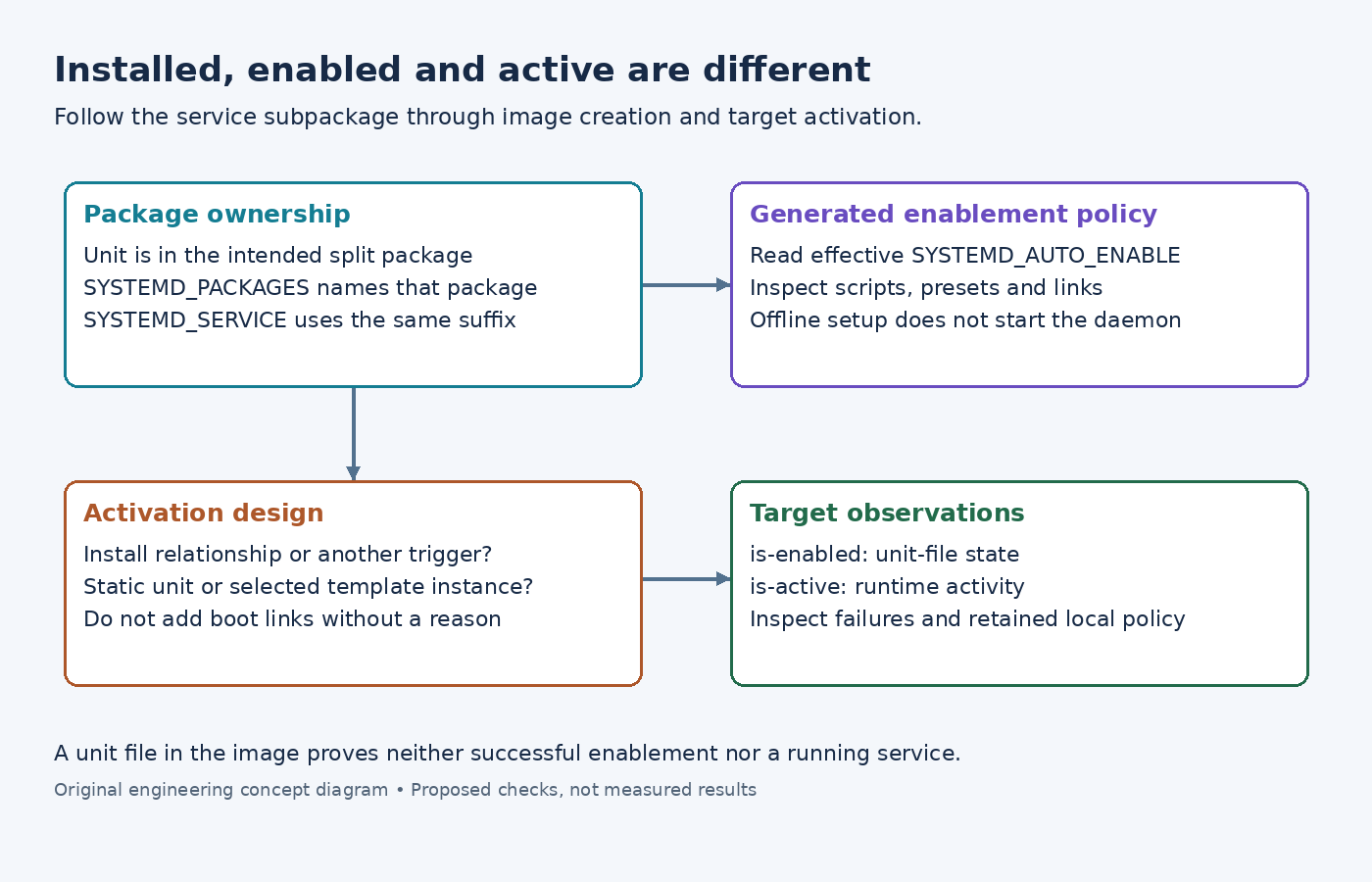
The Yocto systemd class requires systemd in DISTRO_FEATURES for its integration. It expects unit files installed under the configured system unit directory and uses SYSTEMD_PACKAGES to identify packages requiring its packaging scripts.
Suppose sensor-suite produces a separate sensor-agent package. Once that package is declared in PACKAGES and owns the intended files, the associated declarations can be SYSTEMD_PACKAGES = "sensor-agent" and SYSTEMD_SERVICE:sensor-agent = "sensor-agent.service". Set the policy on the same package, for example SYSTEMD_AUTO_ENABLE:sensor-agent = "enable".
This is an illustrative package split, not a complete recipe. Inspect the effective declarations and the emitted package's file list. A setting on SYSTEMD_SERVICE:${PN} does not describe a differently named split package just because both originate from one recipe. Likewise, including the main package in an image does not prove the service subpackage was included.
Inspect generated policy instead of inferring it from the unit
The scarthgap class implementation checks that entries in SYSTEMD_PACKAGES appear in PACKAGES, locates declared unit files, and generates package-specific scripts. Its enable/disable policy also produces corresponding preset entries.
Follow that generated output when diagnosing a mismatch. If the service was renamed, compare SYSTEMD_SERVICE with the installed filename. If the package was renamed, compare the override suffix with the actual package key. If a distribution append changes automatic enablement, inspect the resulting value rather than the original recipe's default.
The class distinguishes installation into an image root from execution on a running target. Offline unit-file operations can establish enablement links without starting a target process on the builder. An image creation log therefore cannot prove the daemon successfully ran.
Check whether the unit has an installation relationship
The systemd unit reference explains that [Install] describes how enablement creates links. For a conventional boot service, WantedBy=multi-user.target supplies such a relationship. Its presence in the unit file alone does not create the link.
A static unit may intentionally lack enablement instructions and be activated by another unit. A socket-activated service may rely on the socket unit's activation path. Do not add a boot dependency merely to make every service report the same enabled state; first identify the intended trigger.
For a templated unit such as sensor-agent@.service, identify the instance the product needs. The template file and a configured instance are different names. The class can locate a template for a declared instance, but that does not decide which instance is operationally correct for the device.
Read enablement and activity separately
On the target, compare systemctl is-enabled sensor-agent.service with systemctl is-active sensor-agent.service, then inspect status and the relevant journal if activation failed. The systemctl reference distinguishes unit-file state from activity. Enabling a unit does not itself start it.
Read the returned state text, not only a shell success code: static units have different semantics from enabled ones. A disabled unit can still be activated through another mechanism, while a mask blocks activation more strongly. Identify local policy or an intentional mask before changing it.
Compare a fresh image with an upgraded development device if only the latter differs. Package script execution, preset policy and retained local changes can lead to different unit-file state. Correct the layer that owns the discrepancy instead of treating every inactive service as a missing-package error.