Yocto Recipe Overrides: Inspect the Effective Value Before Editing Another Layer
An append file adds a feature, another configuration removes it, and the final recipe value still surprises the engineer reading the files. Editing a third layer may make the immediate build work while leaving the reason obscure. The safer first step is to inspect the effective value in the exact recipe context and explain how it was assembled.
This article uses BitBake 2.8 syntax and Yocto Project 5.0.12 inspection tools. The variable names used for small examples are illustrative. The examples explain evaluation rules; they are not a transcript from an executed BitBake build. Check the syntax used by the product's actual release before applying changes.
Capture the value in the right context
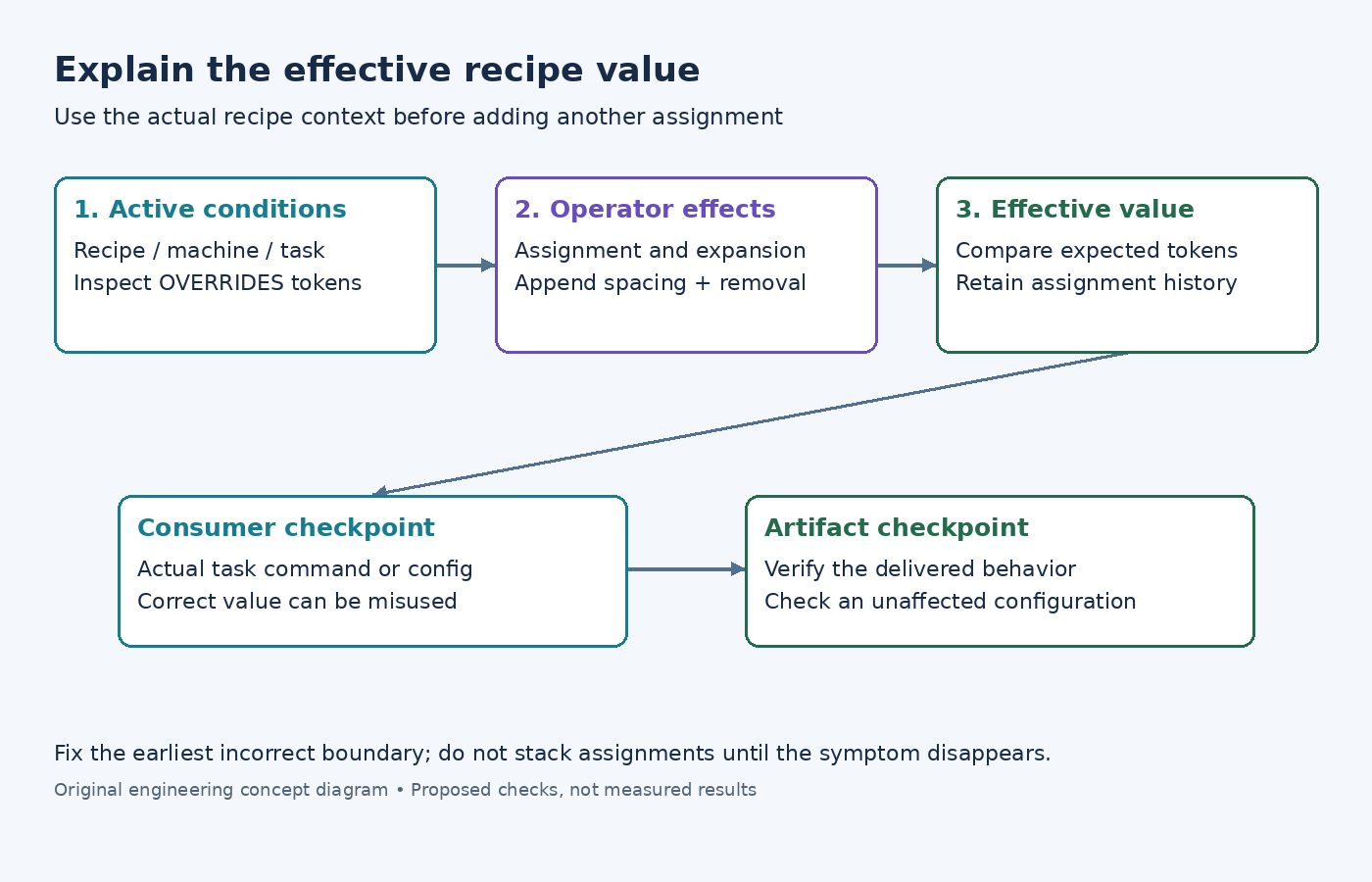
Begin with the recipe and configuration that exhibit the problem. Record the selected machine, distribution, layer revisions, and target. A global environment dump and a recipe-specific dump can answer different questions, so use the affected recipe when diagnosing its value. Also identify the task that consumes the value if the symptom occurs only in one task.
Run an inspection such as bitbake -e example-recipe and retain the relevant variable, its assignment history, and active overrides. Replace the example name with the actual recipe. The Yocto variable-inspection section describes this parsed view. Search the source files afterward to understand the recorded assignments, rather than guessing which one must win.
For a list-valued setting, write down the expected tokens and the actual tokens. A missing item, a duplicated item, and two concatenated items are different defects. For a scalar setting, write down the expected exact value. This small discipline prevents whitespace and scope problems from being hidden behind the phrase override did not work.
Check activation before precedence
A conditional assignment only matters when its condition is active in the relevant context. The conditional metadata reference explains how OVERRIDES selects conditional values. Verify the actual token instead of assuming that a board's marketing name, layer directory, and machine override are interchangeable.
If an intended condition is absent, changing layer priority is unlikely to be the right first repair. Find where that condition should come from and whether the assignment was meant for this recipe, machine, or task. If the condition is present, continue to operator behavior and later transformations.
Do not make an assignment global just to prove that the text is being parsed. That experiment can affect unrelated recipes and obscure the intended scope. Prefer a disposable test configuration and preserve the original effective-value evidence so the temporary change cannot accidentally become the release fix.
Distinguish assignment operators deliberately
The operator reference distinguishes immediate parsing operations from override-style operations applied during expansion. In particular, :append supplies no separator automatically. If the base list ends in alpha, appending beta without a space can create alphabeta rather than a second token.
Consider an invented list called REVIEW_ITEMS. With a base value of alpha, the statement REVIEW_ITEMS:append = " beta" requests a separate beta token. The leading space is part of the value. Reviewers should check both the intended operation and the resulting token list instead of treating punctuation as cosmetic.
Removal needs its own attention. The removal reference documents that removal is applied after append and prepend. An apparent later append therefore does not necessarily restore a removed item. If removal is wrong for this configuration, correct the removal's ownership or condition rather than stacking more append statements on top.
Follow the value to its consumer
An effective metadata value is only an intermediate checkpoint. Inspect the task command or generated configuration that consumes it. If the value is correct but the command is wrong, the problem may be in how the recipe or class translates that value. If both are correct but the artifact is wrong, investigate the upstream build behavior next.
For a feature option, preserve three pieces of evidence: the effective value, the actual configure invocation, and the resulting feature state. For an installed-file list, inspect the packaging result instead. A successful parse does not prove that the chosen upstream build system uses the option as intended.
Avoid broad changes to common classes while still diagnosing one recipe. Establish whether the problem is local or shared. A reusable class change needs checks for more than the recipe that originally exposed the issue, because its corrected interpretation may alter other consumers.
Make the repair smaller than the explanation
A good repair removes ambiguity: one correctly scoped assignment, an explicit separator, or a removal condition that matches the intended product policy. Include a short comment explaining the non-obvious reason when it cannot be inferred from the variable name. Do not preserve abandoned experiments as commented-out competing assignments.
- Save the effective value and the source locations that explain the failure.
- Apply the smallest change at the correct ownership boundary.
- Reinspect the affected value and its consuming task.
- Build the relevant artifact and verify the intended behavior.
- Inspect a configuration where the change should not apply, checking for accidental global effects.
The procedure is complete when the final value can be explained from active conditions and operator semantics, and the delivered result matches that explanation. Merely finding a layer order that happens to work leaves the same uncertainty for the next recipe update.