Yocto Package Splitting: Find Why a Built File Never Reaches the Image
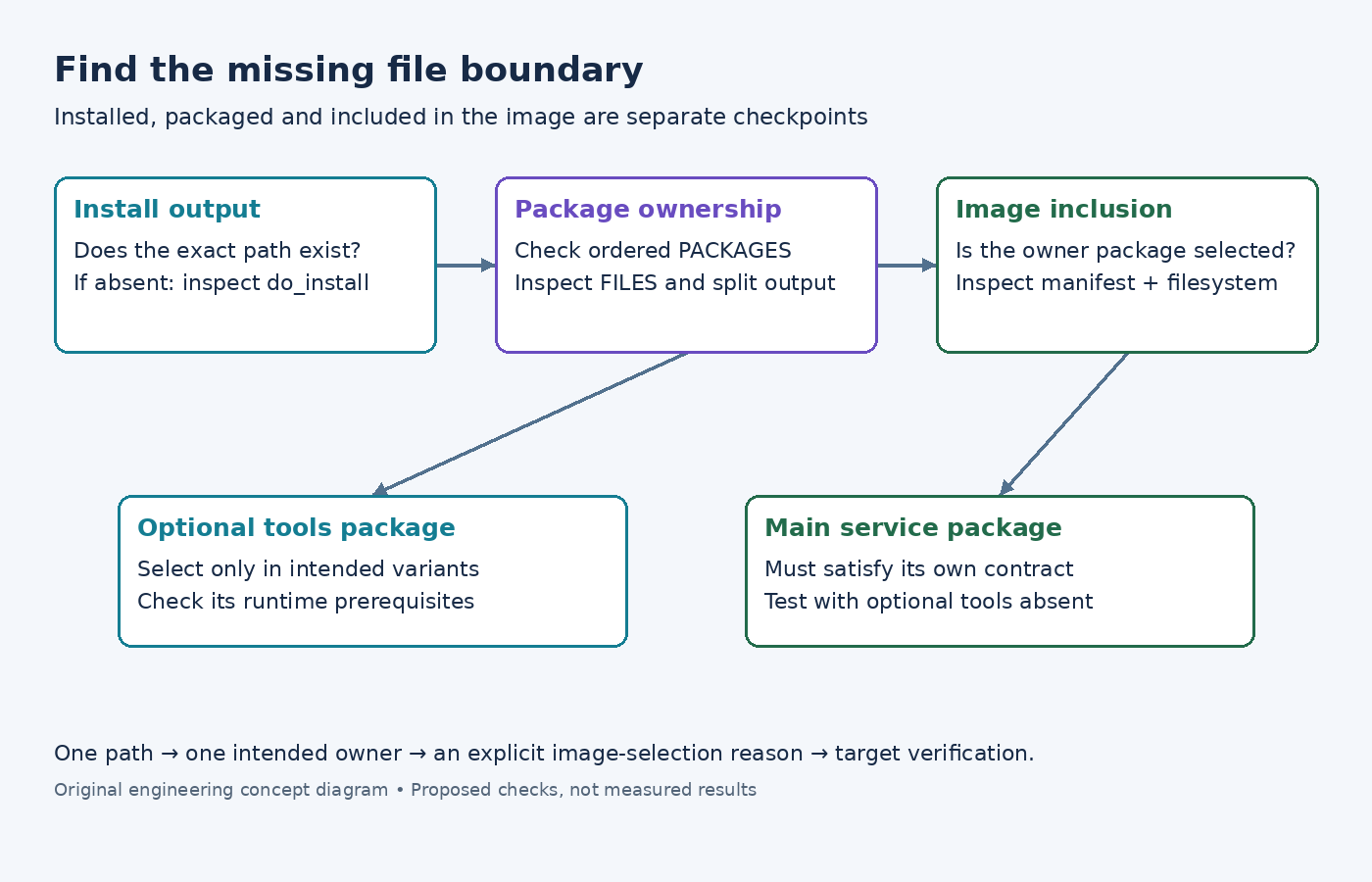
The recipe compiles successfully, and its installation directory contains the expected executable. The final image still lacks that executable. Rebuilding the compiler task is unlikely to explain the missing boundary. Trace the file from installation into a specific binary package, then from that package into the image.
This walkthrough uses Yocto Project 5.0.12 Scarthgap documentation. The example names meter-service and meter-tools are invented. Commands below describe an inspection sequence for a real build; no recipe was executed and no generated package contents are presented as observed results.
Begin with the exact missing path
Record the path expected on the target and why the image needs it. For example, /usr/bin/meter-calibrate may be an optional service tool rather than the main daemon. That distinction affects whether it belongs in the normal product image, a factory image, or a separate support package.
Find the path in the recipe's installation output after do_install. If it is absent there, investigate installation behavior before changing package patterns. A successful compile can produce a binary that the upstream install target never installs. Adding a file pattern to packaging cannot select a file that was never installed.
If the file is present, record its mode, ownership expectations, and any symlink relationship. Use the actual values of the recipe's directories rather than guessing a work-directory pathname from a previous build. Keep this first checkpoint with the investigation so later changes cannot confuse installation failures with package-selection failures.
Identify the package that claims the file
The package-splitting example shows how PACKAGES and package-specific FILES divide installed outputs. Ordering matters when patterns overlap: an earlier package can claim a file before a later package is considered. A broad main-package pattern can therefore frustrate an intended split if the new package is placed incorrectly.
For the illustrative calibration tool, decide whether meter-tools should own only that executable or also its supporting data. Inspect the effective package list and file patterns before changing them. The PACKAGES reference also explains that an empty package is normally not generated unless explicitly allowed. A name appearing in metadata is not proof that a useful package archive exists.
Inspect the split-package output after packaging. If the executable is present under a different package, the problem is ownership. If it appears under none, revisit the patterns and packaging diagnostics. Do not silence a QA message merely to get an image: determine whether the warning reveals an unowned file or a different defect.
Query the built package data
Once the package has been built, use the recorded package information to check ownership. The package-data inspection guide documents commands such as oe-pkgdata-util find-path /usr/bin/meter-calibrate and oe-pkgdata-util list-pkg-files meter-tools. The example arguments must be replaced with the real path and package name.
Use these queries against the correct build configuration. Package data from another machine or an earlier build can answer a different question convincingly. Keep the query output with the layer revisions and the package build that produced it.
If a package is renamed during packaging, distinguish the recipe's package identifier from the emitted package name. Follow the mapping through the build's package data rather than guessing from the recipe filename. One recipe can produce several packages, so adding the recipe name to an image is not always sufficient to select the particular file owner.
Trace the owning package into the image
Now ask whether the image actually selects the owning package, directly or through its dependency relationships. Inspect the generated image package manifest and the filesystem, using artifacts from the same build. A package existing in the deploy area establishes availability; it does not establish installation in this image.
If the calibration tool is deliberately optional, selecting meter-tools in the factory image may be the correct change. If the main service cannot function without a separate data package, the package relationship needs to express that requirement. Do not solve every missing file by adding more packages globally: doing so can hide an incomplete dependency and enlarge unrelated images.
Check postprocessing if the package is installed but the file disappears later. A root-filesystem transformation may remove or replace it. That is a different investigation from package splitting, and the evidence should identify the last stage at which the expected file was present.
Test the intended split as a product boundary
Treat a split as a maintained interface. Define which files and dependencies belong to the main package and which belong to the optional tool package. Then test images with and without the optional package. The main service should meet its stated requirements in the smaller image, while the tool image should contain everything needed for its intended operation.
- Build the recipe and inspect the installed path.
- Confirm exactly one intended package claims the file.
- Inspect the generated package archive or package data for that owner.
- Build each intended image variant and compare its package manifest and filesystem.
- Exercise the tool and service on the target, including the smaller image where the optional tool is intentionally absent.
Also check upgrade expectations if packages are delivered separately to field systems. Moving a file between packages can create conflicts or leave an old copy behind unless the package transition is designed and tested. The correct transition depends on the selected packaging backend and product update policy; the static image checks here do not prove it.
The investigation ends when the missing path has a complete chain: installed by this recipe, owned by this package, selected by this image, and present with the required behavior. That chain is more useful than a successful rebuild because it explains where a future packaging change must be reviewed.