Yocto Disk Space Failures: Distinguish Download, Shared-State and Work Directory Pressure
A BitBake task reports “No space left on device,” yet the build server still has free gigabytes. The exhausted resource may be inodes, or the failing path may sit on a different filesystem from the one being inspected. Deleting an arbitrary cache can lose useful inputs without freeing the resource that stopped the build.
Use the failing pathname to begin the investigation. This workflow follows Yocto Project 5.0.12 and BitBake 2.8 documentation; the shell examples assume a GNU/Linux build host.
Measure the filesystem that actually failed
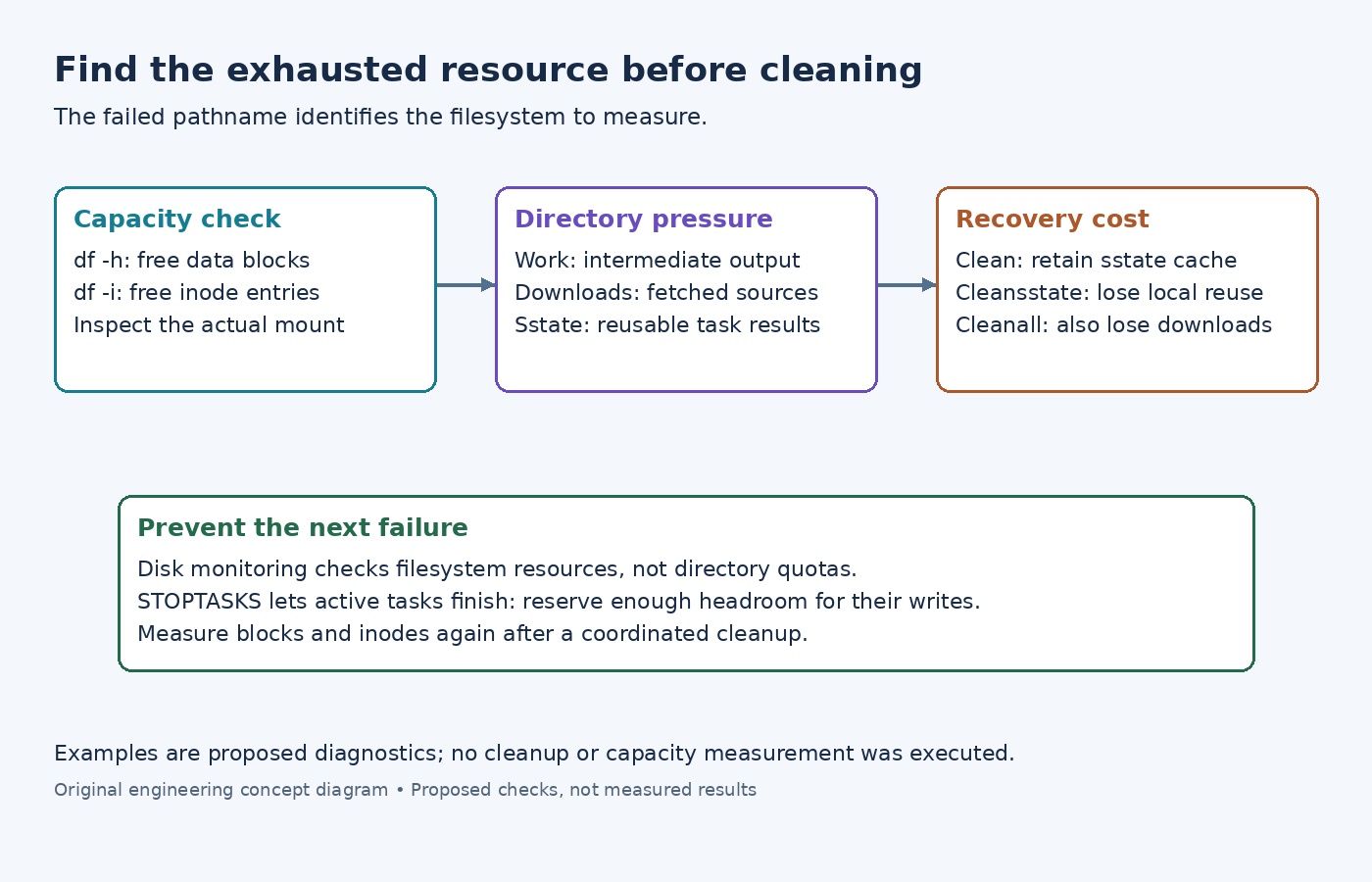
Inspect the effective TMPDIR, DL_DIR, and SSTATE_DIR values in the build configuration. They are not necessarily siblings. Resolve the failing task's path and compare df -h /actual/path with df -i /actual/path. The first reports block capacity; the second reports inode capacity. Replace the example path rather than typing an unexpanded BitBake variable into an unrelated shell.
If available bytes are exhausted, look for large directory consumers. If inodes are exhausted, look for large populations of small files. GNU du -x -h --max-depth=1 /actual/path and du -x --inodes --max-depth=1 /actual/path provide different rankings. These scans can be expensive on a busy cache, so narrow the scope and avoid running several at once.
If both measurements show headroom, retain the exact error and examine filesystem quotas, container storage limits, or the actual temporary-file location. A capacity problem in a container's writable layer will not be explained by measuring only the host's source checkout.
Match the dominant directory to a recovery cost
Work directories hold unpacked sources, intermediate objects, and task output. Downloads hold reusable fetched source material. Shared state holds reusable task results. A large work tree and a large sstate cache therefore call for different decisions even when both reside on the same full volume.
The task reference defines bitbake -c clean recipe as removing output from unpacking onward while retaining sstate. It may recover work-directory capacity without sacrificing cached task results. On a later build, restored output can occupy space again; cleaning is not a permanent capacity increase.
cleansstate additionally removes the recipe's local shared state. The reference warns against doing this against a cache shared with concurrent builds. cleanall also removes downloaded sources and is discouraged for normal use. Neither is an appropriate default response to an unexplained disk error.
Before any cleanup, stop or coordinate builds using the affected directories and preserve the particular logs or modified work files needed for the investigation. Estimate the space in the selected directory; do not promise that cleaning one recipe will free a fixed amount.
Stop before the next allocation failure
The BitBake disk-monitor reference monitors free space and free inodes. A proposed starting example is BB_DISKMON_DIRS = "STOPTASKS,${TMPDIR},5G,100K". The values are illustrative, not a sizing recommendation: here 100K represents an inode threshold, not reserved file-content bytes.
STOPTASKS allows already-running tasks to finish, so the threshold must leave room for their remaining writes. HALT stops immediately; WARN continues and uses warning intervals. Choose behavior deliberately rather than lowering thresholds until the warning disappears.
When monitored directories share a device, the documentation says only the first is monitored. Check the actual mount layout before assuming three configured paths provide three independent policies. Monitoring the filesystem also does not limit an individual directory's growth.
Reduce recurring pressure at its source
The disk-space guide describes rm_work and sstate-cache management. rm_work reduces retained work after recipes finish, but tasks still need temporary headroom before cleanup occurs. It cannot make an undersized filesystem support any peak workload.
For an expanding shared cache, use a coordinated retention policy appropriate to the builds that consume it. The documented cache-management utility has configuration and multi-release limitations; read the version shipped with the checkout before selecting candidates. A file's age alone is not proof that no supported release needs it.
Recheck both free blocks and free inodes after the chosen intervention. The useful outcome is an explanation of which resource was exhausted, which directory caused the pressure, and what rebuild or refetch cost the recovery accepted.