Yocto SDKs: Decide Between a Standard SDK and an Extensible SDK
An application team asks for a Yocto SDK, but the request combines two different jobs. Some developers need to compile against a fixed product image. Others need to modify a platform library and return the change as maintainable build metadata. Choosing an SDK by installer size alone can leave one group without the workflow it needs.
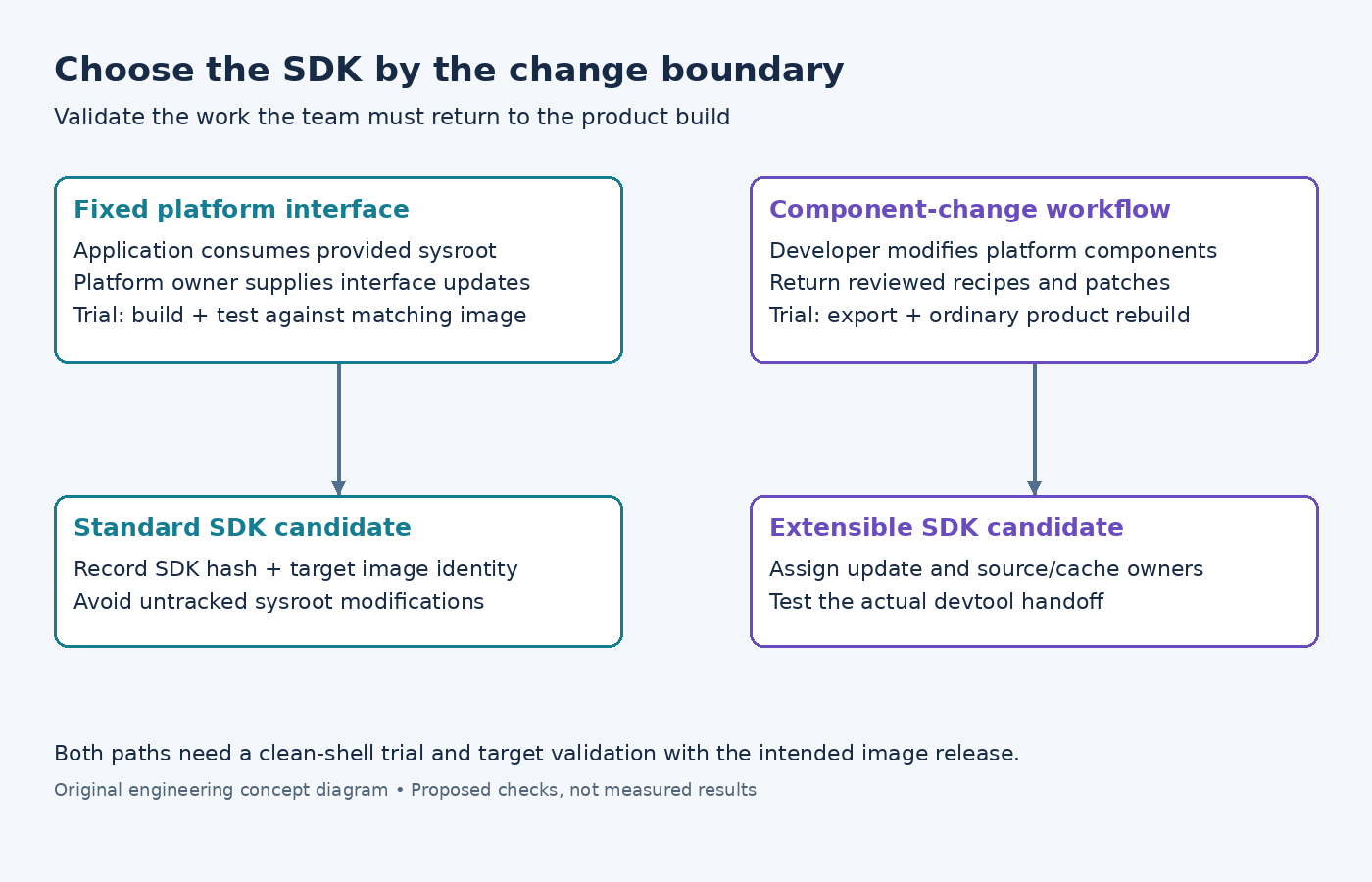
Start with the development boundary: which parts of the platform may this developer change, and how must those changes return to the product build? This article uses the Yocto Project 5.0.12 SDK documentation. The proposed evaluation is not a measured installation comparison, and no particular host or product has been tested.
Define the consumer's work before selecting a package
List the actual development tasks. A team building a standalone application against stable headers and libraries has different needs from a team changing the recipe that supplies those libraries. Include debugging, test deployment, dependency additions, and the handoff expected by the integration team.
Also record the constraints: supported host environment, available disk space, network access, reproducible setup requirements, and who maintains the SDK. If development must work offline, specify which operations need to work offline. Compiling an already configured application and adding a previously unavailable component are different requirements.
The SDK introduction describes the shared toolchain, sysroot, and environment-setup concepts and the extensible SDK's additional development facilities. These capabilities provide a starting point. The actual SDK configuration and delivered content still need to be checked for the product.
Use a standard SDK for a deliberately fixed boundary
A standard SDK can be a good fit when the platform team supplies the development interface and the application team consumes it. The important contract is the association between SDK and target image: compiler configuration, headers, libraries, and the runtime against which the application will be tested.
Make that association visible in the delivery record. Provide the SDK artifact hash, the image release identity, supported installation instructions, and a small representative build example. Avoid telling developers merely to use the latest SDK when several field image versions remain supported.
If an application needs a library missing from the supplied SDK, treat that as a platform-interface change. Do not encourage each developer to copy arbitrary host headers or libraries into the sysroot. Request a reviewed SDK update or choose a workflow that deliberately supports extending the platform. A fixed boundary is useful only when exceptions are handled explicitly.
Choose the extensible path when metadata changes are part of the job
An extensible SDK is relevant when developers need the integrated workflow for modifying components and returning those changes to the build. Its value is the connection between development work and product metadata, not simply a larger collection of tools.
The extensible SDK workflow describes using devtool to add or modify components and integrate the result. Before choosing this path, test the operations the team actually needs: change an existing library, build a consumer, and export the resulting metadata to the intended layer.
Assign ownership for the supporting infrastructure. Who supplies the required shared-state content? Who updates the SDK and handles a failed update? Which source locations are reachable from a developer's environment? An extensible workflow can still become a collection of unreproducible local edits if nobody owns its integration boundary.
Generate and identify the intended SDK
The SDK generation instructions document bitbake image -c populate_sdk for a standard SDK and bitbake image -c populate_sdk_ext for an extensible SDK. Replace image with the product's actual image target and verify the selected machine and SDK host settings before building.
Do not assume that an architecture label alone establishes compatibility. The same processor family can appear in products with different libraries, features, and compiler settings. Retain the configuration that generated the SDK, then compare it with the target image's release record.
Provide the exact environment-setup script to source, using its real installed filename in the product instructions. Check a fresh shell and a fresh installation path. An example that works only in a platform engineer's already configured shell is a poor onboarding test and can hide accidental use of host tools.
Run a workflow trial rather than a feature checklist
Select one application representative of the team's dependencies and build system. For the standard SDK trial, compile it without modifying the supplied sysroot and test the result on the matching target image. For the extensible trial, include one small platform modification and its return into the maintained layer.
- Install the candidate SDK in a clean, supported development environment.
- Initialize only the documented environment and record the selected compiler and sysroot.
- Build the representative application and inspect its target architecture and linked dependencies.
- Test it on the recorded image, including a relevant missing-resource or failure condition.
- For the extensible workflow, export the change and verify that the ordinary product build can reproduce it without the developer's workspace.
Record installation failures, missing inputs, and manual steps. Do not convert them into a vague usability score: each one identifies a change needed in the SDK delivery or workflow. No timing or size advantage should be claimed until it has been measured under the same conditions.
Write down the decision and its limits
The decision can be concise: a standard SDK supports application work against the fixed release interface, while an extensible SDK supports the specified component-change workflow. Some organizations may supply both to different audiences. Keep that choice tied to responsibilities rather than treating one format as universally more advanced.
Revisit the decision when the team's work changes. A new requirement to modify platform recipes, develop offline, or maintain multiple target releases can alter the appropriate boundary. The successful SDK is the one whose documented workflow produces a reviewable, reproducible contribution to the product, with a clear owner for every required input.