U-Boot MMC Device Numbers: Verify the Alias-to-Storage Mapping After a Board Change
A boot script still loads from MMC device zero after a board update,
but that number now selects a different controller. Both devices may
contain plausible files, so the mistake can survive a simple
successful-load check. The engineering problem is to establish which
storage identity the number represents in this bootloader build.
This article follows driver-model MMC behavior in upstream U-Boot
v2025.01. For a Buildroot product, inspect the bootloader configuration
and control devicetree actually produced for the release. Legacy
non-driver-model paths and board-specific numbering changes require
their own source review. No enumeration or storage write was performed
for this article.
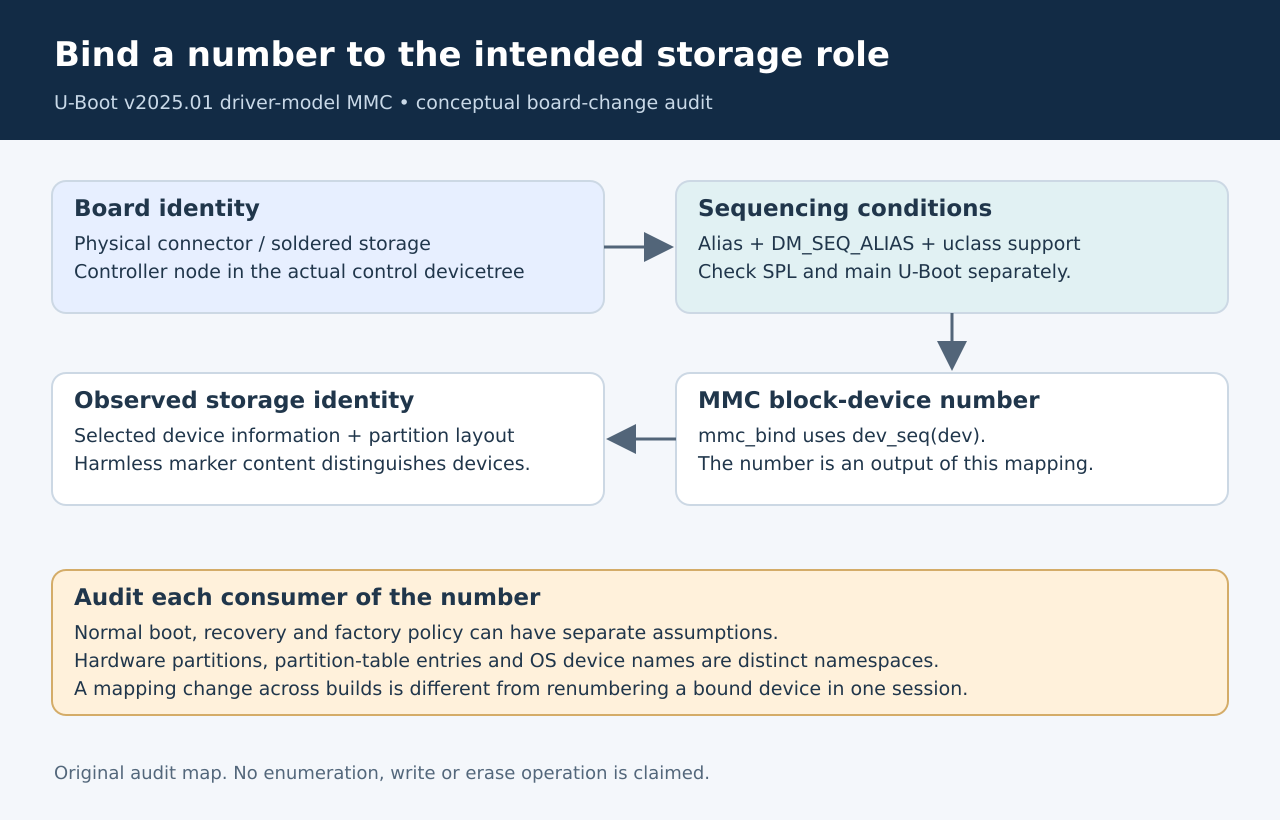
Treat the
number as a mapping, not a physical label
The driver-model
design documentation explains that sequence numbers identify devices
within a uclass. Gaps are permitted. Alias-based numbering requires both
the DM_SEQ_ALIAS configuration and the corresponding uclass flag;
without those conditions, automatic numbering follows the model’s
allocation rules. The configuration can differ between SPL and U-Boot
proper.
A connector label such as “external SD” is therefore not enough to
explain what mmc 0 means. Record the controller’s devicetree path, the
alias that refers to it, the configuration that enables alias use and
the observed command-level number. This produces a reviewable mapping
instead of relying on the number printed during one earlier development
session.
The tagged
MMC uclass implementation supplies the sequence-alias flag. Its
mmc_bind path uses the device sequence when creating the associated
block device. Those two details connect the general driver-model rule to
the MMC number used by this implementation.
Compare
the actual artifacts on both sides of the change
Begin with the old and new board revisions and the exact bootloader
builds intended for them. Preserve the generated configuration and the
devicetree consumed by U-Boot, including applicable board-specific
additions. Reviewing only a common source include can miss a later
override or a build selecting another tree.
For each controller, compare enabled status, node identity and alias
assignment. Then compare the relevant driver-model configuration for
each stage. A stable source alias is not sufficient evidence if the
stage interpreting it ignores aliases. Conversely, an intentional alias
gap is not a defect that should be “fixed” by renumbering everything
densely.
Within the documented model, the sequence is resolved when the device
is bound and remains unchanged for that device’s lifetime. The concern
here is a changed mapping across builds, stages or board configurations,
not a claim that numbers spontaneously shuffle during a running session.
Keeping that boundary clear prevents a release-engineering issue from
being misdiagnosed as random hardware enumeration.
Observe identity
before trusting a boot target
The MMC
command reference provides separate commands for listing devices,
selecting the current device, showing device information and displaying
its partition table. Use the available read-oriented diagnostics to
establish what each intended number selects before executing any
destructive storage command.
Capture the device information and partition layout together with the
selected number. Depending on the product, manufacturer information,
card identity and expected partition contents can contribute to the
check. A matching filename alone is weak evidence when removable media
and internal storage share the same release image.
Be explicit about the several namespaces involved. The MMC device
number selects a device. An eMMC hardware partition is different from an
ordinary partition-table entry used by a filesystem command. A later
operating system’s device naming is another interface that must be
checked independently. Reusing the numeral zero across these interfaces
does not make their meanings equivalent.
Audit every consumer of the
mapping
Search the release’s boot policy, recovery scripts and manufacturing
configuration for numeric MMC assumptions. Classify each use by purpose:
selecting a filesystem, reading a raw area, finding an environment
backend or targeting a factory operation. A correction in the normal
boot path can leave another consumer pointing at the old device.
Keep this audit focused on identity rather than duplicating
storage-layout validation. Once the correct physical device is selected,
offsets and partition boundaries still need their own checks. The two
reviews complement each other: a perfectly bounded write to the wrong
device is still wrong, and the right device does not make an invalid
offset safe.
Where the product can use a stronger identifier, verify that the
particular command and boot path support it before changing policy. Do
not assume that a partition identifier accepted by one loader interface
automatically replaces the device argument in every MMC command. The
migration needs an explicit compatibility and failure-behavior test.
Qualify the mapping
as a release invariant
A proposed qualification matrix covers each supported board revision,
the intended removable-media conditions and each boot stage that
independently selects storage. Include a fixture where both candidate
devices contain the same filename but distinguishable harmless marker
content. That exposes a wrong-device selection that a presence-only
check would miss.
Record the expected mapping before running the tests. Compare
controller identity, selected number and observed marker, then exercise
normal boot and the recoverable maintenance path separately. Keep write
and erase commands out of this discovery campaign unless a separately
approved factory test requires them.
The release invariant should read like a statement about hardware:
this policy selects this controller and this storage role under these
configurations. The numeral is one output of that mapping. Maintaining
that evidence across a board change is more reliable than preserving a
familiar command line and hoping its meaning stayed the same.