Yocto Task Environments: Trace a Host Variable Through Import and Export
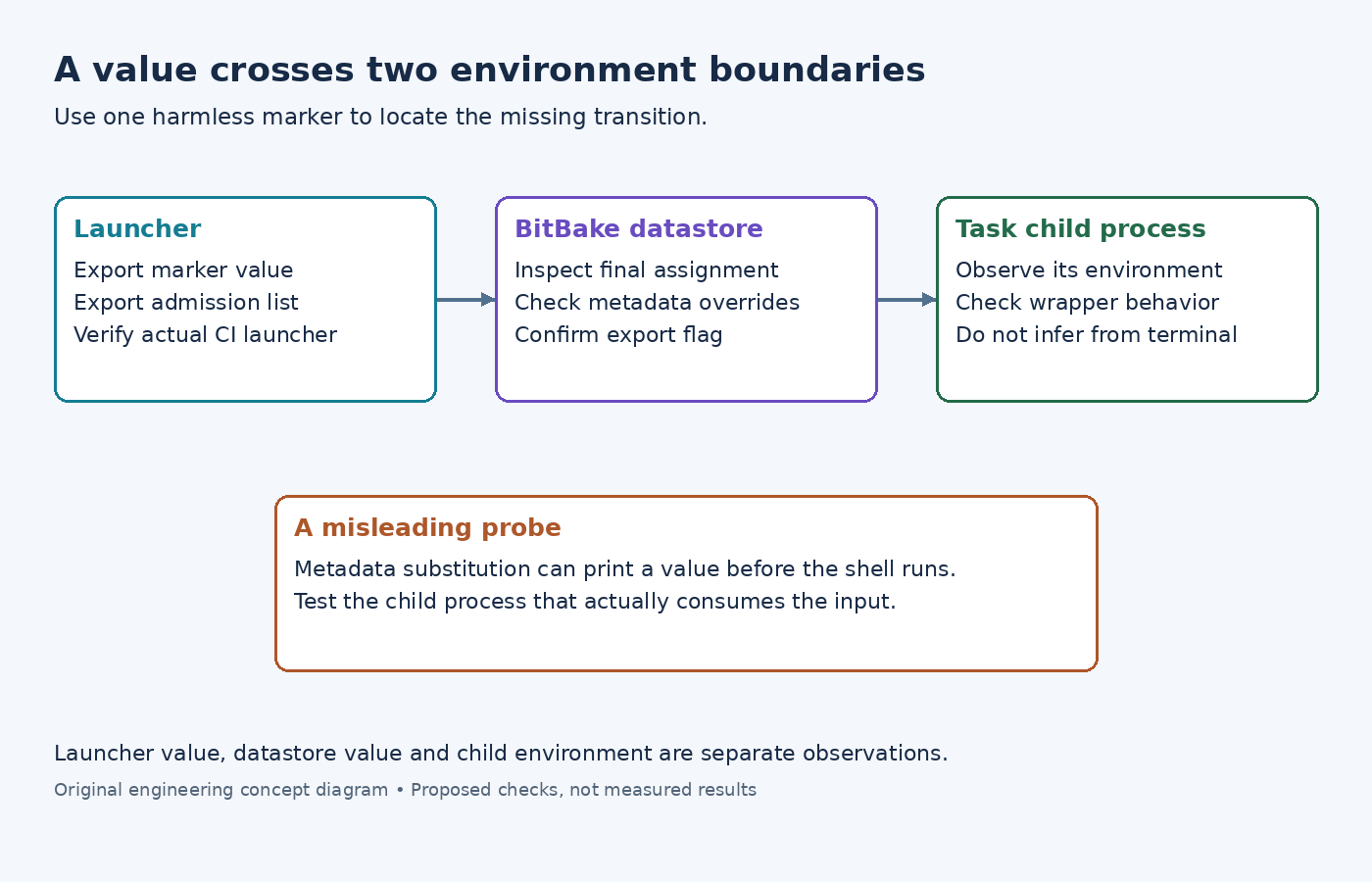
A generator sees PRODUCT_CHANNEL=lab when run from a terminal, yet the same generator reports an unset value inside a Yocto recipe. The variable can disappear at two separate boundaries: entry into BitBake's datastore and export from that datastore into the task process. Inspecting only the launching shell does not locate the failure.
Use a harmless marker for diagnosis. Do not dump a real CI environment containing credentials merely to compare variable lists. The example here follows BitBake 2.8 and uses an invented generator input.
Admit the variable before BitBake starts
In the shell that launches the build, set the marker with export PRODUCT_CHANNEL=lab. Add its name through export BB_ENV_PASSTHROUGH_ADDITIONS="$BB_ENV_PASSTHROUGH_ADDITIONS PRODUCT_CHANNEL" before invoking BitBake.
The passthrough variable reference states that this admission list must be set in the external environment. Putting that assignment only in a recipe is too late to configure the original import boundary.
Confirm that the process launching BitBake receives both exports. An interactive terminal and a CI job can use different launch scripts, containers or service environments. A value exported in one terminal does not establish what another process inherited.
Then inspect bitbake -e sensor-agent, using the actual recipe name. Find the final PRODUCT_CHANNEL assignment and its history. A missing value points toward admission or launch context. A different value can instead mean metadata assigned a replacement after import. Keep those cases separate.
Export the value consumed by the task
The task-environment guide describes import and task export as distinct steps. In metadata, export PRODUCT_CHANNEL marks the resulting value for the task's process environment.
For a deliberately fixed product setting, metadata can instead define export PRODUCT_CHANNEL = "lab" directly. That removes the need to source this particular value from the launching shell. Choose the interface intentionally: a maintained configuration value and an externally supplied CI input have different ownership and reproducibility implications.
In bitbake -e output, exported assignments carry the export prefix. Check that marker as well as the value. A successful datastore lookup does not by itself demonstrate what an external child program received.
Avoid a probe that tests metadata substitution instead
A subtle false positive occurs when the diagnostic prints ${PRODUCT_CHANNEL} inside a BitBake shell function. BitBake can substitute the metadata value before the shell executes. The message can therefore look correct without exercising the environment lookup used by a child generator.
The export syntax documentation distinguishes that form from $PRODUCT_CHANNEL, which is expanded by the shell. For the harmless fixture, inspect the generated task script and have the invoked child report whether its own environment contains the marker. This checks the actual boundary relevant to the failure.
Also examine task-specific overrides if only configure or compile behaves differently. A recipe-wide environment dump is useful context, but the generated script for the failing task is closer to the process being diagnosed.
Interpret the three observations together
The useful comparison is small: value at the launcher, final datastore value, and value observed by the child process. If the first is correct and the second is absent, repair admission. If the second is present but the child sees nothing, inspect export handling and any wrapper that replaces its environment. If all three agree, the generator may be reading a different option or configuration file.
BitBake also exposes BB_ORIGENV, a datastore snapshot of the original external environment. It can support targeted inspection, but retrieving a value from that snapshot does not automatically export it to every task.
Do not disable all filtering as a routine repair. Admit only the input the recipe intentionally consumes, document its allowed values, and ensure output-changing inputs remain represented in build dependencies. Finally, repeat the marker check through the real CI launcher, where the original failure occurred.