Yocto devshell: Reproduce a Failing Task with Its Generated Run Script
A compile task fails under BitBake, but typing make inside a development shell succeeds. That comparison may not reproduce the failed command at all. The manual command can use a different working directory, omit recipe arguments or reuse files created after the failure.
For a shell-based task, begin with its generated run script. It records the expanded function that BitBake executed. Then distinguish that function replay from the orchestration surrounding a scheduled task.
Pair the failure log with its generated script
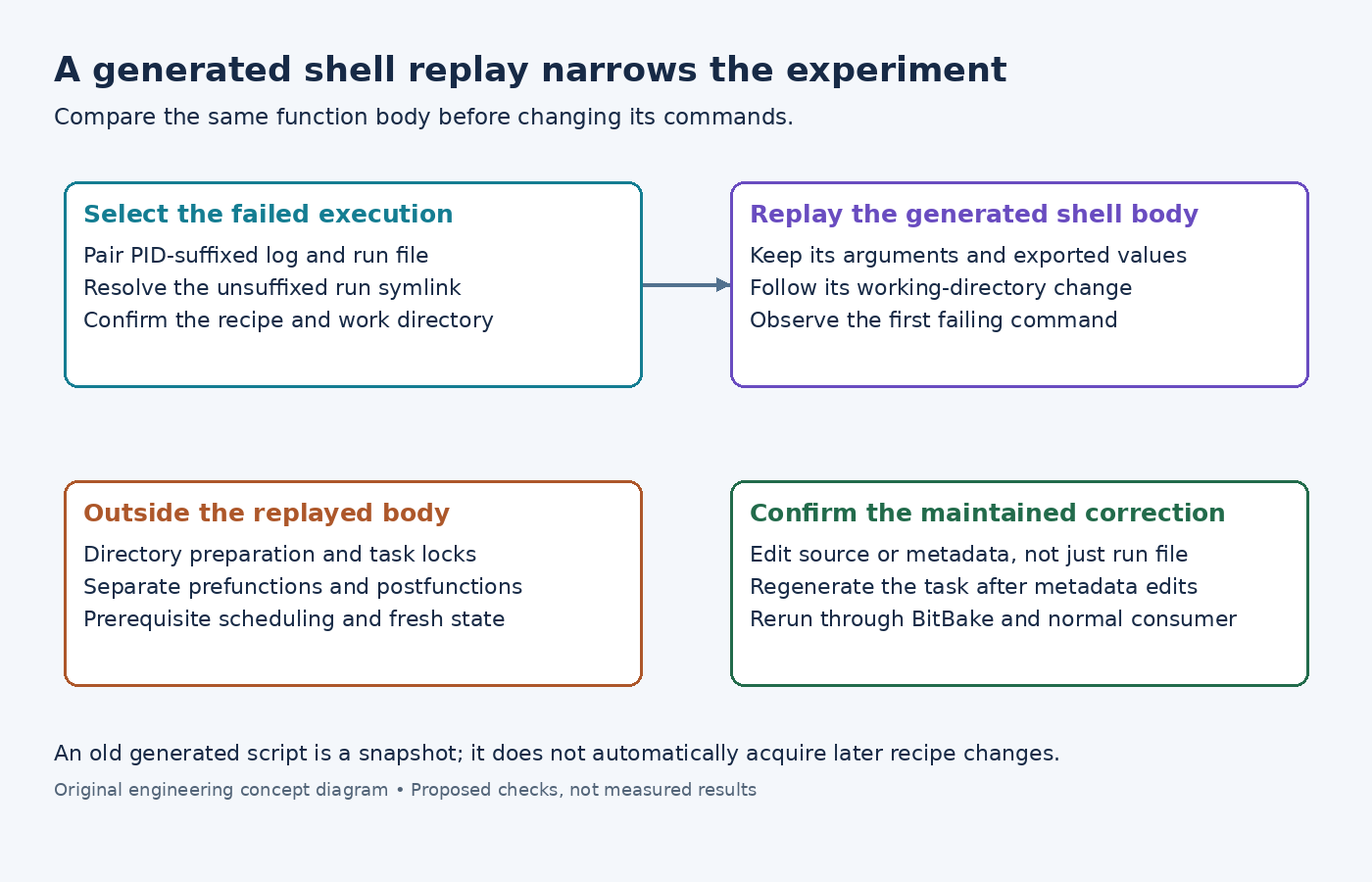
The Yocto debugging guide describes task logs and run files in the recipe's temporary directory. Find the failing task's PID-suffixed log and corresponding run file before another execution replaces the convenient symlinks.
For an illustrative sensor-agent compile failure, inspect run.do_compile.<pid> alongside log.do_compile.<pid>, replacing the placeholder with the real suffix. Confirm the recipe and build configuration. A similarly named file from another machine work directory can contain perfectly plausible but irrelevant commands.
The examined BitBake execution code creates the run.do_task convenience link before running the generated function. The unsuffixed name can therefore point at a failed execution, and a later execution can move it. Resolve the link instead of treating its filename as a permanent record.
Replay the shell body before simplifying it
Use bitbake sensor-agent -c devshell to open the recipe development environment. The task reference defines this shell as an environment for development and debugging.
Inspect the generated shell script's function body, exported values and final invocation. BitBake's shell executor writes the function, an applicable working-directory change, and the function call into that script. Running the selected script from devshell preserves those generated arguments more faithfully than reconstructing a make command from memory.
Do not assume the interactive prompt's current directory is the task's build directory. Out-of-tree builds make this especially important. Compare the script's directory with the recipe's effective B and S before interpreting a successful manual command.
If no run script exists because the relevant work was restored rather than executed, request the task through BitBake in a disposable diagnostic build, for example bitbake sensor-agent -c compile -f. Preserve local edits before forcing work; this is a proposed debugging action, not a command executed for this article.
Recognize what a direct replay omits
A run script is not the entire scheduler. The BitBake task flags describe directory preparation, cleaning, locks and pre/post functions. The examined executor performs these operations around function execution; prefuncs and postfuncs are invoked separately from the main task body.
Consequently, replaying only run.do_compile can observe files left by a previous prefunction or skip a postfunction that causes the original failure. It also does not ask BitBake to resolve and execute a fresh prerequisite graph. Treat replay success as evidence about the selected body and current filesystem, not proof that scheduled execution now succeeds.
For a Python task, do not pass its generated file to a shell interpreter. Use BitBake's Python development facilities or rerun it through BitBake. The pydevshell task reference describes access to the datastore and functions in their intended Python environment.
Turn the observation into a reproducible correction
If the generated shell body fails while a shorter manual command succeeds, compare the first differing argument, directory or input. If replay succeeds but the scheduled task fails, inspect preparation and pre/post functions before changing compiler settings.
Make the correction in recipe metadata or maintained source, not only in a generated run file. After editing metadata, generate a fresh task execution: an older script still contains values expanded for its earlier run.
Finally, invoke the task through BitBake and then its normal consumer. That restores the orchestration the isolated experiment intentionally narrowed. The useful result is a specific difference explaining the failure, with a maintained change that survives regenerated scripts.