Yocto Runtime Dependencies: Diagnose an Interpreter Named by a Packaged Script
A script works in a developer's shell but fails when included in a minimal Yocto image. Its first line names an interpreter that the runtime package never requested. The build can copy the script without needing that interpreter to run, so successful compilation is weak evidence for the script's runtime dependency.
Yocto Project 5.0.12 reports some of these cases through file-rdeps. Treat the named interpreter path as a clue to the package contract, not as a request to add every scripting language to the image.
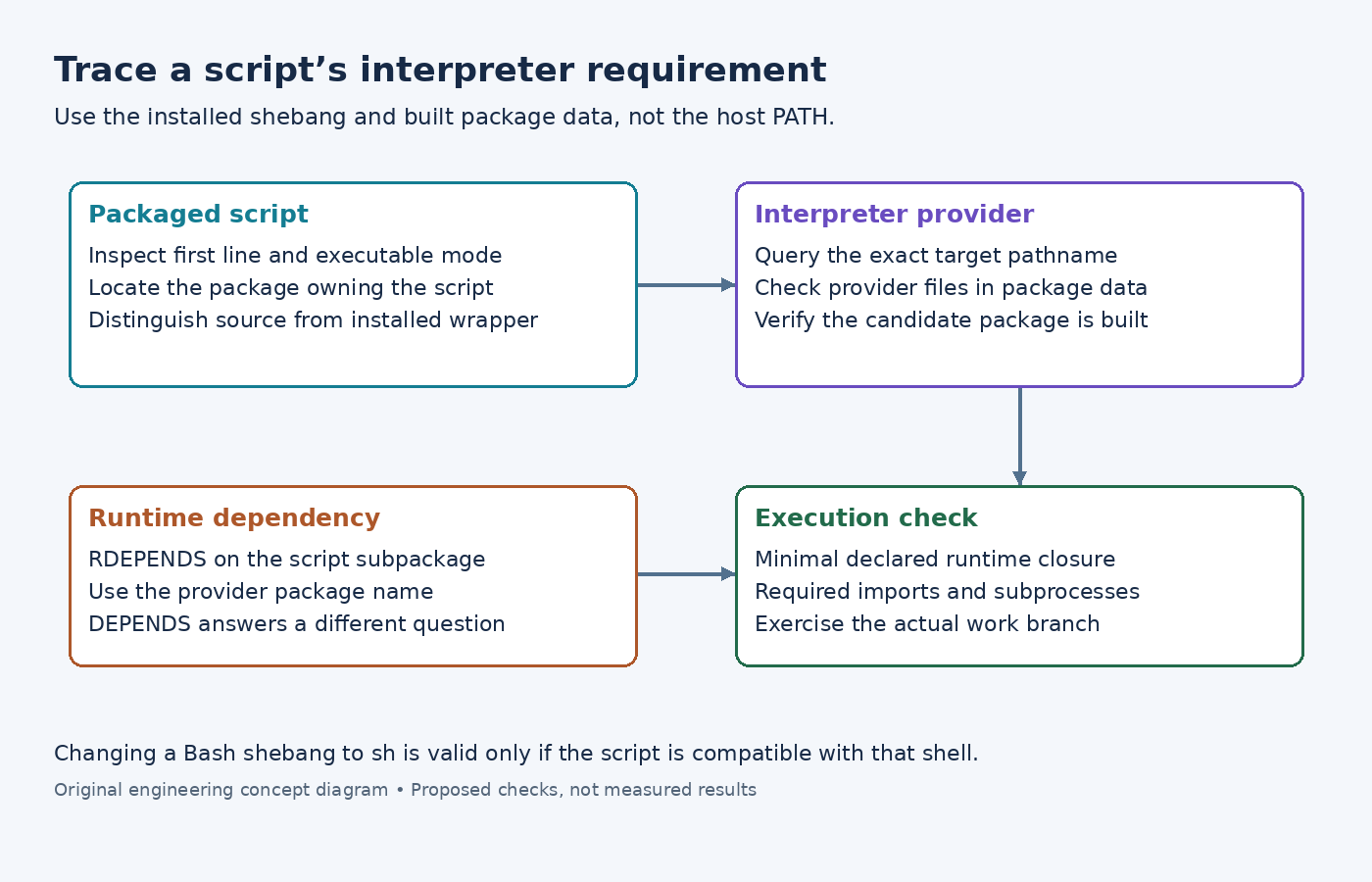
Read the installed script, including its first bytes
Start with the packaged copy named by the QA report. Inspect its shebang, line endings, and executable mode. An upstream source file can differ from the installed script after substitution or wrapper generation. A build-host virtual-environment path in the installed first line is a generation error, not a target interpreter that should be packaged.
The insane class reference uses a Bash shebang to illustrate file-level dependency detection. It explains that RPM can resolve file-level requirements directly, while the other supported package managers do not provide the same mechanism. Explicit runtime dependencies remain important across package backends.
Do not replace #!/bin/bash with #!/bin/sh merely to remove a dependency. First establish that the script actually follows the shell language supported by the target's /bin/sh. Arrays, conditional syntax, and other shell-specific behavior can turn that textual edit into a runtime failure.
Find the package that supplies the exact target path
Use the built package data to identify the provider. The oe-pkgdata-util guide documents path lookup and package-file inspection. For the illustrative Bash case, oe-pkgdata-util find-path /bin/bash queries existing package data; it does not search every possible unbuilt recipe in every layer.
If there is no result, verify that the candidate provider has been built and that the query uses the target path present in its package. Distribution layout and symlinks can affect the installed path. Do not substitute a host which result, which describes the developer's environment instead of the image.
Identify the package containing the script as well. A recipe can produce a main application package and a separate maintenance-tools package. The dependency belongs to the package whose contents need the interpreter, not automatically to every output of the recipe.
Declare runtime ownership at package scope
The RDEPENDS reference uses package names and requires a package-specific assignment. If a fictional ${PN}-maintenance package contains Bash scripts and the verified provider package is bash, the relevant pattern is RDEPENDS:${PN}-maintenance += "bash".
Use the actual package names from the build. Adding the interpreter recipe only to DEPENDS addresses build-time availability, which does not express the same runtime package relationship. Likewise, adding Bash directly to one image may make that image work while leaving the script package broken when reused elsewhere.
For a script using /usr/bin/env, inspect both the launcher path and the interpreter selected through the target environment. Do not assume the shebang scanner fully captures that runtime search. The package still needs a defensible dependency on the interpreter it expects, and the execution environment must provide an appropriate PATH.
Check beyond the shebang
An interpreter being present is necessary but may not be sufficient. A Python script can import optional modules; a shell script can invoke external utilities. Review those runtime requirements separately because a first-line check cannot establish every dynamically selected dependency.
After correcting the recipe, rerun packaging QA and inspect the generated runtime dependency for the affected subpackage. Then test the installed script in an image containing its declared package closure, without borrowing tools from a development image or host-mounted directory.
Exercise the relevant branch of the script. A help command may return before imports or subprocess calls that fail during real work. The desired result is a reusable script package whose declared dependencies support its actual execution path, rather than a single large image that happens to mask an incomplete package contract.