Yocto Image Package Lists: Explain Why a Recommended Package Appears
Removing a package name from IMAGE_INSTALL does not necessarily remove that package from a Yocto image. Another installed package can still request it. A recommendation filter can also appear ineffective when a hard dependency reaches the same package through a different path.
Treat the image package list as the result of dependency resolution. The immediate task is to identify every reason the unexpected package is selected, then choose a policy that matches those reasons.
Establish the edge that brought it in
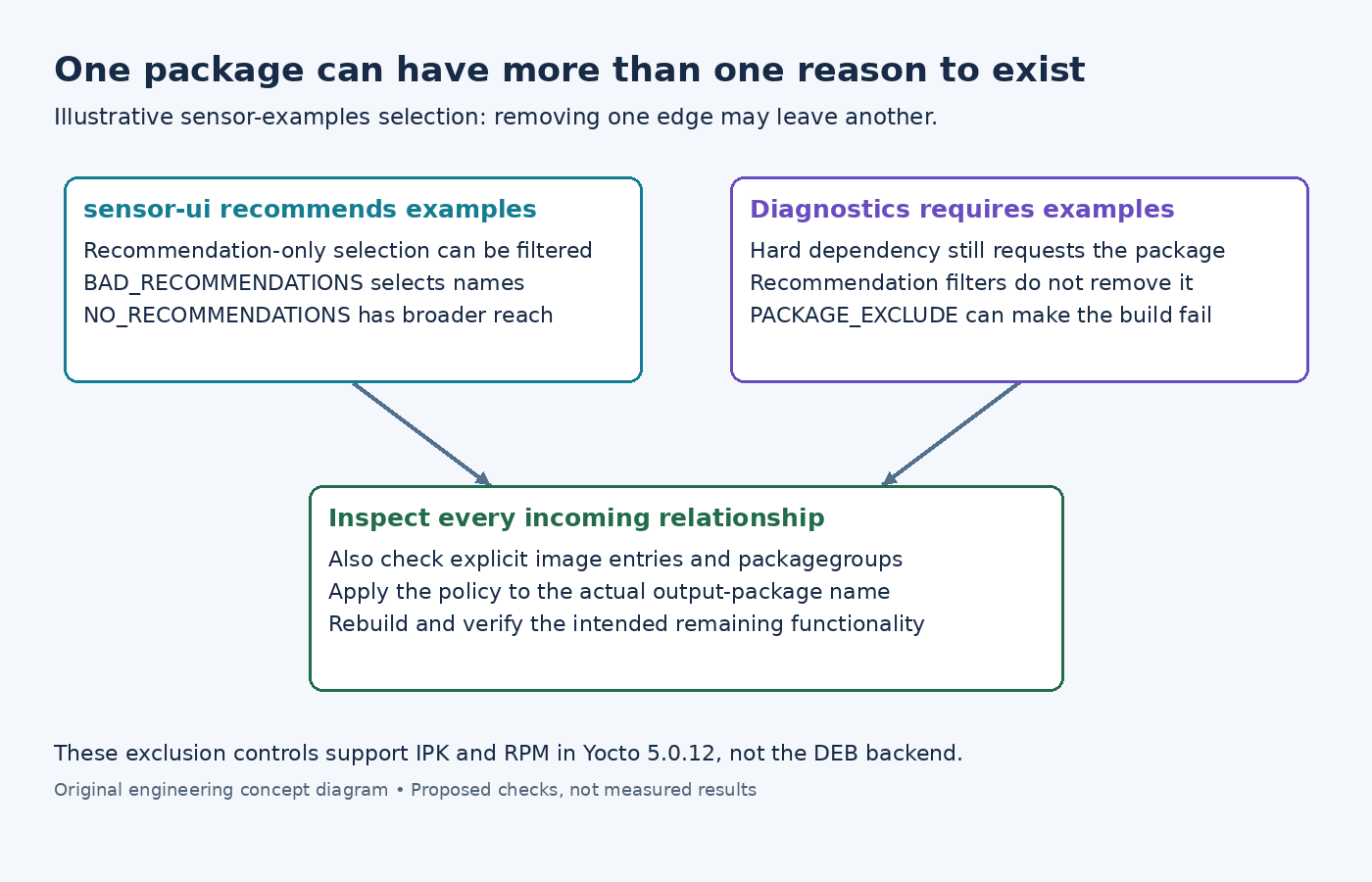
Suppose an illustrative image installs sensor-ui. That package recommends sensor-examples, but an installed diagnostic package also requires sensor-examples. Removing the recommendation does not remove the hard requirement.
Start with the actual output-package name in the image manifest or rootfs package-manager log. Trace its incoming relationships through installed package metadata. Check explicit image entries and packagegroups as well as the application recipe. A recipe can emit several packages, so searching only for its recipe name can miss the relevant relationship.
The RRECOMMENDS reference defines package-scoped recommendations and explains that the package manager normally installs them. Attach a recommendation to the correct output, for example RRECOMMENDS:${PN} += "sensor-examples", rather than assuming it is a recipe-wide installation rule.
For an established build, buildhistory image information includes installed-package lists and dependency graphs. Those can help locate the incoming edge. Read the package-manager diagnostics too: a graph is a useful representation, not a substitute for understanding the failed or completed transaction.
Choose a recommendation filter deliberately
The package-exclusion guide distinguishes selective recommendation filtering from disabling all recommendations and from forbidding a package. In Yocto 5.0.12 these controls support the IPK and RPM backends, not DEB.
For a package wanted only through recommendations, BAD_RECOMMENDATIONS:pn-product-image = "sensor-examples" scopes a selective filter to an illustrative image recipe. Verify the real image recipe name and effective override before concluding that the package manager ignored it.
NO_RECOMMENDATIONS = "1" is broader: it suppresses recommendation-only installation generally. Neither setting overrides a hard dependency. The NO_RECOMMENDATIONS documentation also warns that useful functionality, including some kernel modules, may arrive through recommendations and may need explicit image selection.
That makes blanket filtering a product-policy change. If the intention is only to remove sample data, disabling every recommendation expands the change far beyond that goal.
Use exclusion as a constraint, not a dependency repair
The PACKAGE_EXCLUDE reference documents a different outcome: excluding a package required by another installed package causes a fatal installation error. This can expose an unwanted requirement, but it does not make that requirement disappear.
In the example, decide whether the diagnostic feature should remain. If it genuinely requires the examples package, retaining the feature while forbidding its dependency is contradictory. If the dependency is incorrectly declared or too coarse, fix that package relationship after checking which files the diagnostic tool uses.
Avoid changing RDEPENDS to RRECOMMENDS merely to make exclusion succeed. The appropriate relationship depends on runtime behavior. A daemon that cannot start without a helper needs a different contract from optional demonstrations.
Confirm the resulting feature boundary
Rebuild the affected image and compare its installed-package list. Check whether the named package vanished and whether unexpected removals occurred elsewhere. Then exercise the specific product behavior that should remain available, including paths that previously used the optional package.
If the package is still present, return to its incoming relationships. It may be explicitly selected, required by another package, or selected under a different effective name than the one filtered. Repeating cache cleanup does not resolve a valid dependency request.
Keep the correction at the narrowest useful point: one optional relationship, one image's recommendation policy, or one deliberately removed feature. That produces an explainable image composition instead of a package list that happens to shrink.