Yocto Source Unpacking: Find the Directory Before Changing S
A recipe downloads its archive successfully, but configuration reports that the source directory does not contain the expected build files. Before adding a directory-copy workaround, determine the pathname created by unpacking. The archive's own directory structure, its SRC_URI parameters and the recipe's S value all participate in that result.
This article uses the Yocto 5.0 Scarthgap layout, where the examined base task passes WORKDIR to the fetcher's unpack operation. Do not transplant its path examples into a release with a different unpack-root convention without checking that release.
Start with the archive's actual members
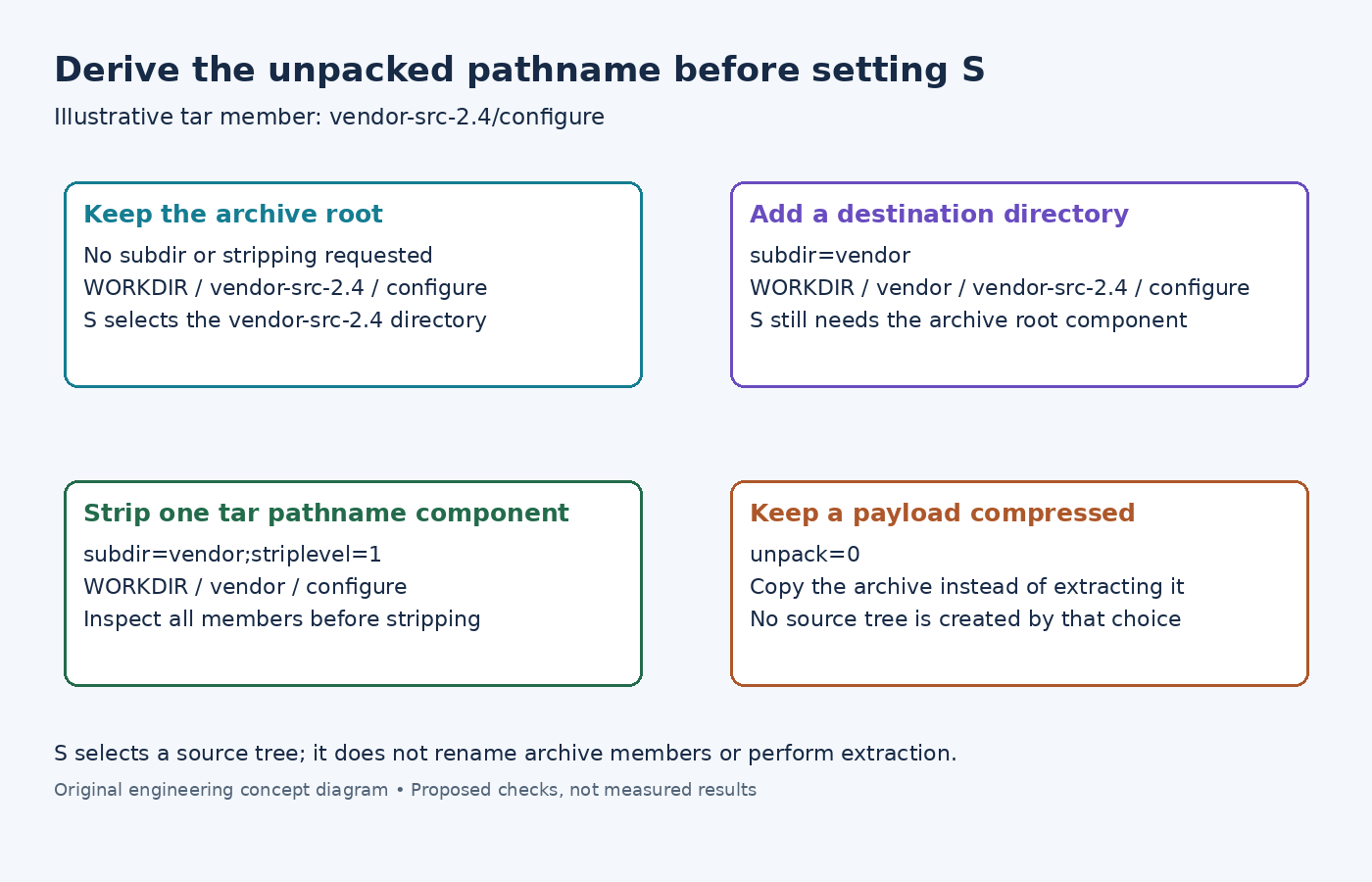
Suppose an illustrative archive contains vendor-src-2.4/configure and vendor-src-2.4/src/main.c, while the recipe is named sensor-tools_2.4.bb. The default source-directory name derived from the recipe will not automatically match the vendor's directory name.
The S reference defines where the build system expects unpacked source code. Changing S points later tasks at a directory; it does not rename the directory stored inside a tar archive.
List the actual archive members with an appropriate read-only listing command, such as tar -tf for a tar archive. Determine whether they share one top-level directory, several roots, or no enclosing directory. Do not infer this from the download filename: sensor-tools-2.4.tar.xz can contain a differently named tree.
Compose the extraction destination explicitly
The BitBake unpack reference describes subdir as a per-URI extraction destination beneath the unpack root. With ;subdir=vendor, the example member becomes ${WORKDIR}/vendor/vendor-src-2.4/configure. Setting S to ${WORKDIR}/vendor would still select the wrong level.
For tar inputs, ;striplevel=1 removes one leading pathname component during extraction. Combining that with ;subdir=vendor makes the example configure file appear under ${WORKDIR}/vendor/configure. S can then point to that directory.
These are alternative layout policies. Keep the upstream root and select it, or deliberately strip it and choose a stable destination. Do not add stripping solely to make one observed error disappear: inspect every member, including files that might lose their entire pathname or collide after transformation.
The examined common unpack implementation attaches striplevel to its tar extraction command. Do not assume the same option transforms all archive formats identically. It also dispatches decompression and extraction using filename suffixes, so an unexpectedly named download deserves inspection before changing S.
Decide whether the archive should remain an archive
Some inputs are payloads installed intact rather than source trees compiled by the recipe. The unpack parameter can disable extraction: ;unpack=0 leaves the archive as a copied file in the unpack destination.
That setting does not make configure understand compressed source. If a source archive unexpectedly remains intact, inspect its effective URI parameters and unpack log. Conversely, if the product needs the original archive as data, automatic extraction is the behavior to disable, rather than rebuilding the archive in do_install.
Inspect the task boundary before retrying configuration
Use bitbake -e sensor-tools to inspect effective SRC_URI, WORKDIR and S. Substitute the real recipe name. Run its unpack task in a disposable build, then compare the resulting tree with the path derived from the archive members and parameters. Read log.do_unpack for the chosen destination and any extraction failure.
The base class implementation also prepares a clean source directory for ordinary unpacking. Preserve local experiments before rerunning the task; hand-edited generated source is not a durable layout fix.
Once the expected build entry point exists under S, continue with patching and configuration. If it does not, fix the extraction contract first. If it does and configuration still fails, investigate the selected build system and its source/build-directory support. Repeatedly moving S cannot correct a missing generator, an inappropriate configure command or an archive that contains different software.