Yocto Shared Library QA: Separate Development Symlinks from Runtime Libraries
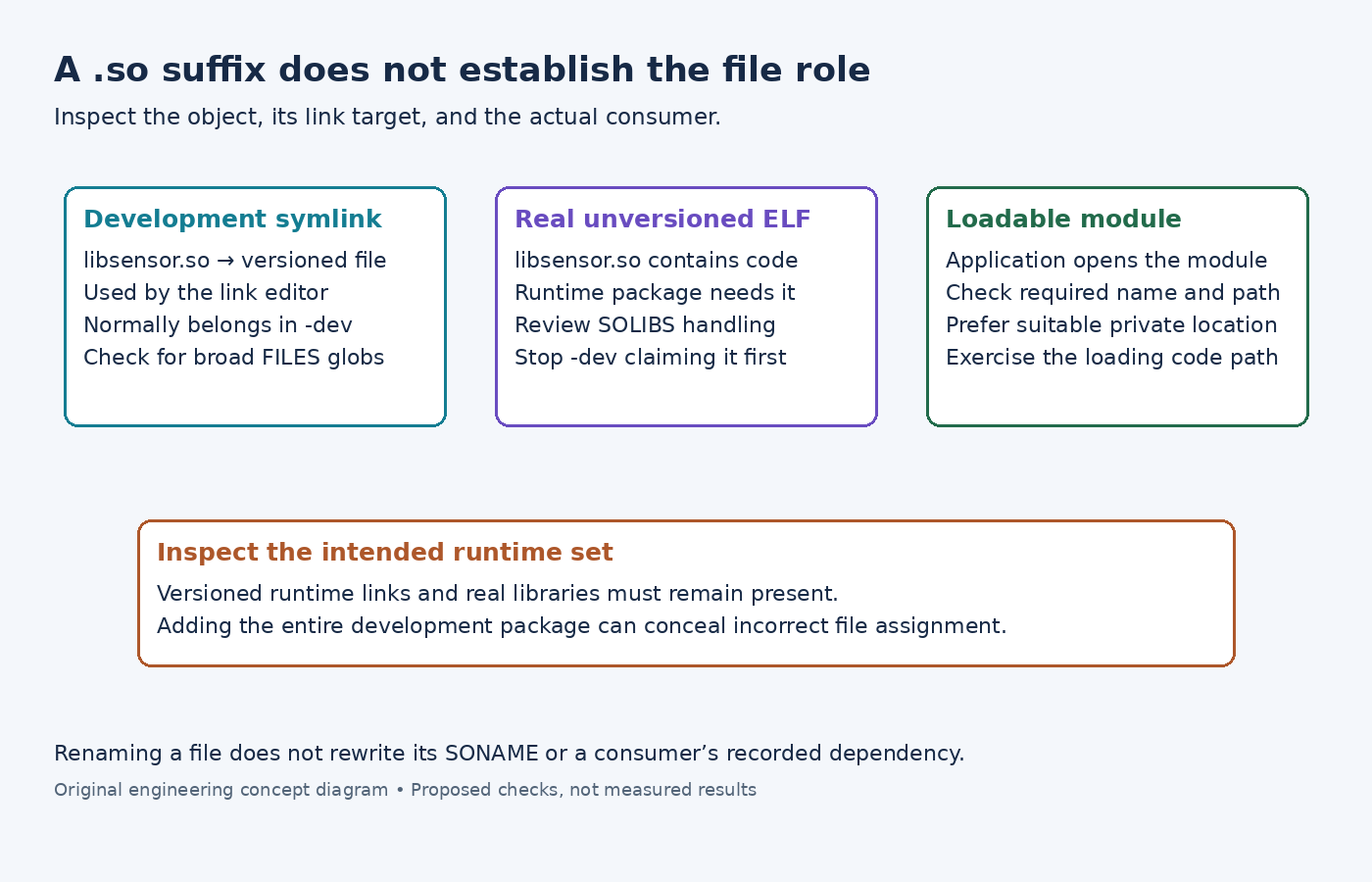
A file named libsensor.so is not enough information to choose a Yocto package. It may be a development symlink pointing to a versioned shared library, a real unversioned ELF library, or a plugin opened by an application. Treating all three as development files can leave a runtime image without code it needs.
The distinction matters when dev-so or a runtime dependency on a development package appears. In Yocto Project 5.0.12, classify the actual object and its consumer before changing FILES patterns.
Inspect the link chain and ELF identity
The shared-library guide explains the normal versioned arrangement. In an illustrative chain, libsensor.so is the development link, libsensor.so.2 is the runtime SONAME link, and libsensor.so.2.4 contains the code. Inspect each entry with a symlink-aware listing, then inspect the real ELF object's dynamic section with a suitable readelf.
Read the consuming executable's needed-library entries as well. A filename change does not automatically change the SONAME embedded in a library or the name recorded by a linked executable. Packaging a renamed file can therefore make the package look tidy while the loader still requests the old name.
Check the final staged links rather than assuming the upstream installation preserved the intended chain. A link into the build sysroot is a separate defect: its target must remain meaningful on the device.
Repair an incorrectly claimed development link
The QA reference identifies dev-so for unversioned .so symlinks in inappropriate nondevelopment packages. A broad pattern such as lib*.so* can collect both runtime files and the development link.
Narrow the package assignment around the actual roles. The runtime package needs the real versioned library and its runtime link; the development package generally needs the unversioned linker-facing symlink. Inspect the package split after the change instead of judging success only from the disappearance of one warning.
For this ordinary versioned case, adding the entire development package to the image hides the packaging mistake and brings unrelated headers or development material with it. Correct ownership of the files rather than expanding the image to compensate.
Handle a real unversioned library deliberately
If libsensor.so is an actual ELF file rather than a symlink, the default development pattern can claim runtime code. The documented recipe-level treatment for a genuinely unversioned library is SOLIBS = ".so" together with FILES_SOLIBSDEV = "".
Both parts matter because the development package normally claims its matches before the main package. Merely appending the same path to the main package does not ensure that it receives the file. These settings are appropriate to the demonstrated file arrangement, not a universal fix for every recipe with a .so warning.
If one recipe installs both ordinary versioned libraries and a special unversioned component, inspect the effect on every affected file before applying recipe-wide changes. Explicit subpackage patterns or an upstream installation correction may be clearer than changing the interpretation of all shared objects produced by that recipe.
Keep plugins distinct from linker-facing libraries
A plugin loaded by name at runtime may also end in .so. The insane class discussion notes rare runtime uses of such symlinks; the library guide recommends private directories for loadable modules where appropriate.
Find the application's actual plugin search path and required filename. A module moved to a private directory must remain discoverable there, and a module renamed to satisfy a packaging pattern may stop loading. Inspect the application's loading configuration rather than inferring behavior from the suffix.
Finally, test the consumer using only the intended runtime package set. For a linked executable, verify its loader dependencies; for a plugin, exercise the code path that opens that module. A program starting successfully does not prove an optional plugin can load. The package repair is complete when the runtime role works without relying on an accidentally installed development package.