U-Boot Script Images: Pin the Executed Script Alongside the Bootloader Release
Two devices run the same U-Boot binary but follow different boot
policies. One takes a recovery branch or loads a different image because
its script artifact, selector or input environment differs. Treating the
bootloader binary as the entire release makes this drift difficult to
reproduce.
This article uses upstream U-Boot v2025.01 and the source command.
Its scope is script identity and execution selection, rather than a
complete verified-boot design. For a Buildroot product, record the
bootloader and script-generation inputs selected by the release. No
script was executed for this article.
Define the release
unit that actually runs
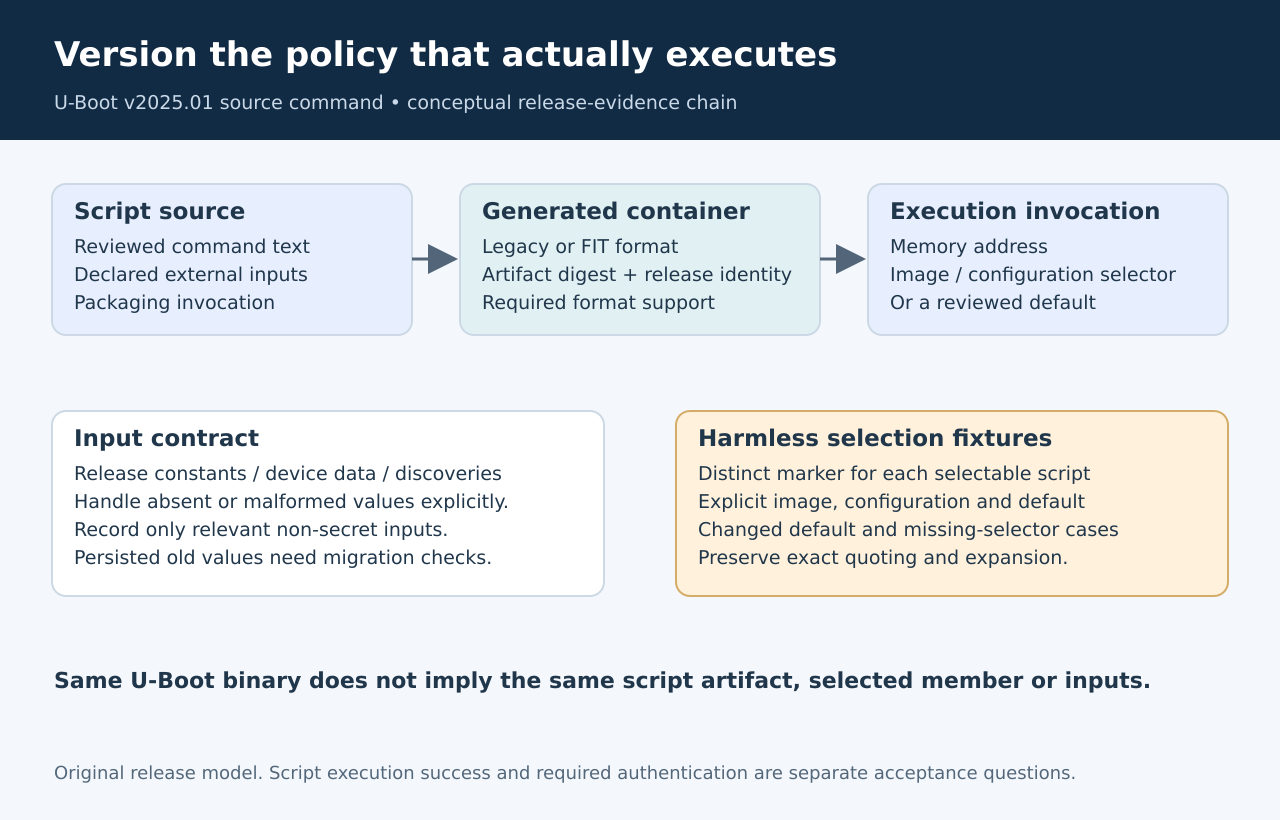
A useful release record includes the U-Boot revision and
configuration, the generated script image, its source text, the tool
invocation that packaged it and the selector used at boot. Include the
relevant environment inputs separately. These are related artifacts, but
they are not interchangeable evidence.
The source
command documentation describes executing a script image already
present in memory. It supports legacy script images and FIT containers,
subject to the corresponding build options. A filename on storage
therefore identifies only one stage in the path: the policy must still
load that file to the intended address and select the intended script
within it.
Record a digest of the generated container and preserve the source
that produced it. A human-readable version string is useful for
troubleshooting, but an accidentally reused string cannot prove that two
artifacts contain identical commands. The release record should make
that discrepancy detectable without depending on a working target.
Make script selection
visible
For FIT input, source accepts an image name or a configuration name.
When both are omitted, the documented default-selection behavior
applies. The distinction matters when a container carries several
scripts or its default changes during a packaging update.
The tagged
command implementation parses the supplied address and selector,
then passes the resulting image or configuration name to
cmd_source_script. With no argument, it uses CONFIG_SYS_LOAD_ADDR. This
is a reason to inspect the actual invocation rather than infer its
address from a nearby load command or a similarly named environment
variable.
For an established release, write down which script the invocation is
supposed to select. If the product intentionally relies on a default,
include that default in the reviewed interface. An explicit selector is
often easier to audit, but changing from an implicit selector is still a
behavior change that should be tested against the actual container.
The command reference also notes that an unquoted hash after
whitespace can begin a comment. An addressless configuration selector
therefore requires appropriate quoting or escaping. Preserve the exact
invocation in the release record, including how a surrounding script
expands it. A visually plausible command in a document is not sufficient
evidence that the interpreter received the intended selector.
Identify the script’s
external inputs
Review the script for variables it reads before assigning them.
Classify those inputs as release constants, per-device manufacturing
data, runtime discoveries or deliberate service overrides. This makes it
possible to reproduce a branch without copying an entire device
environment, including unrelated or sensitive values.
For each required input, define what happens when it is absent or
malformed. Avoid assuming that a value persisted by an earlier release
is suitable for a new policy. A migration can change the meaning of a
variable while preserving its name, leaving a script that works only on
clean development devices.
Keep the evidence minimal. A diagnostic record can contain the script
digest, selector and a bounded set of relevant non-secret inputs. It
should not dump credentials simply because they share the environment
store. Reproducibility improves when the script’s input contract is
explicit rather than when every available value is copied
indiscriminately.
Test
selection independently of booting an operating system
Create harmless qualification scripts with distinct markers for each
selectable image or configuration. On a recoverable test target or
suitable sandbox, exercise the explicit image selector, explicit
configuration selector and default path used by the product. Record the
observed marker with the container identity and exact invocation.
Include a container whose default intentionally selects another
marker. This checks whether the production policy depends on an implicit
choice. Include a missing selector and an unsupported packaging format
when those are relevant to the deployed configuration. The expected
result should be specified before running each case.
Next, test the relevant environment input combinations without
combining them immediately with firmware writes or a kernel handoff.
Separating selection from later side effects makes a failure easier to
classify. Only after those checks should the release qualification
exercise the full boot policy and its recovery behavior.
Keep
success and trust as separate acceptance questions
A successful source command indicates an execution result, not that
the intended release artifact was chosen. It also does not independently
establish the product’s required authentication policy. FIT’s ability to
carry signatures needs the appropriate verification path and
configuration; packaging a script inside FIT alone is not a complete
trust argument.
This article does not replace that security review. Its acceptance
record is narrower: the release contains a reproducible script artifact,
the deployed invocation selects the intended member, and the declared
input contract produces the expected branch behavior. Those records
should travel with the U-Boot binary when a release is archived or
handed to manufacturing.
When a field report says that identical bootloaders behave
differently, compare that complete record first. The useful question is
which versioned policy and inputs actually ran. Answering it can reveal
script drift without incorrectly blaming the bootloader executable or
treating every device-specific input as an unexplained exception.