U-Boot Button Commands: Audit Mapping Gaps and First-Pressed Selection
A service button works in a development build but stops selecting its
expected command after an environment update. The electrical input may
be healthy. In U-Boot v2025.01, the environment-driven button-command
loop has ordering and stopping rules that can make a later mapping
unreachable.
This article examines CONFIG_BUTTON_CMD, not image
authentication or every board’s custom recovery implementation. It
applies to a Buildroot product that includes this U-Boot feature and the
necessary button driver. Physical service access still needs an
independently reviewed policy for every command it can reach.
Locate when the input is
sampled
The tagged
boot configuration enables button-command support only with the
command line and button framework. Mappings use paired environment
variables: button_cmd_N_name identifies the button label,
and button_cmd_N supplies its command.
The main
loop calls button-command processing after the configured preboot
work and before normal boot-delay processing. Other enabled early
activities can also precede it. The input is therefore not necessarily
sampled immediately at reset.
Record that location in the product’s service procedure. A brief
press that ends before this point is different from a held input
observed by the loop. Do not promise a universal hold duration from the
source alone; startup time and driver behavior depend on the board and
enabled work.
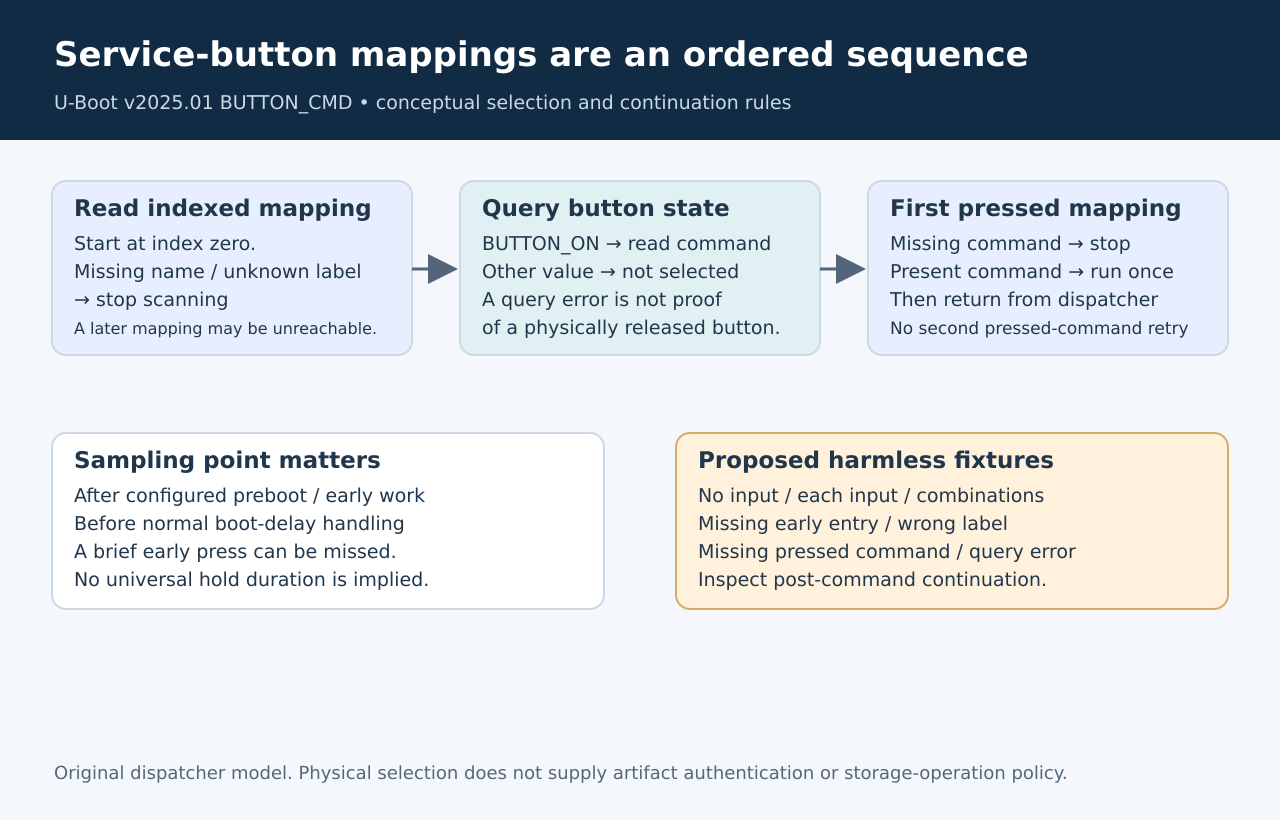
A missing entry stops the
sequence
In common/button_cmd.c,
the loop begins at index zero. Its helper first reads the mapping’s name
and resolves that label to a button. If no name is configured, or no
button is obtained for the label, the helper returns false and the outer
loop stops.
It does not skip a missing index and search arbitrarily for later
names. A release that removes mapping zero while preserving mapping one
can therefore disable the later command without changing its own
variables. Treat the active mapping list as an ordered sequence with a
deliberate termination point.
The helper reads a command value only when its button is pressed. A
released button can advance the scan without needing that command value
on that particular attempt. A pressed button with a missing command,
however, stops processing. This distinction is worth testing because a
broken mapping can remain hidden until an operator actually holds that
input.
Pressed,
released and failed are different observations
The processor computes its pressed flag by comparing the returned
state with BUTTON_ON. The button
interface allows state queries to return a negative error. Such an
error does not equal the pressed state, but that does not establish that
the physical button was released.
Keep driver health separate from selection outcome. A test record
should distinguish a valid released reading from a failed state query.
Otherwise an inaccessible GPIO controller or unsupported driver
operation can look like an operator who did not press the button.
Likewise, confirm the label comes from the actual deployed device
description. A familiar board schematic name does not automatically
equal the label used by the button framework. Changing the button label
supplied to the button framework while retaining an older environment
mapping can break selection even when the same physical pin remains
connected.
Only one pressed mapping
runs
Once the loop finds a pressed mapping with a command, it invokes that
command and returns. It does not execute the commands for every
simultaneously pressed button. Mapping order therefore expresses a
priority when multiple inputs are active.
The function does not use the command’s return value to try another
pressed mapping. If the command returns, the surrounding main loop
continues toward its normal boot processing. Whether the command
normally returns, stays in a service mode or transfers control is
command-specific.
This makes two tests necessary: which mapping wins, and what happens
after its command finishes or fails. A correct button selection does not
prove the intended service operation completed. Avoid using a
destructive recovery action as the first way to observe this
distinction.
Qualify the mapping
with harmless commands
Use an isolated, recovery-capable fixture with distinct
non-destructive markers for each mapping. Test each button alone, no
buttons, and the combinations that the product permits. Record the raw
input state, selected index, marker and subsequent normal-boot
behavior.
Then test the configuration boundaries: a missing early name, an
unresolved label, a pressed mapping without a command and a retained
mapping from the previous release. If the development environment
supports controlled driver-error injection, verify that diagnostics
distinguish it from a released input.
Keep the fixture’s command strings separate from production flashing
or erase commands. Restore and verify the approved configuration before
any later service qualification. No buttons were sampled and no commands
were executed for this article; the cases are proposed checks derived
from the source.
Make the service contract
explicit
A useful release record names the button label, mapping index,
sampling point, simultaneous-input priority and post-command
continuation behavior. It also states which component owns those
environment variables and how updates preserve or replace them.
Security review remains a separate responsibility. The fact that a
command requires a physical button does not establish that its artifacts
are authenticated or that its storage operations are appropriately
constrained. Review the selected command’s policy without assuming the
button dispatcher supplies those guarantees.
The immediate diagnostic benefit is narrower and concrete:
service-button failures can be traced to input health, label resolution,
mapping continuity or command execution instead of being treated as one
unexplained recovery failure.