Yocto cleanall and Shared Downloads: Explain an Unpack Failure After Cleaning a Native Variant
A target recipe can retain a successful fetch-task stamp after its source archive has disappeared. One documented way to create that mismatch is to run cleanall for a native variant that shares the download. The cleanup changes a shared input while the target’s separate task state still says fetching is complete.
This explanation follows Yocto Project 5.0.12 Scarthgap, task reference sections 6.2.2–6.2.4. It examines the official counterexample without running BitBake or deleting any cache. The commands below describe a failure sequence; they are not instructions to reproduce it in a shared build environment.
Draw the ownership mismatch first
Use three separate boxes in the investigation: the target recipe’s task-completion state, the native variant’s task-completion state, and the source archive in DL_DIR. The two variants can use different work directories and task stamps while referring to the same downloaded archive.
That arrangement makes shared downloads useful, but it also gives the archive a lifetime broader than either individual variant. A cleanup action selected through one variant must not be assumed harmless to every other consumer just because their work paths differ.
The relevant stamp here is the target’s do_fetch completion record. Do not substitute the fetcher’s download-validation .done record, an unpacked source tree, or an sstate object. Those artifacts answer different questions. An investigation that calls all of them “the cache” loses the relationship needed to explain this failure.
Walk the documented sequence on paper
The manual illustrates the problem using the following three commands. Keep this as an explanatory transcript, not an executable maintenance recipe:
bitbake -c fetch    recipe
bitbake -c cleanall recipe-native
bitbake -c unpack   recipe
After the first step, the target’s fetch stamp exists and the source archive is available. The second step removes the shared downloaded source through the native variant. Because that step operates on a different work directory, it does not remove the target recipe’s fetch-task stamp.
The third step therefore encounters an inconsistent pair of facts: target fetch completion is still recorded, but the archive needed by unpacking is absent. The documented outcome is an unpack failure when extraction tries to use the deleted input.
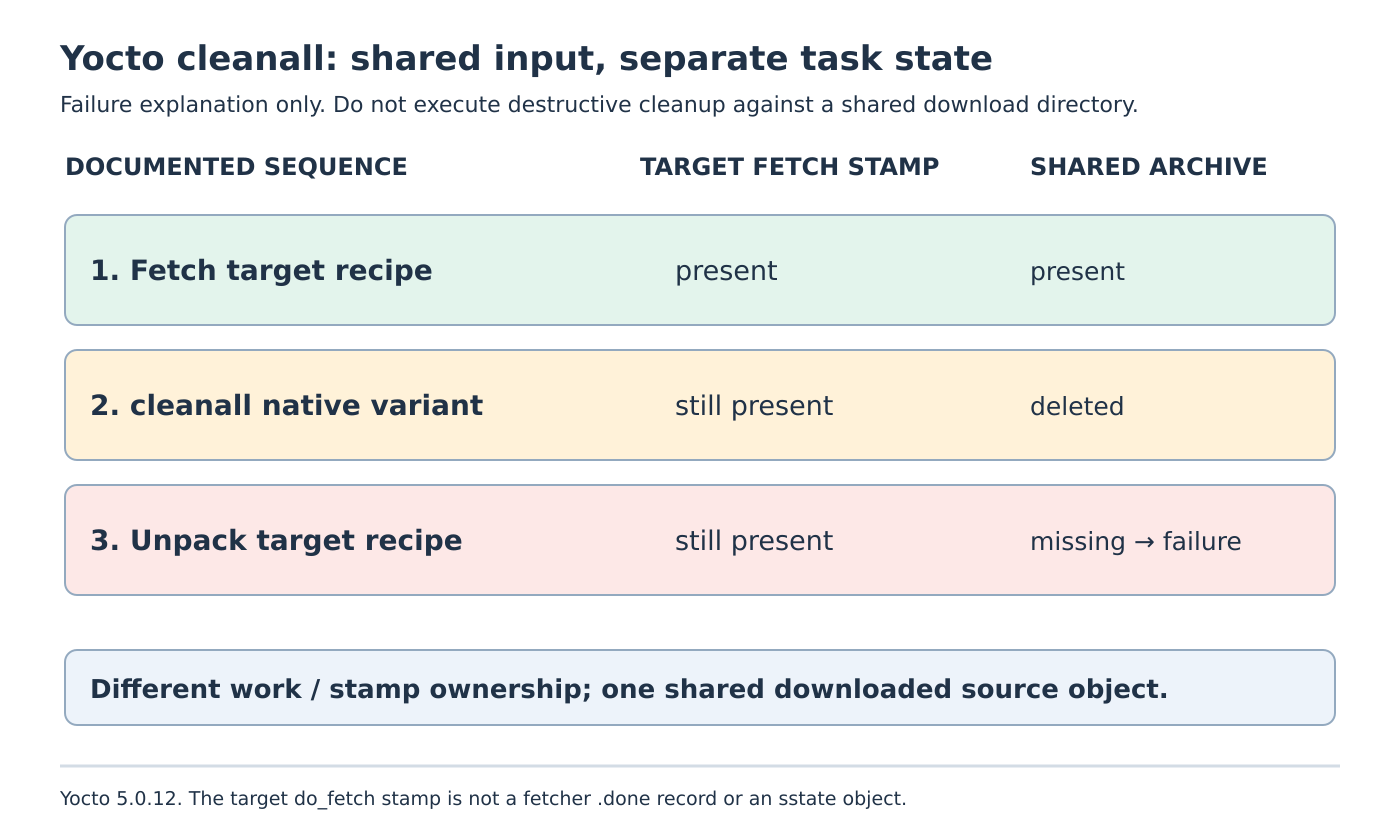
This is more specific than saying that cleanup makes a later build slower. The surviving state prevents the expected fetch prerequisite from automatically restoring the missing object in this example. Repeatedly restarting the same failing unpack step does not explain which input was removed or who removed it.
Confirm the failing artifact before changing metadata
Read the unpack error and identify the actual archive pathname. Then correlate it with the effective SRC_URI, DL_DIR, recipe identity and target/native work paths. Keep the fetch and cleanup logs from the same period rather than comparing a current cache listing with an unrelated older build.
If the archive is missing, investigate recent cleanup operations and other users of that download directory. The manual explicitly extends the warning to concurrent BitBake processes sharing DL_DIR. One build’s apparently local maintenance can invalidate another build’s expected source input.
If the archive exists but has incorrect contents, that is a different branch requiring source and checksum evidence. If extraction succeeds but later tasks look in the wrong directory, investigate the unpack layout and S. Changing S cannot restore an archive deleted before extraction, and changing a checksum to accept unexpected bytes does not repair missing input ownership.
Use the narrow refetch boundary
For the normal goal of starting the fetch task afresh, the task reference recommends bitbake -f -c fetch recipe instead of cleanall. Treat the recipe name as a placeholder and apply the action only in the intended, coordinated build context. It is shown here as documentation, not as an executed repair.
Forced fetching does not guarantee that an unavailable upstream, broken mirror or authentication problem will be resolved. Preserve the resulting fetch evidence before proceeding to unpack. A successful task result and the intended source object need to refer to the same recipe configuration.
The cleanup names have distinct scopes. clean removes outputs from unpacking onward while retaining shared state. cleansstate additionally removes the recipe’s shared-state cache. cleanall also removes downloaded sources. A broader cleanup is not a stronger proof that the original mismatch has been understood.
Preserve coordination as part of the fix
Before any future reproduction, allocate a private disposable download directory and isolated work state, with no other build depending on them. A paper state table is sufficient for this article: archive present or absent, target fetch stamp present or absent, and the operation responsible for each transition.
For a real shared build service, agree who may remove shared source objects and when consumers are quiescent. Keep the immediate recovery separate from that retention policy. The engineering result is a causal account of a shared archive disappearing while variant-local completion state survives, rather than another unexplained instruction to erase more build state.