Yocto Patch Application: Separate Patch Eligibility, Strip Depth and Target Directory
A patch file reaches the recipe's working area, but do_patch either ignores it or fails before compilation. Once the input file is established, three different questions remain: is this input eligible for application, which source pathname does its header identify, and does the current source contain the expected context?
Changing all three at once makes the failure harder to explain. This procedure separates them using Yocto Project 5.0.12 documentation and the examined Scarthgap patch implementation. The filenames and source tree below are illustrative.
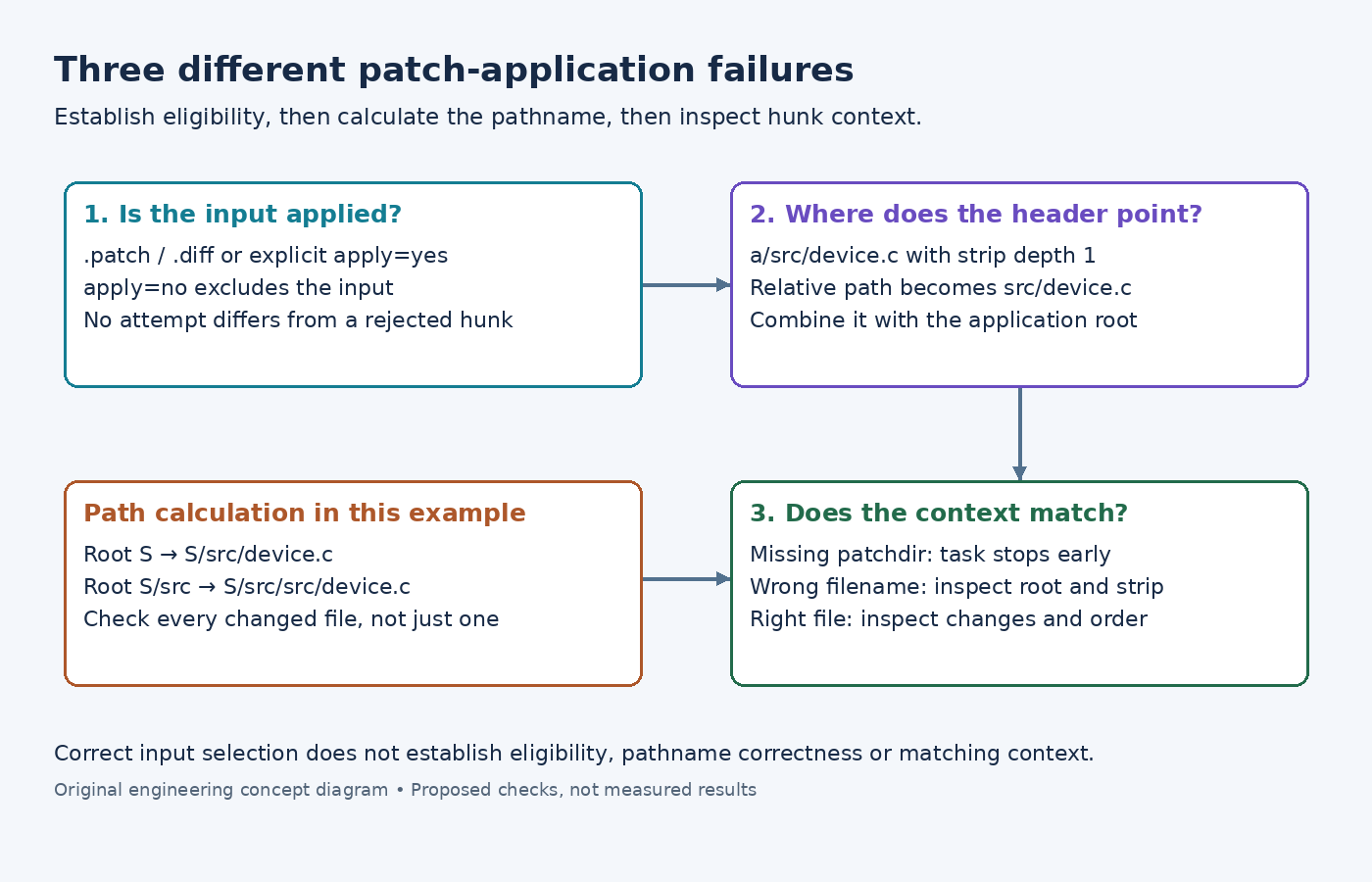
Decide whether the file enters the patch series
The do_patch reference describes automatic treatment of .patch and .diff files. An explicit apply=no prevents application, while apply=yes permits a differently named input to be treated as a patch.
For example, file://reference.patch;apply=no can supply a file without adding its changes to the source. Renaming that file or rerunning compilation does not override the parameter. Inspect the effective SRC_URI, rather than assuming every fetched patch-shaped file participates.
The examined patch-selection implementation performs this eligibility decision before building the patch list. It also evaluates supported revision or version restrictions. Consequently, absence from the application sequence is different from an application attempt that rejects a hunk.
Read the patch task's log for the actual application sequence. If the entry never reaches application, investigate its parameters first. If the log identifies an attempted patch and an error, proceed to pathname resolution instead of removing eligibility restrictions indiscriminately.
Calculate the target pathname before changing context
The SRC_URI option reference defines two independent controls: striplevel, defaulting to one, and patchdir, defaulting to ${S}.
Suppose a patch header identifies a/src/device.c, and the unpacked source contains ${S}/src/device.c. Removing one leading path component leaves src/device.c; applying from ${S} therefore reaches the intended file.
Now suppose the entry also specifies patchdir=src. The application root becomes ${S}/src, while stripping one component still leaves src/device.c. Together they point toward ${S}/src/src/device.c. The directory and strip setting can each look plausible in isolation while their combination is wrong.
For this example, retaining the source root and the default strip depth is the straightforward choice. A patch intentionally generated relative to a nested component may need a different pairing. Calculate that pairing from the actual headers and unpacked layout, including every file changed by the patch; do not keep increasing the strip count until one filename happens to match.
Separate a missing root from a rejected hunk
The examined patch task implementation resolves a relative patchdir beneath S. It explicitly stops if that target directory does not exist. That failure precedes the patch tool's examination of source context.
If the application directory exists but the expected source file does not, revisit the header/root calculation. If both directory and file are correct, compare the rejected hunk with the current source. An upstream revision change, an already-present modification or an earlier patch can explain the disagreement. Changing patchdir cannot repair a changed function body in the correct file.
The task imports and resolves patches in its selected sequence. Inspect the effective order when one patch introduces code that another patch modifies. A numeric filename prefix is a naming convention; it should not substitute for checking the sequence actually consumed.
Recheck from an understood source state
Use a disposable recipe build context when reproducing application failures. Preserve any intentional local source edits before replacing its unpacked tree. A manual patch command run against a previously modified tree can produce a different result from the normal recipe task.
After correcting the identified metadata or patch content, run the recipe through its ordinary patch stage, for example bitbake -c patch sensor-agent in the prepared build environment. Confirm that a fresh application was actually scheduled rather than treating an up-to-date task as a new test. Then inspect the resulting source diff before compiling.
The resolution should identify the failed boundary: excluded entry, incorrect root/strip combination, or incompatible context. A successful application establishes that the textual transformation completed; the component's behavior test still determines whether that transformation fixes the intended defect.