SquareLine Studio Recolored Labels: Test What Happens When a Colored Span Wraps
A colored status phrase fits on one line in SquareLine Studio, then loses its intended color after the label becomes narrower. The text has not necessarily been corrupted. The recolor command and the label's wrapping behavior can interact in a way that a single-width preview never exposes.
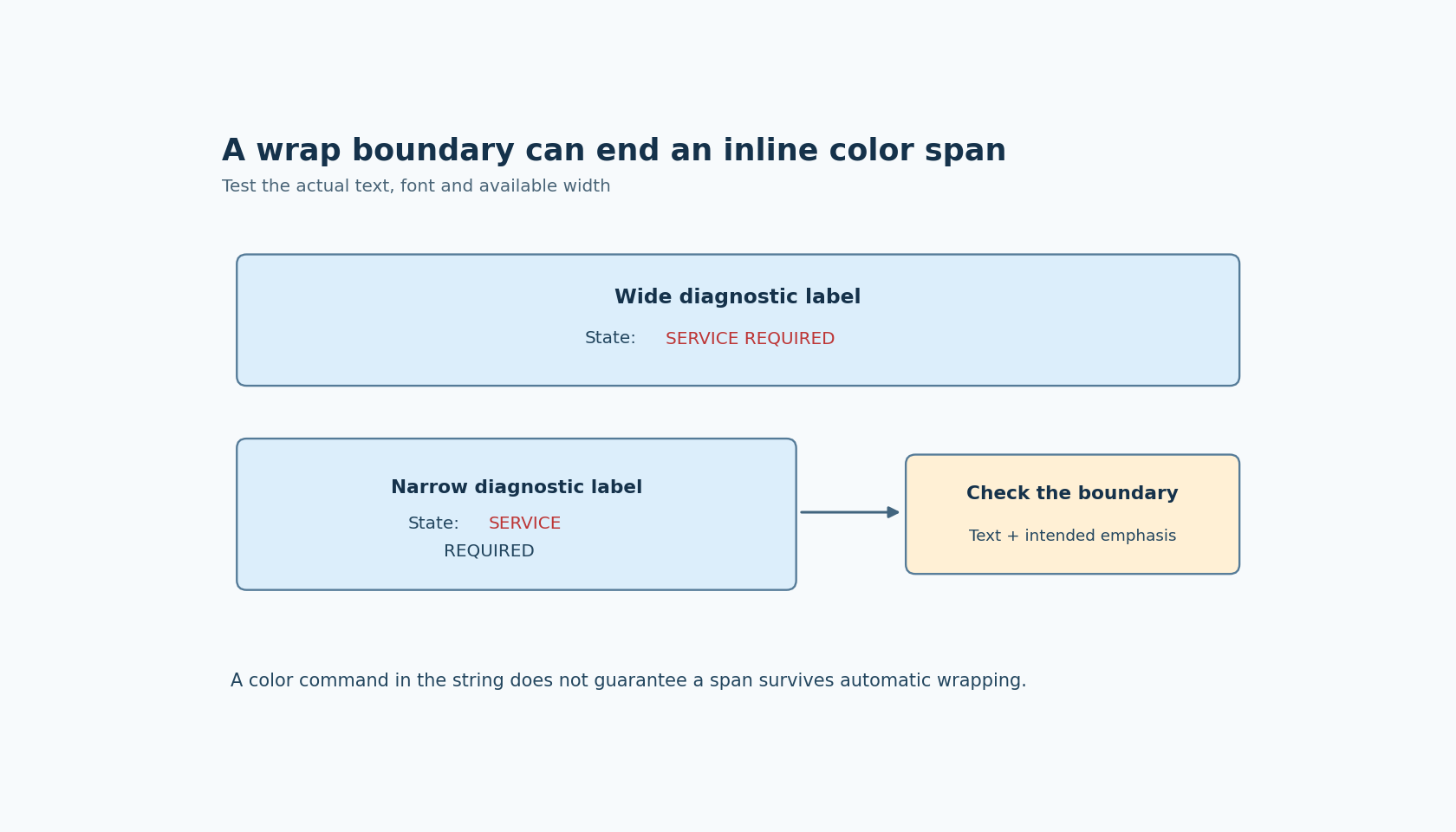
SquareLine's Label widget documentation exposes inline recoloring, and its 1.6.1 release notes list Label recolor support for LVGL 9.3. For a project targeting LVGL 9.5, the LVGL Label reference supplies the important boundary: a recolor span that has not already ended is terminated at the line where wrapping occurs. Do not assume a colored phrase automatically keeps its color across every wrapped line.
Test the semantic phrase at two widths
Begin with a short diagnostic string such as State: #d04040 SERVICE REQUIRED#. Enable recoloring for that label. At a generous width, confirm that the markup produces the intended colored phrase rather than being displayed literally. This establishes the basic feature configuration before testing wrapping.
Reduce the width until the colored phrase crosses a line boundary. Observe both lines. The purpose is not to find a universal pixel width at which wrapping happens; that depends on the selected font and layout. The purpose is to see what happens when a span that represents one semantic message is split by the actual label layout.
Record the exact text, selected font, label width and long-mode setting. If those inputs are omitted, a screenshot can be difficult to reproduce. A later font change can move the boundary even if the label geometry and message are unchanged.
Treat markup as a rendering input
With recoloring enabled, the label text is no longer just visible prose. It contains instructions interpreted by the renderer. That affects how application-generated messages should be assembled and reviewed.
Keep the visible message and its formatting policy conceptually separate. A component that receives arbitrary text should not silently assume that every delimiter inside that text was inserted as an intentional color command. Test representative literal delimiters using the selected implementation. This article does not prescribe an escape sequence because the cited pages do not establish one for every supported version.
When messages are built from several fragments, check where each fragment opens and closes its color span. A missing terminator can change more than the intended word. A terminator placed correctly in the string still does not remove the documented wrapping boundary, so string validation and layout validation remain separate checks.
Choose a solution that matches the content
If the entire label conveys one status and should use one color, a whole-label style may express that intention more directly than inline markup. It also avoids depending on a span continuing through a line break. Test the resulting style and contrast in the selected state, just as you would any other label.
If only a short token needs emphasis, give that token a layout that can reliably accommodate the required text. A separate label may be appropriate when the product already treats the token and explanatory sentence as distinct elements. Do not create a complicated collection of labels merely to preserve one attractive desktop screenshot.
For genuinely mixed-color prose, test the exact version's behavior and supported text facilities before choosing an implementation. Manually inserting formatting commands at predicted wrap points is fragile when the font, width or content can change. A fixed line break can be a deliberate design decision for fixed content, but it should not be mistaken for a general responsive-text solution.
Check content changes that move the boundary
Use the shortest expected message, a common message and the longest realistic message. Include any dynamic identifiers or numeric values that expand the text. The relevant failure can appear only when a value grows from two digits to three or when a service code is longer than the demonstration code.
Check an intentional newline separately from automatic wrapping. The documented automatic-wrap behavior should not be generalized into a claim about every newline and formatting combination without verification. Similarly, scrolling or clipping modes answer a different layout question from wrapping; observe the mode the product actually uses.
If a screen supports translated content, include those actual strings in the same narrow test. The issue being examined is the color-span boundary, not a general translation-layout audit. Do not assume a translated phrase will break at the same word as the original.
Make the message understandable without the color
A status phrase should still communicate its meaning when the color distinction is difficult to perceive. Keeping the words explicit also makes a wrapping defect easier to notice: the complete message remains readable even if one portion loses its intended emphasis. Color markup alone does not establish accessibility or a reliable safety indication.
The acceptance condition is specific: for each required message and width, the displayed text and intended emphasis must both be correct. A successful single-line preview is only the first case. The checks above are proposed rather than executed, and the line-boundary claim is explicitly scoped to the cited LVGL 9.5 documentation.