ifm AL1432: Why Working EtherCAT I/O Does Not Make the Web Interface Reachable
An AL1432 can participate in cyclic EtherCAT communication while its
IoT Core interface remains unreachable from an engineering computer.
Those observations concern different communication paths. Before
changing sensor mappings or IP settings repeatedly, establish how
Ethernet over EtherCAT reaches this particular master.
The reference here is ifm’s AL1432 operating manual 11489157/02,
February 2024, with its TwinCAT 3.1 integration example. The device is
an IO-Link master with an EtherCAT interface. Do not import the
independent IoT-port arrangement of another ifm product into this
model’s network drawing.
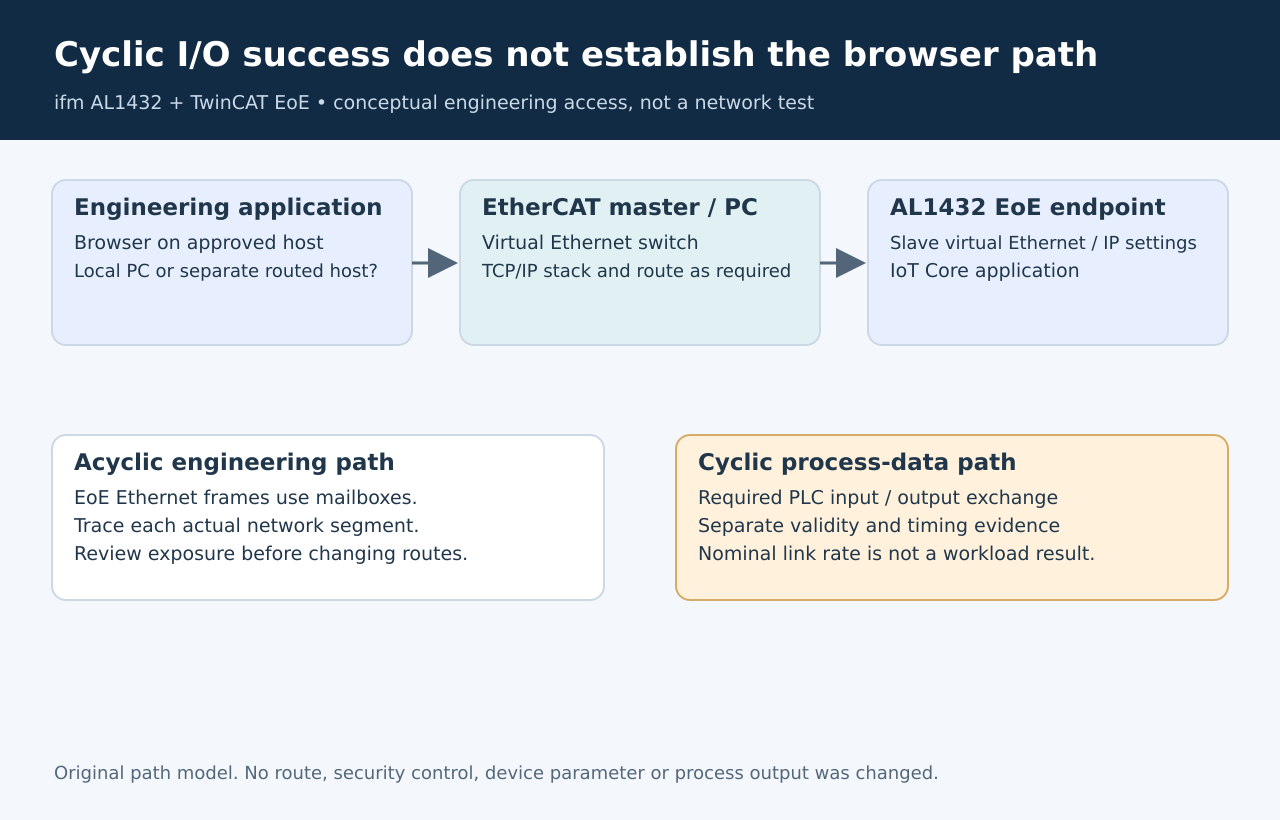
Original path model. No network connection or controller
configuration was performed.
Draw the engineering path
separately
For this model, ifm requires EoE support and configuration on both
the EtherCAT master and the slave before using IoT Core or the stated
parameter-setting tools. Its direct-connection example assigns the
EtherCAT master to the TwinCAT PC’s Ethernet interface and configures
the slave’s virtual Ethernet/IP port. AL1432
manual, sections 4.2, 4.5 and 9.2.2.1
That yields two distinct questions: is the EtherCAT device exchanging
the required cyclic data, and can the engineering application’s IP
traffic traverse the configured EoE path? Success on the first does not
answer the second.
Keep the topology drawing concrete: browser host, network interface,
EtherCAT master, virtual switch and AL1432 IP endpoint. Mark whether the
browser runs on the controller PC or another computer. “Connected to the
machine network” is too vague to identify the missing segment.
Understand what the
master must provide
TwinCAT describes EoE as Ethernet frames transported through EtherCAT
using acyclic mailbox communication. Its virtual Ethernet switch
connects the relevant logical ports. The TCP/IP-stack connection and
routing controls address different access arrangements; routing is
relevant when a computer reaches the EtherCAT equipment through another
network card. TwinCAT
EoE support
This explains a common diagnostic split. If access works from the
TwinCAT PC but fails from a separate engineering station, the device’s
existence and local path have already been demonstrated. Investigate the
additional approved route and return path rather than replacing the
working cyclic mapping.
Conversely, if neither host can reach the endpoint, inspect the
master/slave EoE settings and address assignment first. A browser
timeout alone cannot distinguish an absent virtual path, an incorrect
destination or an application-level failure.
Do not solve
reachability by broadening exposure
A commissioning plan should name which host needs access and why.
Enabling an interface or route can expose parameter-setting
functionality beyond the original machine boundary. Review that
consequence before applying a network change; do not disable host
protections as a troubleshooting shortcut.
Start with the documented local topology on an isolated, authorized
fixture. Record the configured endpoint and whether the expected
read-only interface responds. Add a remote engineering route only when
that route is required and approved. This staged comparison isolates the
added network dependency without changing several layers at once.
Keep mailbox
capacity separate from cyclic health
Once reachability is established, slow page loads or maintenance
transfers raise a different question. Beckhoff’s master guidance
recommends considering EtherCAT cycle time and mailbox sizes before
increasing the virtual switch’s frame queue. A larger queue is not a
universal fix or proof of a faster application. EtherCAT
master default settings, EoE support
For a later qualification, observe the actual maintenance workload
alongside the required cyclic behavior under the chosen configuration.
Do not infer a bandwidth or latency guarantee from the nominal Ethernet
link rate.
The useful handoff is a verified path description: this engineering
host reaches this AL1432 endpoint through these EoE components, with
these access boundaries. Keep the browser-path result separate from the
evidence that the PLC is receiving valid process data.