EEZ Studio Dashboard Slider Events: Compare the Delayed Payload with the Assigned Value
Two consumers of an EEZ Studio Dashboard Slider change can observe different values: one reads the assigned Flow variable, while another reads the ON_CHANGE payload. In the inspected implementation, rapid changes can feed these consumers from different moments in the same timer window.
The Slider reference describes its value and range properties. The relevant behavior appears in SliderDashboardWidgetElement in the fixed source revision, EEZ Studio v0.29.0 commit 3000161d09d40a5c1dc2477ddc30b38037b3a612.
This is a Dashboard HTML range input with an EEZ adapter. It is not a claim about LVGL slider event delivery, and no runtime timing measurements were made.
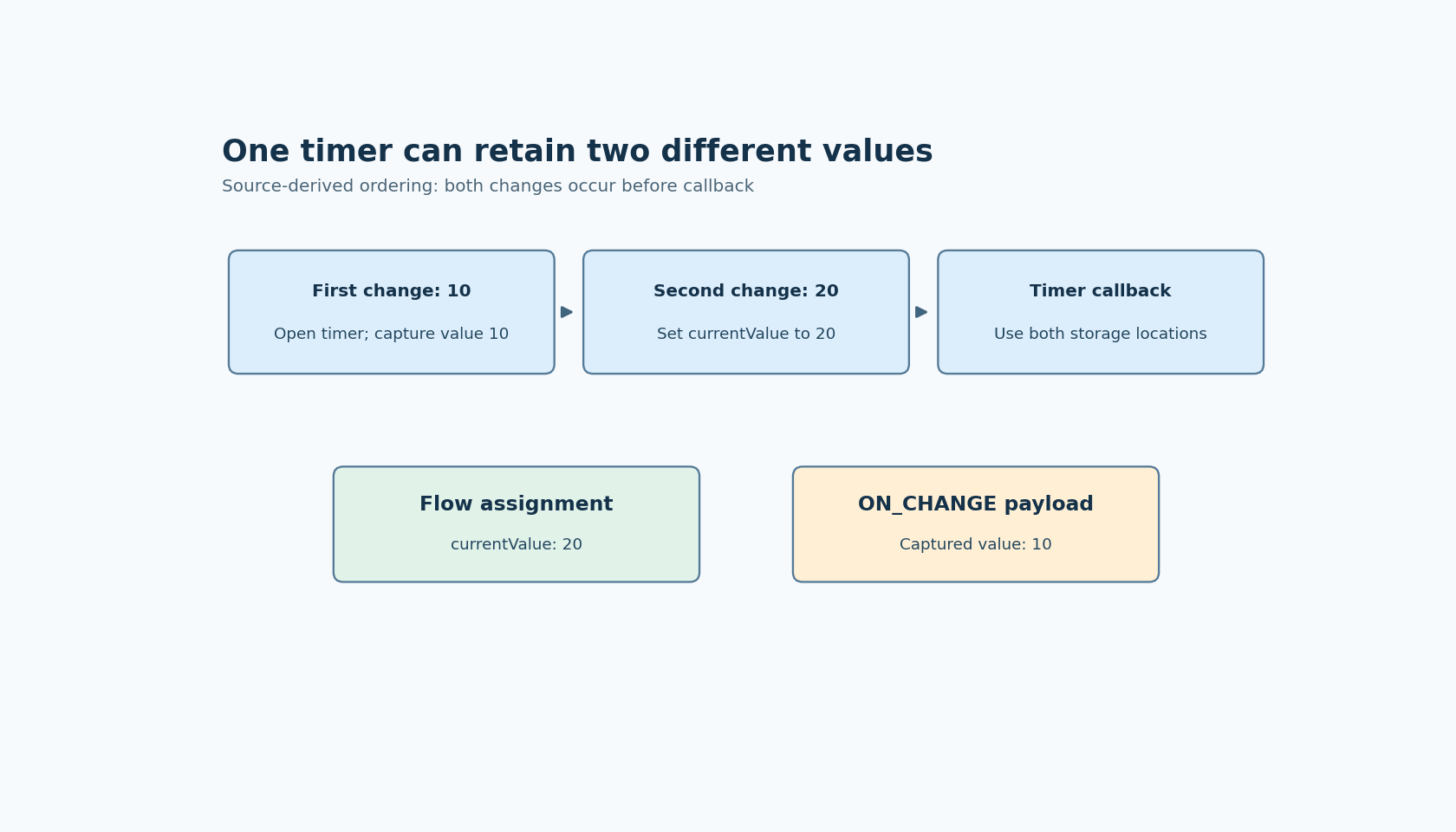
The first change creates a closure
On each change, the handler parses the input value and clamps it to the configured minimum and maximum. It stores that result in the component's currentValue field.
If a timer already exists, the handler then returns. Otherwise, it starts a timer with a requested delay of 20 milliseconds. The timer callback closes over the local value variable belonging to the change that created it.
This gives the implementation two distinct storage locations: currentValue, which later changes can update, and the local value captured by the first handler invocation. They may initially contain the same number, but they are not the same variable.
The callback uses both storage locations
When the timer fires in an active Flow with a bound Value property, it assigns this.currentValue to that property. It then clears currentValue. The ON_CHANGE payload, however, is constructed from the captured local value.
Suppose one change supplies 10 and another supplies 20 before the first callback runs. The second change updates currentValue to 20 and returns because the timer exists. The callback can then assign 20 while emitting an event whose numeric payload is 10.
That result is a source-derived prediction under the stated ordering. A requested 20-millisecond delay is not a guarantee that callbacks run at a precise wall-clock time, nor does the source prove every drag will produce this sequence.
Capture the variable and payload independently
For a proposed instrumented fixture, bind Value to an in-memory variable and attach an ON_CHANGE handler that records its received payload. Observe the bound variable through a separate read-only path. Keep the slider range wide enough that 10 and 20 are both valid, avoiding clamping as an extra cause.
First deliver one change and let its callback complete. Then deliver two distinct changes before the next callback. Record the order of handler invocations and timer callbacks, along with the two numeric observations. This is more decisive than dragging by hand and judging a moving label.
A controlled timer harness can isolate the closure behavior in a source-level test. A separate Dashboard run should confirm how the actual browser input and Flow runtime expose it. Neither test was executed here, and a harness result alone would not establish the behavior of every packaged application.
If the application leaves Value unbound, the assignment branch differs. Include the configured binding in any report rather than treating all slider configurations as equivalent.
Choose the intended value contract
A consumer that reacts to an individual event may reasonably expect its payload to describe that event. A consumer that applies the newest setpoint may instead require the latest accepted state. Mixing those contracts across two consumers can cause inconsistent commands even when each consumer appears internally correct.
For a version containing this implementation, avoid assuming that the bound value and payload are interchangeable. Decide which is authoritative for the operation, and verify the chosen observation path at its actual execution point. Reading a mutable global later is not a universal substitute for an event snapshot.
If maintaining an application-specific adapter or patch, the narrow regression assertion is that the value assigned and the value emitted satisfy the intended contract under two changes in one window. Review later EEZ revisions before retaining a workaround; the issue is tied to these particular storage choices and callback code, not to an inherent limitation of sliders.