EEZ Studio Screen Lifetime: Preserve Application State When a Page Flow Is Deleted
Reducing the number of EEZ Studio screens kept in memory changes more than the number of LVGL objects. When a screen's Flow state is deleted, its local variables and Watch actions are part of that lifetime too. A settings page that used to retain an unfinished edit can therefore behave differently after screen lifetime management is enabled.
Before turning on deletion, classify the state that belongs to the page and the state that belongs to the application. Then make navigation tests check both memory lifetime and the operator's intended workflow.
Start with a retention decision
Consider a settings screen with three kinds of data: a device's committed setting, a temporary value being edited, and a message saying that a save request is pending. These values do not necessarily have the same owner.
The committed setting usually belongs to the application model. The temporary edit may intentionally disappear when the operator leaves, or the product may require it to survive. A pending request needs an owner that remains valid until the result is handled, even if its initiating page is no longer visible.
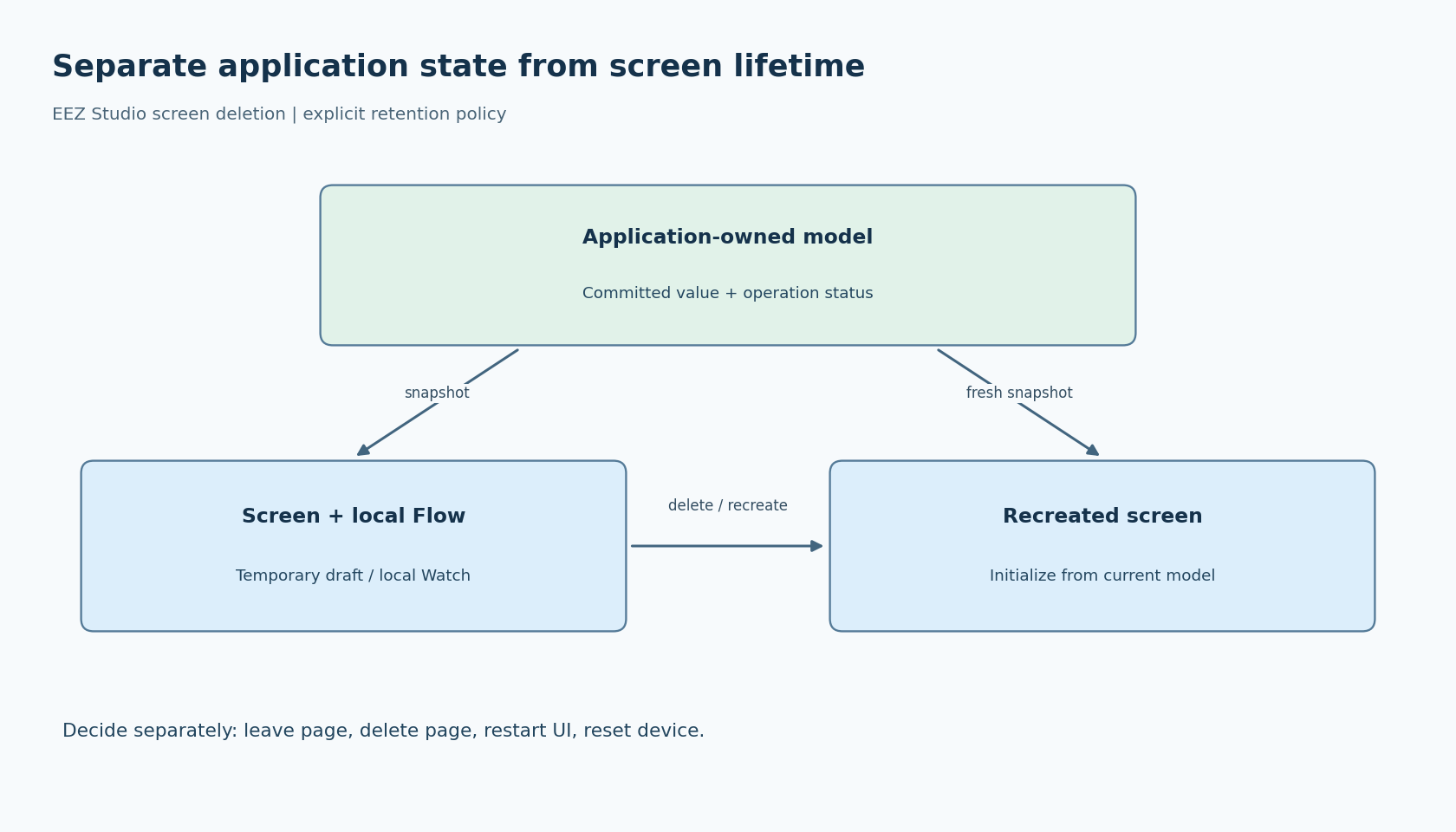
Write the decision before choosing a variable scope. For every value, answer: should it survive leaving the page, deleting and recreating the page, restarting the UI engine, and restarting the device? Those are four different boundaries. A global Flow variable can help with the first two without providing nonvolatile persistence across a reset.
This distinction is especially important when a page was previously created once at startup. Accidental retention can look like intentional application behavior until lazy creation exposes the missing design decision.
Understand the EEZ lifetime controls
The maintainer's screen lifetime documentation describes the default arrangement as creating screens during ui_init() and keeping them. With lifetime support enabled, a project can control startup creation and deletion on unload. The same documentation warns that deleting a screen removes its Flow state, including local variables and Watch actions.
The Studio v0.29.0 generator provides the implementation-side check. It conditionally emits screen create/delete dispatch functions and only creates selected pages at startup when lifetime support is enabled. Inspect the generated output for your project to see which controls and entry points actually exist.
Do not copy a numeric screen index into application code because it appeared in one export. Use the project's generated interface and validate any externally supplied identifier before dispatching. The reviewed generator's create/delete tables are an internal organization, not an invitation to pass arbitrary integers.
Keep durable decisions outside disposable views
For the example settings page, an explicit design might keep the committed value and save-operation status in an application-owned model. Each page creation obtains a snapshot for display. The temporary edit remains page-local and is discarded when the user leaves without applying it.
A different product could preserve drafts globally. That is also valid, but it needs a cancel operation that deliberately clears the saved draft. Otherwise “Back” and “Cancel” can accidentally acquire different meanings depending on whether a page happened to be deleted.
Define what recreation reads. A page should not display an old local default over a newer accepted application value simply because its Flow has restarted. Initialization can load the current model, while an explicit reset-to-defaults action performs the separate operation suggested by its name.
Continuous monitoring deserves the same review. A Watch action placed on a disposable screen should not be the sole owner of a system-wide responsibility. The maintainer documentation suggests a retained page without widgets for Flow work that must remain active; application-owned monitoring is another architectural option. Choose an owner whose lifetime matches the requirement.
Treat screen transitions as a lifecycle boundary
A screen becoming logically “old” does not establish that an animated transition has finished using it. The maintainer's discussion specifically warns against deleting an old screen before its unload lifecycle permits it.
Prefer the supported project lifetime behavior over an unrelated manual deletion added elsewhere. If native code participates, inspect the generated transition path and decide which single component owns deletion. A callback, automatic unload deletion and a service task must not each assume they are responsible for retiring the same page.
Cross-screen updates also need a presence check. Code that previously found every page alive at startup may now address an object that has not been created, or one that has been deleted. Update the durable model first, then refresh an existing view through the UI owner. Recreating a page should reconstruct its presentation from that model.
Test the policy, not merely the absence of a crash
Use a small navigation sequence with recorded expectations:
- Enter the page, modify a draft and leave without applying. Reenter and check the specified draft-retention policy.
- Apply a value, leave during the pending interval and deliver the result through the normal application path. Reenter and check the accepted value and result status.
- Navigate rapidly between two pages with transitions enabled. Confirm that deletion follows the supported unload lifecycle.
- Change a model value while its page does not exist. Create the page and verify the current value appears.
- Repeat navigation long enough to observe the allocator behavior relevant to the product, recording actual measurements rather than assuming deletion guarantees a particular memory saving.
These are proposed tests. No memory reduction or transition stability is claimed here. A successful design makes the important distinction explicit: screens and local Flow execution can be temporary, while committed settings and outstanding operations retain an owner for as long as the application needs them.