EEZ Studio Persistent Variables: Check Whether a Null Reset Replaces the Saved Value
A Dashboard can show a persistent variable as cleared during the current run and still retain an older value in its saved settings. In the inspected EEZ Studio implementation, assigning null is not equivalent to replacing or deleting the saved entry. The persistence loop skips that write.
This is a narrow source-level finding, not a general rule for every EEZ storage API. The Variables guide describes persistent global variables for Dashboard projects. The implementation examined here is runtime-settings.ts at editor commit 3000161d09d40a5c1dc2477ddc30b38037b3a612, corresponding to the inspected v0.29.0 source.
The skipped write is the important branch
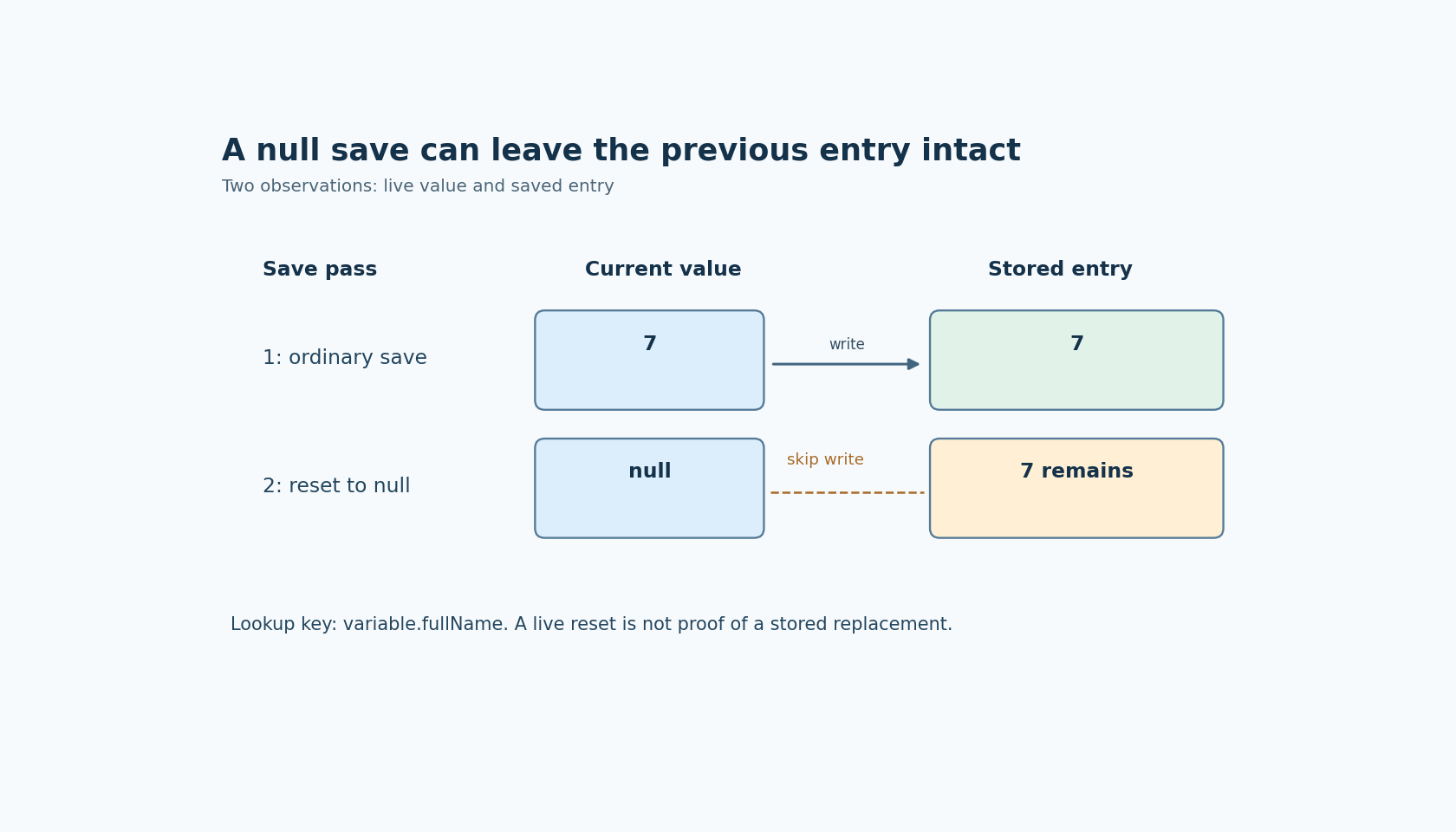
The savePersistentVariables function visits persistent global variables and reads each current value from the data context. It enters the saving branch only when value != null. In JavaScript, that comparison excludes both null and undefined. It does not exclude false or zero.
When a normal value reaches setVariableValue, the implementation places it under the variable's full name in the persistent-variable settings object and marks the settings as modified. When a null value fails the earlier condition, this loop neither writes null over the previous entry nor removes that entry.
Consider an illustrative sequence: a variable named optionalInterval previously saved the value 7; the current run changes it to null; the persistence loop runs again. The source predicts that this loop leaves the old stored entry alone. It does not, by itself, prove exactly which editor button invokes that loop, when the containing settings object reaches disk, or which lifecycle the installed application uses.
Separate the current value from the saved entry
The first diagnostic needs two observations. One is the live data-context value after the reset operation. The other is the stored entry that a later load could find. A screenshot of the live value establishes only the first.
The loading path looks up the persistent entry by variable.fullName. If it obtains a value other than undefined, it assigns that value into the data context. The lookup also handles special object types and dates, so a scalar fixture is preferable when isolating the null behavior.
Use a disposable project with an ordinary supported scalar type and one optional, non-safety-critical preference. Keep its full name unchanged throughout the first experiment. A simultaneous rename can change the lookup key and make a persistence reset appear to work for the wrong reason.
Likewise, keep the project identity and location fixed. The settings implementation derives its storage location from project context, and embedded Dashboard settings have a different enclosing arrangement. Copying a project or changing how it is launched can introduce a different settings store. That is a separate experiment from clearing one existing entry.
A discriminating reset experiment
First, establish the installed version and the lifecycle that actually saves and reloads persistent variables. Use the application's documented normal stop, close or restart procedure rather than guessing that every assignment immediately writes a file.
Save a non-null sentinel through that lifecycle. Reopen the project and confirm that the sentinel, rather than the initial default, is loaded. This proves the fixture is exercising persistence before the reset case is introduced.
Next, change the live value to null and repeat the same lifecycle. Preserve a copy of the available settings material before any repair. Compare the previous entry, the current saved entry and the loaded value. A skipped save with an old value still present is consistent with the inspected source; a different observation requires tracing the installed code and its surrounding lifecycle.
Run false or zero as a separate control only if the selected variable type permits it. The comparison in this function treats those values differently from null. Do not import the behavior of the separate ReadSetting action into this test: its output conversion is another code path.
Define what the reset operation means
A product may mean “return to the configured default,” “disable this optional feature,” or “remove this stored preference.” Those intentions need not share the same representation or operation.
Do not choose an arbitrary sentinel merely because it survives the saving branch. A sentinel must be valid for the declared type, distinguishable from real values, and interpreted consistently by every consumer. A separate explicit enable state may be appropriate in some designs, but it also needs its own persistence and update contract.
Directly editing a runtime-settings file is useful only as a controlled diagnostic on a copy. This analysis does not establish a supported public reset API or recommend modifying live settings behind the runtime's cache. A later save could recreate an entry, and a hand-edited object may violate type-specific expectations.
No Dashboard run or persistence experiment was executed for this article. The actionable conclusion is precise: before treating null as a durable reset, prove that the installed save path replaces or removes the old entry. The inspected loop alone does neither for a null current value.