EEZ Studio Project Imports: Preserve Relative Paths and Import Aliases When Moving a Project
Moving an EEZ Studio project is not just moving one editor file. An imported project is resolved through a path, and it may also be referred to through an import alias. Preserving one does not automatically preserve the other.
The official Settings guide identifies the project-import facility, but some details remain incomplete there. For the mechanics below, the authoritative evidence is the pinned ImportDirective definition and OpenProjectsManager implementation. Both belong to the inspected EEZ Studio v0.29.0 editor commit.
This article concerns local file imports. URL imports take a different branch and should not be diagnosed using the local-directory model alone.
A path is resolved from the containing project
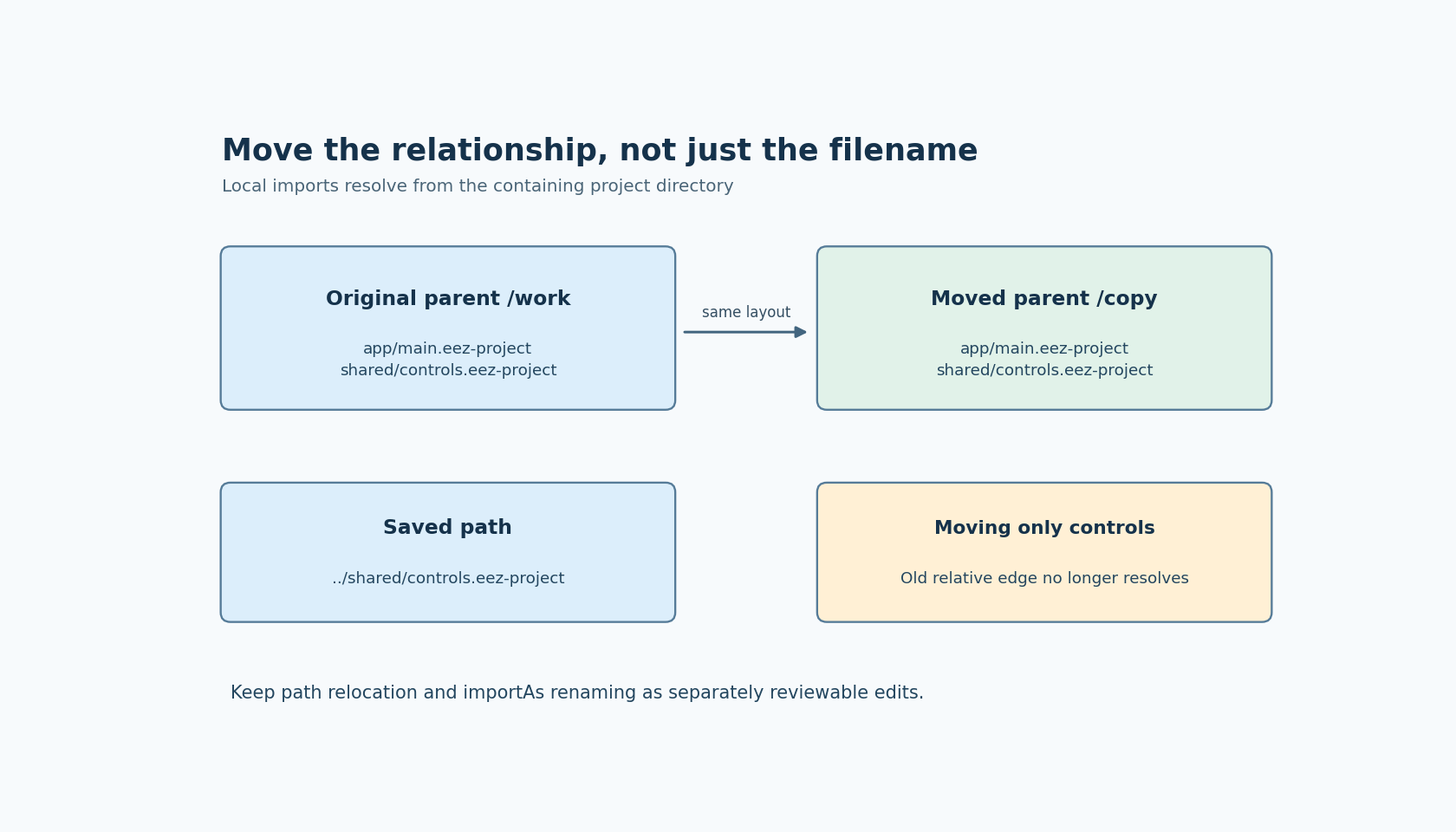
ImportDirective declares projectFilePath as a relative-file property. When loading local imported projects, OpenProjectsManager resolves the reference against the directory containing the current project file. It normalizes the paths and uses that containing directory as the base.
Suppose a main project is at work/app/main.eez-project, and its import path is ../shared/controls.eez-project. The useful relationship is from the app directory to the sibling shared directory. Moving the whole work tree to another parent can preserve that relationship. Moving only the shared project into an unrelated directory does not.
A successful move therefore depends on the directory relationship, not on the imported file retaining the same basename. Two files named controls.eez-project can exist in different locations. Finding a familiar filename somewhere on the machine is not evidence that the main project resolves to that copy.
The alias is a separate identity
The pinned ImportDirective definition gives importAs a uniqueness constraint. It also includes the alias in the import's display label when one is present. These details make the alias worth recording separately from the file path.
A path edit says where the imported material comes from. An alias edit changes the name through which the import is identified in the project model. Do not bundle both changes into a move merely because a new folder name looks cleaner.
The cited code does not prove that every expression, action reference or editor command automatically rewrites itself when an alias changes. Review the references relevant to the project and run the available project checks after an intentional rename. Keep an unchanged-alias relocation as the first test, so path resolution can be diagnosed without introducing a second variable.
This is also why two imported revisions should not silently share an ambiguous alias. The uniqueness setting is an editor-model constraint, not a complete package-management system. It does not establish dependency version selection, content pinning or a lockfile for the imported project.
Build a two-project relocation fixture
Start with a copy of the main project and one imported project in a small directory tree. Give the imported project an unmistakable harmless marker, such as a diagnostic label or action name that the main project actually references. Confirm that the intended copy is loaded before moving anything.
Move their common parent while preserving the internal directory layout. Open the main project from the new location and inspect the resolved import and marker. This is the positive case for a preserved relative relationship.
Then, in another disposable copy, move only the imported project and leave the saved import path unchanged. The ImportDirective check includes a missing-file diagnostic, so this case should expose the broken reference rather than being repaired silently by an assumed search path. Record the installed version and actual check result instead of treating the expectation as an executed result.
Finally, update the path deliberately and verify the marker again. A project that merely opens without an immediate dialog is weaker evidence than a project that demonstrably loads the intended imported revision.
Follow nested imports from their own base
A library project may itself import another project. Inspect those references too. The loading implementation passes the imported project's own location into its loading work; the relevant local reference is resolved in that project's context, not by a universal assumption that every relative path starts at the top-level workspace.
Keep the fixture small enough to draw these edges. A directory diagram with main-to-library and library-to-common arrows is often more useful than a flat list of filenames. It shows which move breaks which relationship and prevents accidental dependence on an old copy left behind elsewhere.
If an import fails, the manager reports the failed project load. That message establishes a load problem, not necessarily its entire cause. Confirm the resolved location, file availability and project compatibility before changing aliases or rewriting application logic.
No project relocation was executed here. A sound handover records the project tree, the saved local paths, the aliases and the imported revision markers. Those four pieces make the dependency relationship reviewable without promising an automatic migration feature that the inspected source does not establish.