BitBake Pressure Limits: Distinguish New-Task Admission from Process Resource Caps
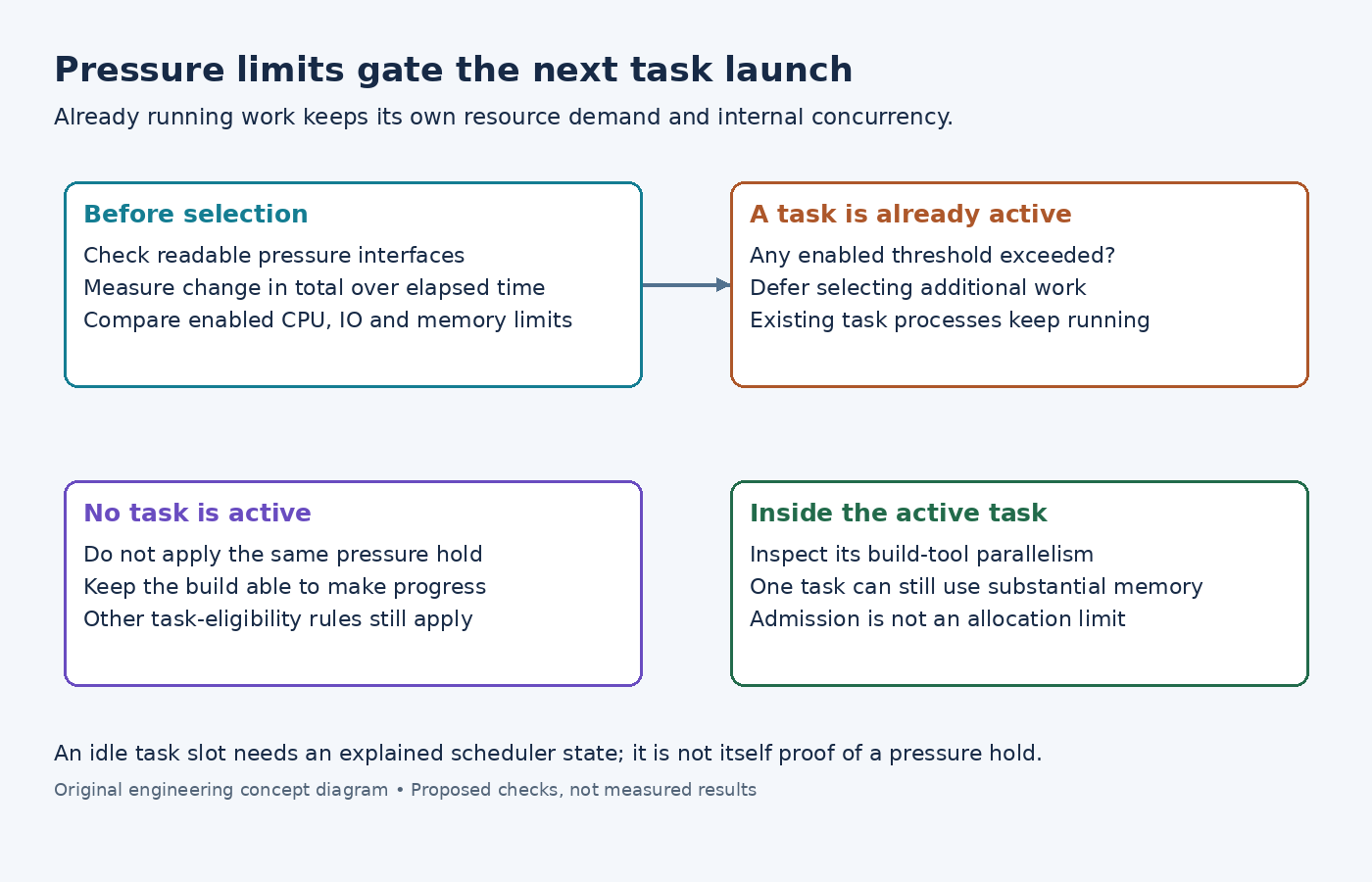
A build has unused BitBake task slots, yet new tasks stop starting while existing compilers continue consuming resources. If pressure controls are enabled, this can be the scheduler behaving as configured. Those controls regulate admission of additional work; they do not resize a compiler's process pool or cap its memory allocation.
The useful diagnosis is to connect the scheduler's pressure decision with its active tasks. Changing the threshold without that connection can either remove the intended protection or create unnecessarily slow builds.
Determine which launch gate is active
The BB_PRESSURE_MAX_CPU reference describes a threshold that prevents new tasks starting while at least one task remains active. Corresponding controls exist for I/O and memory pressure. An unset threshold does not monitor that resource for admission.
Inspect the effective three thresholds alongside BB_NUMBER_THREADS. For a diagnostic configuration, BB_PRESSURE_MAX_CPU = "500" illustrates the syntax from the reference, not a recommended setting for every builder. Select an operating value from the actual host workload and build behavior.
Unused task slots alone do not prove pressure throttling. A recipe dependency may leave no eligible task, or another scheduler condition may prevent a launch. Read the pressure-status messages and active-task state together before attributing an idle interval to this control.
Follow the implementation's measurement and decision
The examined BitBake scheduler reads system pressure files and uses the first line's cumulative total. It computes a change divided by elapsed time, updating the saved baseline after the accumulation interval. It does not compare the threshold directly with avg10.
The Linux PSI interface defines total stall time in microseconds. Consequently, a BitBake threshold is not a memory quantity, process count or direct CPU-utilization percentage. Check the metric's units before translating an existing dashboard alarm into a build setting.
In this scheduler, exceeding any enabled resource threshold prevents selection of another task when a task is already active. The active-task condition avoids a pressure rule leaving the build with no running work and no newly admitted work.
Verify that pressure monitoring actually initialized
The scheduler tests whether the pressure files can be opened and read. If that initialization fails, it emits a note and continues without pressure monitoring. Readable-looking permissions alone are insufficient when the kernel returns an error on access.
Inspect the startup log in the actual build environment. A container can present different pressure interfaces from the host terminal used for diagnosis. Do not treat an unset pressure-state message or an inaccessible file as evidence of low contention.
The observed scope is also important: this implementation reads system pressure files. Unrelated work visible in that scope can affect admission. If another job saturates storage, lowering a recipe's compiler parallelism may not remove the I/O-pressure condition that is delaying new tasks.
Control work inside an already admitted task separately
The Yocto parallel-task reference explicitly distinguishes task limits from the parallel jobs launched inside each task. PARALLEL_MAKE can still allow substantial work after the pressure gate has stopped admitting additional tasks.
Therefore, inspect a memory-heavy link or compile task on its own. If one admitted task can exhaust the host, pressure admission cannot guarantee survival. Review that build tool's supported concurrency and the recipe's actual command, rather than assuming the scheduler will interrupt it at the threshold.
Do not interpret a pressure-state transition as an instruction to kill running work. The mechanism described here simply postpones additional launches. Recovery, process limits and machine-level isolation require separate policies.
Test the scheduler effect with comparable work
Use the same target and comparable cache conditions for a controlled comparison. Record when eligible tasks wait, when the pressure state changes and when launches resume. Observe total completion time and failures as well as concurrency.
If launches pause in the expected pressure state and resume after it clears, the admission mechanism is behaving consistently. If resource failures persist within one active task, fix that task's demand separately. This distinguishes a functioning scheduler safeguard from a complete resource guarantee that it was never designed to provide.