Yocto Package Indexes: Diagnose a Built Package Missing from a Feed Listing
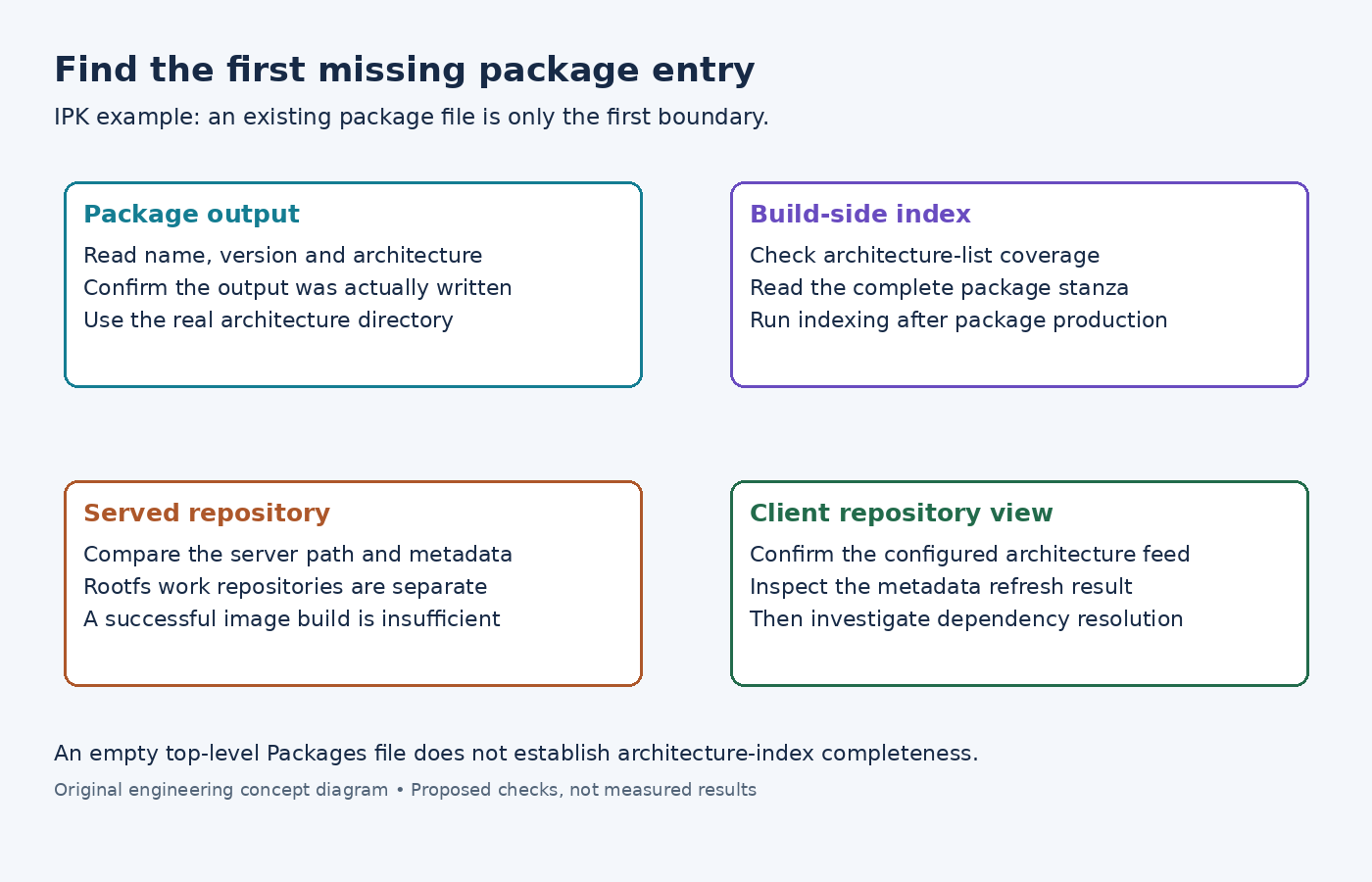
An IPK file is present in the build output, but a target cannot find the package. Rebuilding the recipe may simply reproduce the same situation. Package creation, repository indexing and the client's downloaded repository metadata are separate stages, and each can contain a different view of what is available.
Use one missing package to trace those stages. This article uses Yocto's IPK implementation as the concrete example; RPM and DEB have different index formats and should not be investigated by assuming they use IPK's Packages files.
Locate the package and the index that should describe it
Start with the completed package output, including its actual package name, version and architecture. A recipe can emit several packages, and the name requested on the target may not be the recipe name. Inspect the package's control metadata rather than inferring its identity from a remembered recipe filename.
In the examined IPK package writer, output is organized under the package architecture. An optional hierarchical-feed setting adds further directories. The writer also omits empty packages unless their metadata permits an empty output.
This gives two early branches. If no package file exists, investigate package splitting or writing before indexing. If the file exists, locate the index for its architecture and search for that exact package identity. An index at the deploy directory's top level is not sufficient evidence that the relevant architecture has been indexed.
Understand which architecture directories the indexer scans
The examined OpkgIndexer enumerates ALL_MULTILIB_PACKAGE_ARCHS and SDK_PACKAGE_ARCHS. It skips architecture directories that do not exist and invokes opkg-make-index for the directories it finds. It can create an empty top-level Packages file, so that file's existence does not prove the expected entry is present.
Compare the missing package's directory with the effective architecture lists in the configuration running the indexing operation. A package copied into an arbitrary extra directory is not automatically discovered just because that directory sits below the same deploy tree.
For an illustrative package named sensor-cli, read its complete stanza in the relevant Packages file. Check its Version, Architecture and Filename together. A match on the name alone can hide a different version or a path that no longer identifies the package file you intend to serve.
Finish package production before rebuilding the index
The runtime-package-management guide requires a separate bitbake package-index invocation after package-producing work. Listing a package target and package-index in one invocation does not impose the needed completion order.
For a development check, first finish bitbake sensor-cli, if that is the actual recipe target, and then run bitbake package-index. Confirm that the new entry appears in the appropriate architecture index. These commands are proposed diagnostics; no package build was performed for this article.
Do not stop at the command's success. If the entry is still absent, return to the index task's output directory and architecture coverage. An index generated for a different build directory is still a valid index for the wrong package set.
Do not confuse the rootfs working repository with a published feed
The same IPK implementation constructs a task-local repository under the image recipe's work directory, normally named oe-rootfs-repo. It prepares package inputs for rootfs assembly and uses its own indexer there.
Therefore, an image successfully installing sensor-cli during do_rootfs does not establish that the separately served deploy feed lists it. Compare the repository paths in the rootfs log and in the server configuration. They can differ without either operation being broken.
Finally, inspect the metadata served at the target's configured feed URL and compare its package stanza with the build-side index. If the server is current but the client still lacks the entry, check whether the correct architecture feed is configured and whether opkg update completed successfully. The Yocto guide documents that refresh step.
This sequence distinguishes an unwritten package, an unindexed architecture, an outdated served index and an unrefreshed client. Only after the intended package appears in the client's available metadata should installation dependency or version-selection failures become the next investigation.